Problem
Suppose you have two monitors.
You would like your PHP-GTK application to always open on the second monitor as shown below:
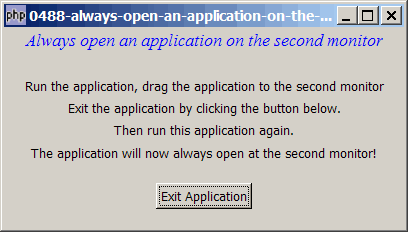
Solution
- We make use of the technique as outlined in How to open an application at last window position - works with multiple monitors?
- Run your application, move it to your desired locaiton on the second monitor, and exit the application.
- From then on, when you run your application, it will always be opned on the second montior.
Sample Code
| 1 2 3 4 5 6 7 8 9 10 11 13 14 15 16 17 18 19 20 21 22 23 24 25 26 27 28 29 30 31 32 33 34 35 36 37 38 39 40 41 42 43 44 45 46 47 48 49 50 51 52 53 54 55 56 57 58 59 60 | <?php $window = new GtkWindow(); $window->set_title($argv[0]); $window->set_size_request(400, 200); $window->connect('delete-event', 'on_delete_event'); // note 4 $window->connect_simple('destroy', array('Gtk','main_quit')); $window->add($vbox = new GtkVBox()); $title = new GtkLabel("Always open an application on the second monitor"); $title->modify_font(new PangoFontDescription("Times New Roman Italic 10")); $title->modify_fg(Gtk::STATE_NORMAL, GdkColor::parse("#0000ff")); $vbox->pack_start($title); $vbox->pack_start(new GtkLabel('')); $vbox->pack_start(new GtkLabel('Run the application, drag the application to the second monitor')); $vbox->pack_start(new GtkLabel('Exit the application by clicking the button below.')); $vbox->pack_start(new GtkLabel('Then run this application again.')); $vbox->pack_start(new GtkLabel('The application will now always open at the second monitor!')); $vbox->pack_start(new GtkLabel(), 0); $vbox->pack_start($hbox = new GtkHBox(), 0); $button = new GtkButton('Exit Application'); $button->connect('clicked', 'on_click'); $hbox->pack_start(new GtkLabel()); $hbox->pack_start($button, 0); $hbox->pack_start(new GtkLabel()); $vbox->pack_start(new GtkLabel(), 0); $window->show_all(); Gtk::idle_add('move_to_last_pos'); Gtk::main(); function on_click($button) { save_window_position(); Gtk::main_quit(); } function on_delete_event($window) { save_window_position(); } function save_window_position() { global $window; print "save_window_position!\n"; file_put_contents('last_pos.txt', implode("\t", $window->get_position())); // note 1 } function move_to_last_pos() { if (file_exists('last_pos.txt')) { $pos = file_get_contents('last_pos.txt'); // note 2 list($x, $y) = explode("\t", $pos); global $window; echo "move to: $x ($y)\n"; $window->move($x, $y); // note 3 } } ?> |
Output
As shown above.Explanation
- Save a copy of the position of the application window in the file last_pos.txt.
- Retrieve the last saved position.
- Move to the last saved position.
- This one takes care of the case when the user tries to exit the application by closing the window.
Read more...