Problem
A GtkAction is usually used together with GtkUIManager to manage menus and toolbar items. But it can actually be used with almost any standard GtkWidget.
We've seen how to use GtkAction with GtkButton in How to activate deactivate a bunch of GtkButtons using GtkAction and GtkActionGroup?
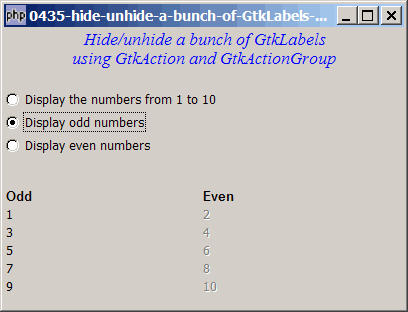
In this example, we will use GtkAction with GtkLabel. It is useful when you need to hide or unhide a group of related GtkLabels as shown below:
Solution
- We make use of exactly the same technique as outlined in How to activate deactivate a bunch of GtkButtons using GtkAction and GtkActionGroup? Instead of GtkButton, we use GtkLabel.
- For each action, we add it to the respective GtkActionGroup.
- To hide out all the labels in a group, all we need is to use the method GtkActionGroup::set_visible()).
Sample Code
| 1 2 3 4 5 8 9 10 11 12 13 14 15 16 17 18 19 20 21 22 23 24 25 26 27 28 31 32 33 34 35 36 38 39 47 48 49 50 51 52 53 54 55 56 57 58 61 62 64 65 66 67 68 69 70 71 72 74 75 76 77 78 79 80 81 83 85 86 87 88 89 90 91 93 94 96 97 98 101 102 103 104 105 106 107 108 109 110 111 112 113 114 115 116 117 118 119 120 121 122 123 124 125 126 131 134 135 136 | <?php $window = new GtkWindow(); $window->set_size_request(400, 280); $window->connect_simple('destroy', array('Gtk','main_quit')); $window->add($vbox = new GtkVBox()); // display title $title = new GtkLabel(" Hide/unhide a bunch of GtkLabels\n". "using GtkAction and GtkActionGroup"); $title->modify_font(new PangoFontDescription("Times New Roman Italic 10")); $title->modify_fg(Gtk::STATE_NORMAL, GdkColor::parse("#0000ff")); $title->set_size_request(-1, 40); $vbox->pack_start($title, 0, 0); $vbox->pack_start(new GtkLabel(), 0, 0); setup_menu($vbox); setup_numbers($vbox); $window->show_all(); Gtk::main(); function setup_numbers($vbox) { function setup_buttons($label_text, $vbox, $action_grp) { $label = new GtkLabel($label_text); $vbox->pack_start($hbox = new GtkHBox(), 0); $hbox->pack_start($label, 0); $action = new GtkAction($label_text, '_'.$label_text, '', ''); // note 3 $action->connect_proxy($label); // note 3 $action_grp->add_action($action); // note 4 return $label; } $vbox->pack_start($hbox = new GtkHBox()); $hbox->pack_start($vbox1 = new GtkVBox()); $hbox->pack_start($vbox2 = new GtkVBox()); global $odd_nummbers_action_grp; $odd_nummbers_action_grp = new GtkActionGroup("OddActions"); // note 1 global $buttons; $vbox1->pack_start($hbox1 = new GtkHBox, 0); $hbox1->pack_start($label = new GtkLabel('Odd'), 0); $label->modify_font(new PangoFontDescription("Arial Bold")); for ($i=1; $i<=10; $i+=2) { $buttons[$i] = setup_buttons($i, $vbox1, $odd_nummbers_action_grp); } global $even_nummbers_action_grp; $even_nummbers_action_grp = new GtkActionGroup("EvenActions"); // note 2 $vbox2->pack_start($hbox2 = new GtkHBox, 0); $hbox2->pack_start($label = new GtkLabel('Even'), 0); $label->modify_font(new PangoFontDescription("Arial Bold")); for ($i=2; $i<=10; $i+=2) { $buttons[$i] = setup_buttons($i, $vbox2, $even_nummbers_action_grp); } } function setup_menu($vbox) { function setup_radio($radio_button_grp, $button_label, $button_value) { $radio = new GtkRadioButton($radio_button_grp, $button_label); $radio->connect('toggled', "on_toggle", $button_value); return $radio; } function on_toggle($radio, $value) { global $status_area; $label = $radio->child->get_label(); $active = $radio->get_active(); global $odd_nummbers_action_grp, $even_nummbers_action_grp; switch($value) { case 'odd_number': $odd_nummbers_action_grp->set_visible(true); $even_nummbers_action_grp->set_visible(false); // note 6 break; case 'even_number': $odd_nummbers_action_grp->set_visible(false); $even_nummbers_action_grp->set_visible(true); break; case 'any_number': $odd_nummbers_action_grp->set_visible(true); $even_nummbers_action_grp->set_visible(true); break; } } // setup grouped radio buttons $radio1 = setup_radio(null, 'Display the numbers from 1 to 10', 'any_number'); $radio2 = setup_radio($radio1, 'Display odd numbers', 'odd_number'); $radio3 = setup_radio($radio1, 'Display even numbers', 'even_number'); // pack them inside vbox $vbox->pack_start($radio1, 0); $vbox->pack_start($radio2, 0); $vbox->pack_start($radio3, 0); $vbox->pack_start(new GtkLabel()); } ?> |
Output
As shown above.Explanation
- Create the odd-number action group.
- Create the even-number action group.
- Create a new action and binds the GtkLabel to the action.
- Add the action to the action group.
- Turn the respective group visible and not visible based on the user selection.
- Hide all the odd numbers.
Note
Compare the above code with that of How to activate deactivate a bunch of GtkButtons using GtkAction and GtkActionGroup? The two are very similar, except one uses GtkLabels, and the other uses GtkButtons.
Related Links
- How to setup and process a GtkButton using GtkAction - Part 1?
- How to setup and process a GtkButton using GtkAction - Part 2 - add stock image?
- How to activate deactivate a bunch of GtkButtons using GtkAction and GtkActionGroup?
- How to set up toolbar using GtkAction - Part 1?
- How to set up toolbar using GtkAction - Part 2 - add accelerators?
Read more...