Problem
In Part 1 I've showed you how to set up a GtkButton using GtkAction.
In this Part 2, we will add a stock image to the button as shown below:
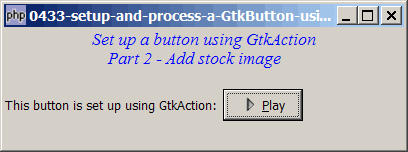
Solution
- Use GtkAction::create_icon() to load the image.
- Then use GtkButton::set_image() to add the stock image to the button.
NOTE: The sample code below doesn't seem to work on Gnope windows version. I believe it's a bug on the method GtkButton::set_image(). The code runs fine, but you won't be able to see the stock image. If you're using windows, and you want to have buttons with stock image, then use the technique as outlined in How to display button with image?
Sample Code
| 1 2 3 4 5 6 9 10 11 12 13 14 15 16 17 18 19 20 21 22 23 24 25 26 27 28 29 30 31 36 37 39 40 41 42 43 44 45 46 47 54 55 56 57 | <?php $window = new GtkWindow(); $window->set_title($argv[0]); $window->set_size_request(400, 120); $window->connect_simple('destroy', array('Gtk','main_quit')); $window->add($vbox = new GtkVBox()); // display title $title = new GtkLabel("Set up a button using GtkAction\n". " Part 2 - Add stock image"); $title->modify_font(new PangoFontDescription("Times New Roman Italic 10")); $title->modify_fg(Gtk::STATE_NORMAL, GdkColor::parse("#0000ff")); $title->set_size_request(-1, 40); $vbox->pack_start($title, 0, 0); $vbox->pack_start(new GtkLabel(), 0, 0); $vbox->pack_start($hbox = new GtkHBox(), 0); $button = setup_GtkAction_button('Play', '_Play', 'Start playing this song', Gtk::STOCK_MEDIA_PLAY); $button->set_size_request(80, -1); $hbox->pack_start(new GtkLabel('This button is set up using GtkAction: '), 0); $hbox->pack_start($button, 0); $window->show_all(); Gtk::main(); function setup_GtkAction_button($name, $label, $tooltip, $stock) { $button = new GtkButton($name); $action = new GtkAction($name, $label, $tooltip, $stock); $action->connect_proxy($button); $action->connect('activate', "on_click", $name); $img = $action->create_icon(Gtk::ICON_SIZE_BUTTON); // note 1 $button->set_image($img); // note 2 return $button; } function on_click($button, $label) { echo "button clicked: $label\n"; } ?> |
Output
As shown above.Explanation
We make use of the code from How to setup and process a GtkButton using GtkAction - Part 1?
What's new here:
- Load the image.
- Add the image to the button.
Read more...