Problem
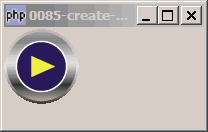
You want to create a round button as shown below:
Solution
- Load the button image with GdkPixbuf::new_from_file.
- Get the pixmap and mask with GdkPixbuf::render_pixmap_and_mask.
- Set the property GtkStyle::bg_pixmap to show the button image.
- Now make it a round button by setting the mask with GtkWidget::shape_combine_mask().
Sample Code
Note: The following image file is required by the sample code below. Please save a copy of the image file and put it in the same directory where you store the sample code.
 | button_play1.png |
| 1 2 3 5 6 7 8 9 10 11 12 13 14 15 16 17 20 21 22 23 24 31 32 33 34 35 36 37 38 | <?php $window = new GtkWindow(); $window->set_size_request(200, 100); $window->connect_simple('destroy', array('Gtk','main_quit')); $vbox = new GtkVBox(); $window->add($vbox); $pixbuf=GdkPixbuf::new_from_file("button_play1.png"); list($pixmap,$mask)=$pixbuf->render_pixmap_and_mask(255); $eventbox = new GtkEventBox(); $vbox->pack_start($eventbox); $style = $eventbox->get_style(); $style=$style->copy(); $style->bg_pixmap[Gtk::STATE_NORMAL]=$pixmap; $eventbox->set_style($style); $eventbox->connect('button-press-event', 'on_button_press'); $eventbox->shape_combine_mask($mask, 0, 0); $window->show_all(); Gtk::main(); function on_button_press($button) { print "button_pressed!\n"; } ?> |
Output
As shown above.Explanation
You might be tempted to use GtkButton. Try it. You will see some lines by the edges. Think it's inherent for a button. That's why I ended up using GtkEventBox.
Note that you can use any image format that is supported by php-gtk, as long as the image format supports transparent background (e.g. png, gif). The transparent background will be become the mask to produce the round button.
Note
In this example, I try to simplify the codes so that it's easier to see the fundamentals for displaying a round button.
In the next article, I will expand on this to show a more complete example - with button click state and rollover effect.
Read more...