Problem
You have created a round button in Part 1.
Now you would like to add in button click state and rollover effect as shown below:
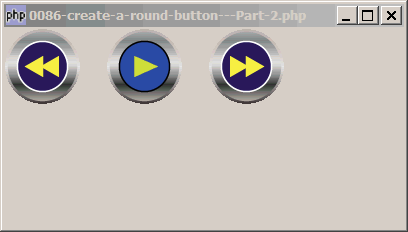
Solution
- First display the round buttons using the technique as explained in Part 1.
- Use the signal enter-notify-event to detect when a mouse hovers over the button.
- Use the signal leave-notify-event to detect when a mouse leaves the button.
Sample Code
Note: The following image files are required by the sample code below. Please save a copy of the image files and put them in the same directory where you store the sample code.
 | button_rew1.png |
 | button_rew2.png |
 | button_play1.png |
 | button_play2.png |
 | button_ff1.png |
 | button_ff2.png |
| 1 2 3 5 6 7 8 9 11 13 18 19 20 21 26 27 28 29 30 31 32 33 34 35 36 37 38 39 40 41 42 43 44 45 46 47 48 49 50 51 52 53 54 55 56 57 58 61 62 63 64 68 69 70 71 72 73 74 75 76 77 78 79 80 82 83 84 85 86 87 88 89 90 91 93 94 95 96 97 100 101 102 103 104 111 112 113 114 | <?php $window = new GtkWindow(); $window->set_size_request(400, 200); $window->connect_simple('destroy', array('Gtk','main_quit')); $vbox = new GtkVBox(); $window->add($vbox); // create a hbox to hold the buttons $vbox->pack_start($hbox = new GtkHBox()); $buttons2 = new RoundButtons($hbox, array( array('button_rew1.png', 'button_rew2.png'), array('button_play1.png', 'button_play2.png'), array('button_ff1.png', 'button_ff2.png'))); class RoundButtons { function RoundButtons($container, $buttons) { $button_id = 0; $this->button_count = count($buttons); foreach($buttons as $button_img) { $this->create_round_button($container, $button_id, $button_img[0], $button_img[1]); $this->button_state[$button_id] = 0; ++$button_id; } } function create_round_button($container, $button_id, $image0, $image1) { $pixbuf[0]=GdkPixbuf::new_from_file($image0); list($this->pixmap[$button_id][0], $this->mask[$button_id][0]) = $pixbuf[0]-> render_pixmap_and_mask(255); $pixbuf[1]=GdkPixbuf::new_from_file($image1); list($this->pixmap[$button_id][1], $this->mask[$button_id][1]) = $pixbuf[1]-> render_pixmap_and_mask(255); $eventbox = new GtkEventBox(); $this->eventbox[$button_id] = $eventbox; $eventbox->set_size_request(100, -1); $container->pack_start($eventbox, 0, 0); $style = $eventbox->get_style(); $style=$style->copy(); $style->bg_pixmap[Gtk::STATE_NORMAL]=$this->pixmap[$button_id][0]; $eventbox->set_style($style); $eventbox->shape_combine_mask($this->mask[$button_id][0], 0, 0); $eventbox->connect('button-press-event', array(&$this, 'on_button_press'), $button_id); $eventbox->connect('enter-notify-event', array(&$this, 'on_enter_leave'), $button_id, 1); // note 1 $eventbox->connect('leave-notify-event', array(&$this, 'on_enter_leave'), $button_id, 0); // note 1 } function on_button_press($widget, $event, $button_id) { echo "button_pressed: button $button_id!\n"; for ($i=0; $i<$this->button_count; ++$i) { $state = ($i==$button_id) ? 1 : 0; $style = $this->eventbox[$i]->get_style(); $style=$style->copy(); $style->bg_pixmap[Gtk::STATE_NORMAL]=$this->pixmap[$i][$state]; $this->eventbox[$i]->set_style($style); $this->button_state[$i] = $state; } return true; } function on_enter_leave($widget, $event, $button_id, $state) { if ($state==0 && $this->button_state[$button_id]) return; // note 2 $style = $this->eventbox[$button_id]->get_style(); $style=$style->copy(); $style->bg_pixmap[Gtk::STATE_NORMAL]= $this->pixmap[$button_id][$state]; // note 1 $this->eventbox[$button_id]->set_style($style); return true; } } $window->show_all(); Gtk::main(); ?> |
Output
As shown above.Explanation
- We detect whether the mouse is over the button, and set the image accordingly.
- We use the array
$button_state[$button_id]to keep track of the state of the button. If it's pressed, hovering and leaving the button should not change the image.
Read more...