Problem
If you've tried the sample code from How to allow user to adjust volume using GtkVolumeButton - Part 1? most likely you will get the error message that says:
(php.exe:4888): Gtk-WARNING **: Could not find the icon 'audio-volume-muted'. The 'hicolor' theme was not found either, perhaps you need to install it.
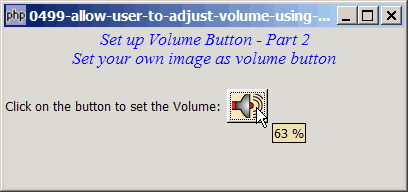
If you do not have the 'hicolor' theme, I'll show you in this article how to replace the default volume button icon with your own custom image so that the error message no longer appears as show below:
Solution
- Create a new GtkVolumeButton.
- Remove the original image from GtkVolumeButton with GtkContainer::remove().
- Load your custom image into a pixbuf and set this as the image for your volumne button with GtkContainer::add().
Important Note: This only works for PHP-GTK v2.0 (or PHP-GTK2 compliled with gtk+ v2.12 and above. If you are using an older version, for linux, you may follow the step-by-step instructions to recompile php-gtk2 with gtk+ v2.12. For windows, please refer to How to install php gtk2 on windows?
Sample Code
The following image file is required by the sample code below. Please save a copy of the image file and put it in the same directory where you store the sample code.
 | volume.gif |
| 1 2 3 4 5 6 7 8 9 10 11 12 13 14 15 16 20 23 24 25 27 30 31 32 33 39 45 46 47 48 49 50 51 52 53 54 60 61 62 | <?php $window = new GtkWindow(); $window->set_title($argv[0]); $window->set_size_request(400, 160); $window->connect_simple('destroy', array('Gtk','main_quit')); $window->add($vbox = new GtkVBox()); // display title $title = new GtkLabel(" Set up Volume Button - Part 2\n". "Set your own image as volume button"); $title->modify_font(new PangoFontDescription("Times New Roman Italic 10")); $title->modify_fg(Gtk::STATE_NORMAL, GdkColor::parse("#0000ff")); $title->set_size_request(-1, 40); $vbox->pack_start($title, 0, 0); $vbox->pack_start(new GtkLabel(), 0, 0); $vol_button = new GtkVolumeButton(); // note 1 $img = $vol_button->child; $vol_button->remove($img); // note 2 $pixbuf = GdkPixbuf::new_from_file("volume.gif"); // note 3 $vol_button->add(GtkImage::new_from_pixbuf($pixbuf)); // note 4 $img_width = $pixbuf->get_width(); $img_height = $pixbuf->get_height(); $vol_button->set_size_request($img_width, $img_height); // note 5 $vol_button->connect('value-changed', 'on_value_changed'); // note 6 $vbox->pack_start($hbox = new GtkHBox(), 0); $hbox->pack_start(new GtkLabel('Click on the button to set the Volume: '), 0); $hbox->pack_start($vol_button, 0); $window->show_all(); Gtk::main(); function on_value_changed($vol_button, $value) { echo "value = $value\n"; // note 7 } ?> |
Output
As shown above.
Explanation
- Create the GtkVolumeButton.
- Remove the original image.
- Load the cutom image into a pixbuf.
- Add the custom image to the volume button.
- Set the width and height of the volume button to be the same as that of the image.
- Register the signal
value-changed. - Output the new volume value to the command window. Note that the range of the volume is between 0.0 and 1.0, with a stepping of 0.02.
Read more...