Problem
In the article How to set up volume control - Part 1 - using GtkVScale? we set up a vertical volume control using GtkVScale.
In PHP-GTK v2.0 (which is compiled with gtk+2.12), you can use the new widget called GtkVolumeButton to achieve the same functionality. The user interface is slightly different. It comes in the form of a button. When you click on it, a vertical scale will appear for you to adjust the volume as shown below:
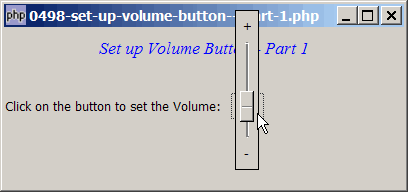
Note that the range of the volume is between 0.0 and 1.0, with a stepping of 0.02.
Solution
- Create a new GtkVolumeButton.
- Register the signal
'value-changed'so that you will know the new volume level set by the user.
Important Note: This only works for PHP-GTK v2.0 (or PHP-GTK2 compliled with gtk+ v2.12 and above. If you are using an older version, for linux, you may follow the step-by-step instructions to recompile php-gtk2 with gtk+ v2.12. For windows, please refer to How to install php gtk2 on windows?
Sample Code
| 1 2 3 4 5 6 7 8 9 10 11 12 13 14 23 24 25 26 27 28 29 35 41 42 43 44 45 46 52 53 54 | <?php $window = new GtkWindow(); $window->set_title($argv[0]); $window->set_size_request(400, 160); $window->connect_simple('destroy', array('Gtk','main_quit')); $window->add($vbox = new GtkVBox()); // display title $title = new GtkLabel("Set up Volume Button - Part 1"); $title->modify_font(new PangoFontDescription("Times New Roman Italic 10")); $title->modify_fg(Gtk::STATE_NORMAL, GdkColor::parse("#0000ff")); $title->set_size_request(-1, 40); $vbox->pack_start($title, 0, 0); $vbox->pack_start(new GtkLabel(), 0, 0); $vbox->pack_start($hbox = new GtkHBox(), 0); $hbox->pack_start(new GtkLabel('Click on the button to set the Volume: '), 0); $vol_button = new GtkVolumeButton(); // note 1 $hbox->pack_start($vol_button, 0); $vol_button->set_size_request(41, 34); $vol_button->connect('value-changed', 'on_value_changed'); // note 2 $window->show_all(); Gtk::main(); function on_value_changed($vol_button, $value) { echo "value = $value\n"; // note 3 } ?> |
Output
As shown above.
Explanation
- Create the GtkVolumeButton.
- Register the signal
value-changed. - Output the new volume value to the command window. Note that the range of the volume is between 0.0 and 1.0, with a stepping of 0.02.
Note
If you run the above script, most likely you will get the following error message in the command window:
(php.exe:4888): Gtk-WARNING **: Could not find the icon
'audio-volume-muted'. The 'hicolor' theme was not found either,
perhaps you need to install it.
And the icon doesn't show:
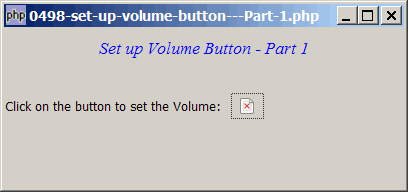
I still have problem setting up the 'hicolor' theme.
Don't worry, in the next article, I will show you how to replace the default icon with our own image.
Read more...