Problem
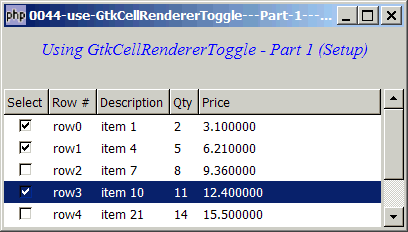
Suppose you have a treeview and you would like to add a checkbox in front of each row so that you can perform some actions based on user selections as shown below:
Solution
- Selection checkbox can be displayed inside a GtkTreeView with GtkCellrenderertoggle.
Sample Code
| 1 2 3 4 5 6 7 8 9 10 11 12 13 14 15 16 17 18 19 20 21 22 23 24 25 26 27 28 29 30 31 32 33 34 35 36 37 38 39 40 41 42 43 44 45 46 47 48 49 50 51 52 53 54 55 56 57 58 59 60 61 62 63 64 65 66 67 68 69 70 71 72 73 74 75 76 77 78 79 80 81 82 83 84 | <?php $window = new GtkWindow(); $window->set_size_request(400, 200); $window->connect_simple('destroy', array('Gtk','main_quit')); $window->add($vbox = new GtkVBox()); // display title $title = new GtkLabel("Using GtkCellRendererToggle - Part 1 (Setup)"); $title->modify_font(new PangoFontDescription("Times New Roman Italic 10")); $title->modify_fg(Gtk::STATE_NORMAL, GdkColor::parse("#0000ff")); $title->set_size_request(-1, 40); $vbox->pack_start($title, 0, 0); $vbox->pack_start(new GtkLabel(), 0, 0); // the 2D table $data = array( array('row0', 'item 1', 2, 3.1), array('row1', 'item 4', 5, 6.21), array('row2', 'item 7', 8, 9.36), array('row3', 'item 10', 11, 12.4), array('row4', 'item 21', 14, 15.5), array('row5', 'item 36', 17, 18.6), array('row6', 'item 42', 20, 21.73)); display_table($vbox, $data); $window->show_all(); Gtk::main(); function display_table($vbox, $data) { // Set up a scroll window $scrolled_win = new GtkScrolledWindow(); $scrolled_win->set_policy( Gtk::POLICY_AUTOMATIC, Gtk::POLICY_AUTOMATIC); $vbox->pack_start($scrolled_win); // Creates the list store if (defined("GObject::TYPE_STRING")) { $model = new GtkListStore(GObject::TYPE_BOOLEAN, GObject::TYPE_STRING, GObject::TYPE_STRING, GObject::TYPE_LONG, GObject::TYPE_DOUBLE); } else { $model = new GtkListStore(Gtk::TYPE_BOOLEAN, Gtk::TYPE_STRING, Gtk::TYPE_STRING, Gtk::TYPE_LONG, Gtk::TYPE_DOUBLE); } $field_header = array('Row #', 'Description', 'Qty', 'Price'); // Creates the view to display the list store $view = new GtkTreeView($model); $scrolled_win->add($view); // Creates the selection column $cell_renderer = new GtkCellRendererToggle(); $cell_renderer->set_property('activatable', true); // note 1 $column = new GtkTreeViewColumn('Select', $cell_renderer, 'active', 0); // note 2 $cell_renderer->connect('toggled', 'on_toggle', $model); // note 3 $view->append_column($column); // Creates the rest of the column for ($col=0; $col<count($field_header); ++$col) { $cell_renderer = new GtkCellRendererText(); $column = new GtkTreeViewColumn($field_header[$col], $cell_renderer, 'text', $col+1); // note 4 $view->append_column($column); } // pupulates the data for ($row=0; $row<count($data); ++$row) { $values = array(0); // note 5 for ($col=0; $col<count($data[$row]); ++$col) { $values[] = $data[$row][$col]; } $model->append($values); } } // toggle the selection box function on_toggle($renderer, $row, $model) { $iter = $model->get_iter($row); // note 6 $model->set($iter, 0, !$model->get_value($iter, 0)); // note 7 } ?> |
Output
As shown above.
Explanation
- You need to set this to allow user to toggle.
- For text column we use "text" for the third argument. For toggles, we use "active".
- Set up the event handler to listen to toggle event.
- Note that the 4th argument is now
$col+1because our data array doesn't have the toggle column. So there's a one column difference between the model and the data array. - The first column of the treeview is the selection box. We put a value of
0here. This will uncheck the initial selection checkboxes for all rows. If you wish to have all the rows checked initially, you can just put a value of1here. - Get the iter.
- This simply toggles the selection box. If the original value is
0, we set it to1. If it's1, we set it to0.
Note
Note that here we have only set up the selection checkbox. You can now check and uncheck the checkboxes for each row. In Part 2, we will perform some actions based on user selection.
Read more...