Problem
This is in response to Vincent's post titled "refreshing application".
He has set up a treeview displaying a 2D array of data. The data is read from an external text file on another drive. Each hour, this file is modified by other person with another application. He would like the treeview to be updated hourly with the data from the external file as shown below:
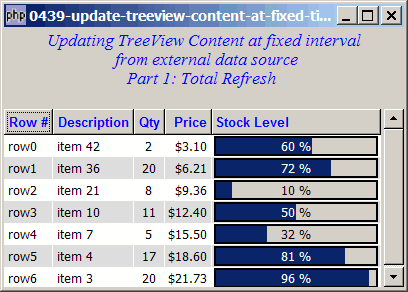
Solution
- We use Gtk:;timeout_add() to call the function update_treeview() repeatedly at fixed interval.
- Just populate the treeview data model with the latesst data, and the treeview will be updated accordingly.
Note: In this example, the data is stored in the file data.txt, located in the same directory where you run this sample code. The first time you run this program, the data file will be automatically created. From then on, open the file data.txt, change any data inside and save it. Within 3 seconds, you will see the data change reflected in the treeview.
Sample Code
| 1 2 3 4 5 6 7 8 9 10 11 12 13 14 15 16 17 19 20 21 22 23 24 25 26 27 28 29 30 31 32 33 34 35 36 37 38 39 40 41 42 43 44 45 46 47 48 49 50 51 52 53 54 55 56 57 59 60 61 62 63 64 65 66 67 68 69 70 71 72 73 74 75 76 77 78 79 80 81 82 83 84 85 86 87 88 89 90 91 92 94 95 96 97 98 99 100 101 102 103 104 105 106 107 108 109 110 111 112 113 114 115 116 117 118 119 120 121 122 123 125 126 127 128 129 130 131 132 133 134 135 137 138 139 140 141 142 143 144 145 146 147 148 149 150 151 152 153 154 155 156 | <?php $window = new GtkWindow(); $window->set_size_request(400, 260); $window->connect_simple('destroy', array('Gtk','main_quit')); $window->add($vbox = new GtkVBox()); // display title $title = new GtkLabel( "Updating TreeView Contents at fixed interval\n". " from external data source\n". " Part 1: Total Refresh"); $title->modify_font(new PangoFontDescription("Times New Roman Italic 10")); $title->modify_fg(Gtk::STATE_NORMAL, GdkColor::parse("#0000ff")); $title->set_size_request(-1, 60); $vbox->pack_start($title, 0, 0); $vbox->pack_start(new GtkLabel(), 0, 0); setup_treeview($vbox); // note 1 update_treeview(); // note 2 Gtk::timeout_add(3000, 'update_treeview'); // note 3 $window->show_all(); Gtk::main(); function setup_treeview($vbox) { // Set up a scroll window $scrolled_win = new GtkScrolledWindow(); $scrolled_win->set_policy( Gtk::POLICY_AUTOMATIC, Gtk::POLICY_AUTOMATIC); $vbox->pack_start($scrolled_win); // Creates the list store global $model; if (defined("GObject::TYPE_STRING")) { $model = new GtkListStore(GObject::TYPE_STRING, GObject::TYPE_STRING, GObject::TYPE_LONG, GObject::TYPE_DOUBLE, GObject::TYPE_DOUBLE); } else { $model = new GtkListStore(Gtk::TYPE_STRING, Gtk::TYPE_STRING, Gtk::TYPE_LONG, Gtk::TYPE_DOUBLE, Gtk::TYPE_DOUBLE); } $field_header = array('Row #', 'Description', 'Qty', 'Price', 'Stock Level'); $field_justification = array(0.0, 0.0, 0.5, 1.0, 0.0); // Creates the view to display the list store $view = new GtkTreeView($model); $scrolled_win->add($view); // Creates the columns for ($col=0; $col<count($field_header); ++$col) { if ($col==4) { $cell_renderer = new GtkCellRendererProgress(); $column = new GtkTreeViewColumn($field_header[$col], $cell_renderer, 'value', $col); } else { $cell_renderer = new GtkCellRendererText(); $cell_renderer->set_property("xalign", $field_justification[$col]); $column = new GtkTreeViewColumn($field_header[$col], $cell_renderer, 'text', $col); $column->set_alignment($field_justification[$col]); $column->set_sort_column_id($col); } // set the header font and color $label = new GtkLabel($field_header[$col]); $label->modify_font(new PangoFontDescription("Arial Bold")); $label->modify_fg(Gtk::STATE_NORMAL, GdkColor::parse("#0000FF")); $column->set_widget($label); $label->show(); // setup self-defined function to display alternate row color $column->set_cell_data_func($cell_renderer, "format_col", $col); $view->append_column($column); } // setup selection $selection = $view->get_selection(); $selection->connect('changed', 'on_selection'); } function format_col($column, $cell, $model, $iter, $col_num) { $path = $model->get_path($iter); $row_num = $path[0]; if ($col_num==3) { $amt = $model->get_value($iter, 3); $cell->set_property('text', '$'.number_format($amt,2)); } elseif ($col_num==4) { $val = $model->get_value($iter, 4); $cell->set_property('value', $val); } $row_color = ($row_num%2==1) ? '#dddddd' : '#ffffff'; $cell->set_property('cell-background', $row_color); } function on_selection($selection) { list($model, $iter) = $selection->get_selected(); $desc = $model->get_value($iter, 1); $qty = $model->get_value($iter, 2); $price = $model->get_value($iter, 3); print "You have selected $desc: $qty ($price)\n"; } function read_data() { // let's create a sample data file if it doesn't exist if (!file_exists('data.txt')) { // note 4 $data = array( array('row0', 'item 42', 2, 3.1, 60), array('row1', 'item 36', 20, 6.21, 72), array('row2', 'item 21', 8, 9.36, 10), array('row3', 'item 10', 11, 12.4, 50), array('row4', 'item 7', 5, 15.5, 32), array('row5', 'item 4', 17, 18.6, 81), array('row6', 'item 3', 20, 21.73, 96)); $data_str = ''; foreach($data as $row) { $data_str .= implode("\t", $row); $data_str .= "\r\n"; // change to "\n" if you're on linux } file_put_contents('data.txt', $data_str); } // read the data $data_str = file_get_contents('data.txt'); $rows = explode("\r\n", $data_str); // change to "\n" if you're on linux $data = array(); foreach($rows as $row) { if (trim($row)!='') $data[] = explode("\t", $row); } return $data; } function update_treeview() { echo "update treeview: ".date('H:i:s')."\n"; $data = read_data(); // note 5 global $model; $model->clear(); // note 6 for ($row=0; $row<count($data); ++$row) { $values = array(); for ($col=0; $col<count($data[$row]); ++$col) { $values[] = $data[$row][$col]; } $model->append($values); // note 7 } return true; // note 8 } ?> |
Output
As shown above.
Explanation
This example makes use of the code in How to display progress bar in GtkTreeView using GtkCellRendererProgress?
What's new here:
- Set up the treeview and the data model.
- Display the initial data.
- Redisplay data from the external source at fixed interval. Here we set it at 3000ms interval, i.e. once every 3 seconds.
- Create a sample data file called 'data.txt' if it doesn't exist.
- Read the latest data from the source.
- Clear the entire model.
- And repopulate the model with the latest data.
- Don't forget this so that php-gtk will continue to call this function once every 3 seconds.
Read more...