Problem
This is in response to Manar's post titled "How to disconnect an event?"
He has set up a button-press-event, and he would like to switch the signal handler processing the button-press-event depending on some conditions as shown below:
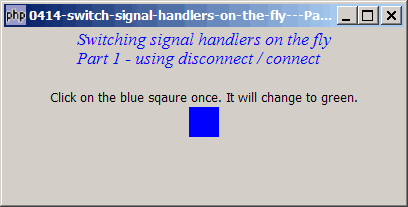
In this example, the first time you click the box, it will be handled by on_button_press1() and the box color change to green as shown below:

When you press the box a second time, it will be handled by on_button_press2() and the box color change to yellow as shown below:

Thereafter, when you click on the box further, the signal handlers will alternate between on_button_press1() and on_button_press2().
Solution
- There are many ways of achieving this.
- In this Part 1, we will use the methods GObject::connect() and GObject::disconnect($signal_handler_id) to switch the signal handlers.
- Please refer to the article How to disconnect a signal? for more explanations on how to use these two methods.
Sample Code
| 1 2 3 4 5 6 7 8 9 10 11 12 13 14 15 16 17 18 19 20 21 22 23 24 25 26 27 28 29 30 31 32 33 34 35 36 37 38 39 40 41 42 43 44 45 47 48 49 50 53 54 55 56 57 58 59 60 61 62 63 65 66 67 68 69 70 71 72 73 74 75 76 77 78 79 | <?php $window = new GtkWindow(); $window->set_size_request(400, 175); $window->connect_simple('destroy', array('Gtk','main_quit')); $window->add($vbox = new GtkVBox()); // display title $title = new GtkLabel("Switching signal handlers on the fly\n". "Part 1 - using disconnect / connect"); $title->modify_font(new PangoFontDescription("Times New Roman Italic 10")); $title->modify_fg(Gtk::STATE_NORMAL, GdkColor::parse("#0000ff")); $title->set_size_request(-1, 40); $vbox->pack_start($title, 0); $vbox->pack_start(new GtkLabel(), 0); $label = new GtkLabel('Click on the blue sqaure once. '. 'It will change to green.'); $vbox->pack_start($label, 0); $signal_id = setup_colorbox('#0000ff', 'blue', $vbox); // note 1 $window->show_all(); Gtk::main(); function setup_colorbox($color, $label, $vbox) { $hbox = new GtkHBox(); $hbox->set_size_request(30, 30); $eventbox = new GtkEventBox(); $eventbox->add($hbox); $eventbox->modify_bg(Gtk::STATE_NORMAL, GdkColor::parse($color)); $signal_id = $eventbox->connect('button-press-event', 'on_button_press1'); // note 2 $hbox = new GtkHBox(); $vbox->pack_start($hbox, 0); $hbox->pack_start(new GtkLabel()); $hbox->pack_start($eventbox, 0); $hbox->pack_start(new GtkLabel()); return $signal_id; } function on_button_press1($eventbox, $event) { if ($event->type!=Gdk::BUTTON_PRESS) return false; // note 9 echo "on_button_press1!\n"; $eventbox->modify_bg(Gtk::STATE_NORMAL, GdkColor::parse('#00ff00')); // note 3 global $signal_id; $eventbox->disconnect($signal_id); // note 4 $signal_id = $eventbox->connect('button-press-event', 'on_button_press2'); // note 5 global $label; $label->set_text('Click on this again. It will change to yellow.'); } function on_button_press2($eventbox, $event) { if ($event->type!=Gdk::BUTTON_PRESS) return false; // note 9 echo "on_button_press2!\n"; $eventbox->modify_bg(Gtk::STATE_NORMAL, GdkColor::parse('#ffff00')); // note 6 global $signal_id; $eventbox->disconnect($signal_id); // note 7 $signal_id = $eventbox->connect('button-press-event', 'on_button_press1'); // note 8 global $label; $label->set_text('Click on this again. It will change to green.'); } ?> |
Output
As shown above.
Explanation
- Set up the blue color box.
- Set up the
button-press-eventsignal. Don't forget to take note of the signal handler id. - Change the color box from blue to green.
- Disconnect the
button-press-eventsignal. - Connect to eventbox to the other signal handler.
- Change the color box from green to yellow.
- Disconnect the
button-press-eventsignal. - Connect to eventbox to the other signal handler.
- Added this here to handle only single-click. Try removing this line and see what happens.
Read more...