Problem
A standard GtkComboBox presents the options in a list. However, sometimes a list of options are better presented in a 2d matrix or table.
This example shows how you can have pulldown menu that lists the options in a 2d matrix as shown below:
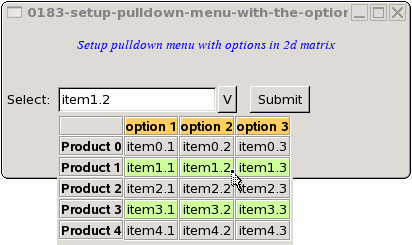
Solution
- This example makes use of the technique as described in How to setup pulldown menu with 2 columns - Part 3 - using self defined combobox? to create a self-defined pulldown menu.
- We present the options in a 2d matrix using the method as described in How to display a 2D array in table - Part 5?
- We use GtkWidget::button-press-event() to detect button-click on an option.
Sample Code
| 1 2 3 4 5 6 7 8 9 10 11 12 13 14 16 17 18 19 20 21 22 23 24 25 26 27 28 29 30 31 32 33 34 35 36 37 38 39 41 42 43 44 45 46 47 48 49 50 51 52 53 56 57 58 59 60 61 62 63 64 65 66 67 69 70 74 75 76 77 78 79 80 81 82 83 84 85 86 88 89 90 91 92 93 94 95 96 97 98 99 100 101 102 103 104 105 106 107 108 109 110 111 112 113 114 115 116 117 118 119 120 121 122 123 124 125 126 127 128 129 130 131 132 133 | <?php $window = new GtkWindow(); $window->connect_simple('destroy', array( 'Gtk', 'main_quit')); $window->set_size_request(400,150); $window->add($vbox = new GtkVBox()); // display title $title = new GtkLabel("Setup pulldown menu with options in 2d matrix"); $title->modify_font(new PangoFontDescription("Times New Roman Italic 10")); $title->modify_fg(Gtk::STATE_NORMAL, GdkColor::parse("#0000ff")); $title->set_size_request(-1, 40); $title->set_justify(Gtk::JUSTIFY_CENTER); $alignment = new GtkAlignment(0.5, 0, 0, 0); $alignment->add($title); $vbox->pack_start($alignment, 0, 0); $vbox->pack_start(new GtkLabel(), 0, 0); $vbox->pack_start($hbox=new GtkHBox(), 0, 0); $hbox->pack_start(new GtkLabel('Select: '), 0, 0); // Setup combobox $combobox = new ComboBox1($window); $hbox->pack_start($combobox, 0, 0); $hbox->pack_start(new GtkLabel(' '), 0, 0); $hbox->pack_start($button = new GtkButton('Submit'), 0, 0); $button->set_size_request(60, 24); $button->connect('clicked', "on_submit_button", $combobox); $window->show_all(); Gtk::main(); class ComboBox1 extends GtkHBox { function __construct($parent_window) { parent::__construct(); $this->parent_window = $parent_window; $this->entry = new GtkEntry(); $this->pack_start($this->entry, 0, 0); $this->pack_start($this->button = new GtkButton('V'), 0, 0); $this->button->connect('clicked', array(&$this, 'on_button')); $this->entry->connect('key-press-event', array(&$this, 'on_keypress_entry')); } function on_keypress_entry($widget, $event) { $this->button->clicked(); } function on_button($button) { // process button click $win_pos=$this->parent_window->get_position(); $x_field_pos=$this->entry->allocation->x; $y_field_pos=$this->entry->allocation->y; $x_shift=4; $y_shift=23+$this->entry->allocation->height; $x_win=$win_pos[0]+$x_field_pos+$x_shift; $y_win=$win_pos[1]+$y_field_pos+$y_shift; $this->dialog = new GtkDialog(null, null, Gtk::DIALOG_MODAL|Gtk::DIALOG_NO_SEPARATOR); $this->dialog->set_decorated(false); $this->dialog->set_uposition($x_win,$y_win); $this->dialog->vbox->pack_start($table = new GtkTable(), 0, 0); // the selection $data = array( array('', 'option 1', 'option 2', 'option 3'), array('Product 0', 'item0.1', 'item0.2', 'item0.3'), array('Product 1', 'item1.1', 'item1.2', 'item1.3'), array('Product 2', 'item2.1', 'item2.2', 'item2.3'), array('Product 3', 'item3.1', 'item3.2', 'item3.3'), array('Product 4', 'item4.1', 'item4.2', 'item4.3')); $this->display_table ($table, $data); $this->dialog->action_area->set_size_request(-1, 0); $this->dialog ->show_all(); $this->dialog->run(); } function display_table($table, $a) { for ($row=0; $row<count($a); ++$row) { for ($col=0; $col<count($a[$row]); ++$col) { $frame = new GtkFrame(); $eventbox = new GtkEventBox(); // note 1 $frame->add($eventbox); $eventbox->add($label = new GtkLabel($a[$row][$col])); if ($col==0 || $row==0) { $label->modify_font(new PangoFontDescription("Arial Bold")); } if ($row==0 && $col>0) { $eventbox->modify_bg(Gtk::STATE_NORMAL, GdkColor::parse("#FFCC66")); } elseif ($row%2==0 && $col>0) { $eventbox->modify_bg(Gtk::STATE_NORMAL, GdkColor::parse("#CCFF99")); } if ($row>0 && $col>0) { $eventbox->connect('button-press-event', array(&$this, 'on_buttonpress'), $a[$row][$col]); // note 2 } $table->attach($frame, $col, $col+1, $row, $row+1, Gtk::FILL, Gtk::SHRINK, 0, 0); } } } function on_buttonpress($widget, $event, $label) { $this->entry->set_text($label); // note 3 $this->dialog->destroy(); } } function on_submit_button($button, $combobox) { $selection = $combobox->entry->get_text(); print "selection = $selection\n"; } ?> |
Output
As shown above.Explanation
The above sample code is based on How to setup pulldown menu with 2 columns - Part 3 - using self defined combobox? and How to display a 2D array in table - Part 5?
What's new here:
- We wrap each option in a GtkEventBox so that we can detect button-click.
- Connect each option to the
button-press-eventsignal. - Get the option selected by user and stuff it in the GtkEntry.
Related Links
- How to setup pulldown menu with 2 columns - Part 3 - using self defined combobox?
- How to setup pulldown menu with 2 columns - Part 2 - using GtkEntryCompletion?
- How to setup pulldown menu with 2 columns - Part 1 - using GtkComboBox?
- How to setup pulldown menu that allows multiple select?
- How to setup a pulldown calendar for date selection?
Read more...