Problem
For more advanced stuff using GtkCombobox and GtkComboBoxEntry, you will need access to its underlying data model.
This example produces the same result as How to setup and process GtkComboBoxEntry - Part 1?
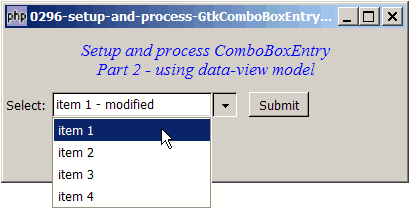
The only difference is that it uses the data-view model as shown below:
Solution
- Instead of creating the GtkComboBoxEntry using GtkComboBoxEntry::new_text(), first we set up the data model.
- Then we binds the model to the GtkComboBoxEntry with GtkComboBoxEntry::new_with model().
Sample Code
| 1 2 3 4 5 6 7 8 9 10 11 12 13 14 15 16 17 18 19 20 21 22 23 24 25 26 27 28 30 36 37 38 39 40 41 42 43 44 45 46 49 50 51 52 53 54 55 57 58 59 60 61 62 63 | <?php $window = new GtkWindow(); $window->connect_simple('destroy', array( 'Gtk', 'main_quit')); $window->set_size_request(400,150); $window->add($vbox = new GtkVBox()); // display title $title = new GtkLabel("Setup and process ComboBoxEntry\n". " Part 2 - using data-view model"); $title->modify_font(new PangoFontDescription("Times New Roman Italic 10")); $title->modify_fg(Gtk::STATE_NORMAL, GdkColor::parse("#0000ff")); $title->set_size_request(-1, 60); $vbox->pack_start($title, 0, 0); // the selection $list = array('item 1', 'item 2', 'item 3', 'item 4'); $vbox->pack_start($hbox=new GtkHBox(), 0, 0); $hbox->pack_start(new GtkLabel('Select: '), 0, 0); // Create the data model if (defined("GObject::TYPE_STRING")) { $model = new GtkListStore(GObject::TYPE_STRING); // note 1 } else { $model = new GtkListStore(Gtk::TYPE_STRING); // note 1 } // Create the comboboxentry $combobox = &GtkComboBoxEntry::new_with_model($model, 0); // note 2 // Stuff the choices in the model foreach($list as $choice) { $model->append(array($choice)); } // Set up a hbox to contain the combobox as well as the Submit button $hbox->pack_start($combobox, 0, 0); $hbox->pack_start(new GtkLabel(' '), 0, 0); $hbox->pack_start($button = new GtkButton('Submit'), 0, 0); $button->set_size_request(60, 24); // Set up the event handler to respond to button click $button->connect('clicked', "on_button", $combobox); // The callback function that is called when user clicks the submit button function on_button($button, $combobox) { $model = $combobox->get_model(); $selection = $combobox->get_child()->get_text(); // note 3 echo "You have selected: $selection!\n"; } $window->show_all(); Gtk::main(); ?> |
Output
As shown above.Explanation
We make use of the code from How to setup and process GtkComboBox?
What's new here:
- Creates the data model.
- Creates the GtkComboBoxEntry, binds the data model to the GtkComboBoxEntry, and informs php-gtk2 to use the first column (col 0).
- Get the selection.
Notes
You may want to take a look at How to setup and process GtkComboBox? to compare the difference between GtkComboBox and GtkComboBoxEntry.
Read more...