Problem
You have set up menus with stock images and accelerators in Part 3.
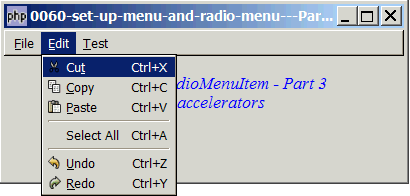
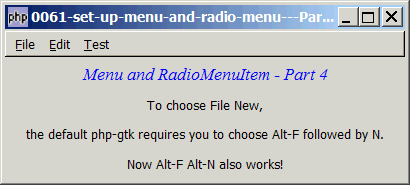
I'm not sure about Linux. On my machine running winxp, if I want to choose File New, the default php-gtk2 application requires one to choose Alt-F followed by N. But in standard window application, we usually don't release the Alt key after pressing F, that is, we usually press Alt-F Alt-N in a row.
Though this is a minor point, let's try to fix this as an exercise. It also serves as an example to show that php-gtk2 leaves enough hooks here and there that allow us to "tweak" it to suit our application needs.
Solution
- Use the steps as outlined in Part 3.
- To avoid too many global variables and passing of too many arguments around, we encapsulate the variables and functions associated with menu display in the class
Menu. The good thing about using classes is that once you have defined it and make sure everything works fine, you can forget about the details and display your menus with a one-liner:$menu = new Menu($vbox, $menu_definition, $accel_group); - To allow support for Alt-F Alt-N, we simply intercepts the menu processing by setting up a
connect('key-press-event')to each of the top-level menu (i.e. the File, Edit and Test). - When the user press Alt-F, the default handler will first pop up the File Menu listing all the menu options. When the user press Alt-N (actually any key), php-gtk2 will pass control to our 'key-press-event' handler. We just need to go through all the possible options and check if there's any matches. If there is, we simulate a click on the menu item by calling the
activate()function of the menu item. We then pass control back to php-gtk2 and let it take over from there.
Sample Code
| 1 2 3 4 5 6 7 8 9 10 11 12 13 14 15 16 17 19 20 21 22 23 25 26 27 28 29 30 31 32 33 34 35 36 37 38 39 40 42 43 44 48 49 50 51 52 53 54 55 57 58 59 60 61 63 64 65 66 67 68 69 70 71 72 73 74 75 76 77 78 79 82 84 85 86 87 88 94 95 96 100 101 102 104 105 106 107 108 109 110 111 112 113 114 115 117 118 119 120 121 122 123 124 125 131 132 134 136 137 138 139 140 141 143 150 151 152 154 155 159 160 161 162 163 164 166 169 170 176 177 178 179 180 181 182 183 184 | <?php $window = new GtkWindow(); $window->set_size_request(400, 150); $window->connect_simple('destroy', array('Gtk','main_quit')); $window->add($vbox = new GtkVBox()); $accel_group = new GtkAccelGroup(); $window->add_accel_group($accel_group); // define menu definition $menu_definition = array( '_File' => array('_New|N', '_Open|O', '_Close|C', '<hr>', '_Save|S', 'Save _As','<hr>', 'E_xit'), '_Edit' => array('Cu_t|X', '_Copy|C', '_Paste|V', '<hr>', 'Select _All|A', '<hr>', '_Undo|Z','_Redo|Y'), '_Test' => array('Test_1|1', 'Test_2|2', 'Test_3|3', '<hr>', array('Selection 1', 'Selection 2', 'Selection 3'), '<hr>', 'Test_4|4') ); $menu = new Menu($vbox, $menu_definition, $accel_group); // display title $title = new GtkLabel("Menu and RadioMenuItem - Part 4"); $title->modify_font(new PangoFontDescription("Times New Roman Italic 10")); $title->modify_fg(Gtk::STATE_NORMAL, GdkColor::parse("#0000ff")); $vbox->pack_start($title); $vbox->pack_start(new GtkLabel("To choose File New,")); $vbox->pack_start(new GtkLabel("the default php-gtk requires you to choose Alt-F followed by N.")); $vbox->pack_start(new GtkLabel("Now Alt-F Alt-N also works!")); $window->show_all(); Gtk::main(); // class Menu class Menu { var $prev_keyval = 0; var $prev_state = 0; var $prev_keypress = ''; function Menu($vbox, $menu_definition, $accel_group) { $this->menu_definition = $menu_definition; $menubar = new GtkMenuBar(); $vbox->pack_start($menubar, 0, 0); foreach($menu_definition as $toplevel => $sublevels) { $top_menu = new GtkMenuItem($toplevel); $menubar->append($top_menu); $menu = new GtkMenu(); $top_menu->set_submenu($menu); // let's ask php-gtk to tell us when user press the 2nd Alt key $menu->connect('key-press-event', array(&$this, 'on_menu_keypress'), $toplevel); // note 1 foreach($sublevels as $submenu) { if (strpos("$submenu", '|') === false) { $accel_key = ''; } else { list($submenu, $accel_key) = explode('|', $submenu); } if (is_array($submenu)) { // set up radio menus $i=0; $radio[0] = null; foreach($submenu as $radio_item) { $radio[$i] = new GtkRadioMenuItem($radio[0], $radio_item); $radio[$i]->connect('toggled', array(&$this, "on_toggle")); $menu->append($radio[$i]); ++$i; } $radio[0]->set_active(1); // select the first item } else { if ($submenu=='<hr>') { $menu->append(new GtkSeparatorMenuItem()); } else { $submenu2 = str_replace('_', '', $submenu); $submenu2 = str_replace(' ', '_', $submenu2); $stock_image_name = 'Gtk::STOCK_'.strtoupper($submenu2); if (defined($stock_image_name)) { $menu_item = new GtkImageMenuItem(constant($stock_image_name)); } else { $menu_item = new GtkMenuItem($submenu); } if ($accel_key!='') { $menu_item->add_accelerator("activate", $accel_group, ord($accel_key), Gdk::CONTROL_MASK, 1); } $menu->append($menu_item); $menu_item->connect('activate', array(&$this, 'on_menu_select')); $this->menuitem[$toplevel][$submenu] = $menu_item; // note 2 } } } } } // process radio menu selection function on_toggle($radio) { $label = $radio->child->get_label(); $active = $radio->get_active(); if ($active) echo("radio menu selected: $label\n"); } // process menu item selection function on_menu_select($menu_item) { $item = $menu_item->child->get_label(); echo "menu selected: $item\n"; if ($item=='E_xit') Gtk::main_quit(); } // processing of menu keypress function on_menu_keypress($menu, $event, $toplevel) { if (!$event->state & Gdk::MOD1_MASK) return false; // note 3 // get the ascii equivalent of the keypress $keypress = ''; if ($event->keyval<255) { $keypress = chr($event->keyval); // ascii equivalent $keypress = strtolower($keypress); // convert to lowercase } $match = 0; // flag to see if there's a match foreach($this->menu_definition[$toplevel] as $submenu) { if (!preg_match("/.*_([a-zA-Z0-9]).*/", "$submenu", $matches)) continue; // note 4 $key2 = strtolower($matches[1]); // convert to lowercase if ($keypress==$key2) { // check if there's a match if (strpos("$submenu", '|') === false) { $accel_key = ''; } else { list($submenu, $accel_key) = explode('|', $submenu); // remove any accelerator } $menuitem = $this->menuitem[$toplevel][$submenu]; // get the ID $menuitem->activate(); // simulate a click $menu->popdown(); // close the toplevel menu $match = 1; // set the match flag break; } } return $match; // return control back to php-gtk } } ?> |
Output
As shown above.Explanation
- This is the place where we "intercept" the processing of menu keypress.
- We keep a copy of the ID of each menu item so that we can "simulate" the clicking of the menu item later.
$event->state & Gdk::MOD1_MASKallows us to check for Alt keys. Since we are only interested in Alt keys, any keypress that are not Alt keys will be returned straight to php-gtk by returning afalse.- The regular expression
/.*_([a-zA-Z0-9]).*/extract the mnemonics of each menu item. E.g. "_Open" will return a "O", "Select _All" will return a "A".
Read more...