Problem
To reinforce the concept as described in How to set up an application to run in the system tray using GtkStatusIcon - Part 2 - display GTK window on left click?, here's another sample code on GtkStatusIcon.
In this example, we make use of the "simple messenger" that we have developed in the article How to respond to enter in GtkTextView?
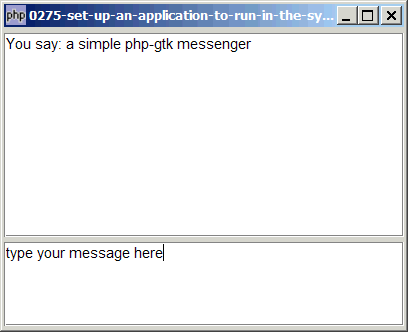
What we will try to accomplish in this example is to add a system tray icon for this application and hide the main window when the application is first started. When the user clicks on the system tray icon with left mouse button, the messenger will open up. On the next click, the messenger hides in the system tray again as shown below:
Solution
We use the technique as outlined in Part 2.
- We set up the main application as described in How to respond to enter in GtkTextView?
- Add the system tray icon with GtkStatusIcon.
- Hide the main application.
- Start the main loop.
- Show the main application when the user left click on the system tray icon.
Important Note: This only works for PHP-GTK2 compliled with gtk+ v2.10 and above. If you are using an older version, for linux, you may follow the step-by-step instructions to recompile php-gtk2 with gtk+ v2.10. For windows, please refer to How to install php gtk2 on windows? You may also want to take a look here to see some of the new exciting PHP-GTK2 Functionalities.
Sample Code
| 1 2 3 4 5 6 7 8 9 10 11 12 13 14 15 16 17 18 19 20 21 22 23 24 25 26 27 28 29 30 31 32 33 34 35 36 37 38 39 40 41 42 43 44 45 46 47 48 49 50 51 52 53 54 55 56 58 59 60 61 62 63 64 65 66 67 68 69 70 71 72 73 74 75 76 77 79 80 82 83 84 85 87 88 89 90 91 92 93 98 | <?php // setup GTK main application $window = new GtkWindow(); // note 1 $window->set_title($argv[0]); $window->set_size_request(400, 300); $window->connect_simple('destroy', array('Gtk','main_quit')); $window->add($vbox = new GtkVBox()); $vbox->pack_start($hbox = new GtkHBox(), 0, 0); $hbox->set_size_request(-1, 2); // Create the top textview to display the conversation $buffer1 = new GtkTextBuffer(); $view1 = new GtkTextView(); $view1->set_buffer($buffer1); $view1->set_editable(false); $view1->modify_font(new PangoFontDescription("Arial 9")); $view1->set_wrap_mode(Gtk::WRAP_WORD); $scrolled_win1 = new GtkScrolledWindow(); $scrolled_win1->set_policy( Gtk::POLICY_AUTOMATIC, Gtk::POLICY_AUTOMATIC); $frame1 = new GtkFrame(); $frame1->add($scrolled_win1); $vbox->pack_start($frame1, 0, 0); $scrolled_win1->add($view1); $scrolled_win1->set_size_request(400,200); $vbox->pack_start($hbox = new GtkHBox(), 0, 0); $hbox->set_size_request(-1, 1); // Create the bottom textview to type your message $buffer2 = new GtkTextBuffer(); $buffer2->set_text('type your message here'); $view2 = new GtkTextView(); $view2->set_buffer($buffer2); $view2->modify_font(new PangoFontDescription("Arial 9")); $view2->set_wrap_mode(Gtk::WRAP_WORD); $scrolled_win2 = new GtkScrolledWindow(); $scrolled_win2->set_policy(Gtk::POLICY_AUTOMATIC,Gtk::POLICY_AUTOMATIC); $frame2 = new GtkFrame(); $frame2->add($scrolled_win2); $vbox->pack_start($frame2, 0, 0); $scrolled_win2->add($view2); $view2->connect('key-press-event', 'on_key_press', $view1, $buffer1, $view2, $buffer2); $scrolled_win2->set_size_request(400,80); $view2->grab_focus(); // setup system tray icon $statusicon = new GtkStatusIcon(); // note 2 $statusicon->set_from_stock(Gtk::STOCK_NETWORK); $statusicon->set_tooltip('Left click to launch PHP-GTK Messenger'); $app_status = 0; $statusicon->connect('activate', 'on_activate'); $window->hide_all(); // note 3 Gtk::main(); // note 4 function on_key_press($widget, $event, $view1, $buffer1, $view2, $buffer2) { if ($event->keyval==Gdk::KEY_Return) { if ($event->state & Gdk::SHIFT_MASK) return false; $input = $buffer2->get_text($buffer2->get_start_iter(), $buffer2->get_end_iter()); $iter = $buffer1->get_end_iter(); $buffer1->insert($iter, "You say: $input\n\n" ); $view1->scroll_to_mark($buffer1->get_insert(), 0); $buffer2->set_text(''); return true; } else { return false; } } function on_activate($statusicon) { global $window, $app_status, $view2; if ($app_status) { // note 5 $statusicon->set_tooltip('Left click to launch PHP-GTK Messenger'); $window->hide_all(); $app_status = 0; } else { $statusicon->set_tooltip('Left click to hide PHP-GTK Messenger'); $window->show_all(); $view2->grab_focus(); $app_status = 1; } } ?> |
Output
As shown above.Explanation
The sample code above is based on the example from How to respond to enter in GtkTextView?
What's new here:
- Set up a GtkWindow just like a standard PHP-GTK2 application.
- Add the system tray icon.
- Hide the main GtkWindow initially, showing only the system tray icon.
- Start the main loop.
- Hide/show the main GtkWindow and display appropriate tooltip based on the current application status.
Note
- I've only tested GtkStatusIcon on winxp. If you're on linux or mac, please let me know if the code runs ok on your machine.
- On my machine running winxp, I got the following warning message:
(php2.exe:xxxx): GLib-WARNING **: g_main_context_prepare() called recursively fr
om within a source's check() or prepare() member.
I've tried many different applications using GtkStatusIcon. All seems to run ok. So I'm not sure if this is a bug or not. Does it occur on your machine too?
Related Links
- How to set up an application to run in the system tray using GtkStatusIcon - Part 1?
- How to set up an application to run in the system tray using GtkStatusIcon - Part 2 - display GTK window on left click?
- How to set up an application to run in the system tray using GtkStatusIcon - Part 4 - display popup menu on right click?
- How to set up an application to run in the system tray using GtkStatusIcon - Part 5 - make the tray icon blink?
- How to set up an application to run in the system tray using GtkStatusIcon - Part 6 - make the application blink?
- How to set up an application to run in the system tray using GtkStatusIcon - Part 7 - ensure only one popup menu?
Read more...