Problem
You want to achieve the following:
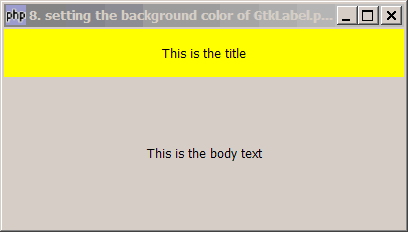
Solution
- Create a GtkEventBox
- Place the label in the EventBox
- Set the background color of the eventbox with modify_bg
Sample Code
| 1 2 3 4 5 6 7 8 9 10 11 12 13 14 15 16 17 18 19 20 21 22 23 24 25 26 | <?php $window = &new GtkWindow(); $window->connect_simple('destroy', array( 'Gtk', 'main_quit')); $window->set_size_request(400,200); // create a vbox to hold multiple labels $vbox = new GtkVBox(); // create an eventbox that allows you set background color $eventbox = new GtkEventBox(); $eventbox->modify_bg(Gtk::STATE_NORMAL, GdkColor::parse('#ffff00')); // create the title label and stuff it in the eventbox $title = new GtkLabel('This is the title'); $title->set_size_request(100,48); // note 1 $eventbox->add($title); $vbox->pack_start($eventbox, 0, 0); // note 2 // create the body_text and place it below the title $label2 = new GtkLabel('This is the body text'); $vbox->pack_start($label2); // note 3 $window->add($vbox); $window->show_all(); Gtk::main(); ?> |
Output
As shown above.Explanation
GtkLabel is one of those "transparent" widgets. This means that it will take on the color of the container widget in which it's residing. Since it is transparent, there is no way you can set its background color.
In order to have change the color of a label, one way is to create a GtkEventBox, place the label in it, and change the background color of the eventbox with modify_bg. The net effect is you have a colored label!
In the example above, we place the title label in the eventbox and set the background color of the eventbox to yellow.
Note 1: this sets the size of the title.
Note 2: this make sure that php-gtk doesn't change the size of title.
Note 3: this makes the body text stretechable, that is, it will take on whatever space remains below the title.
Notes
Note that GtkWindow can only hold one widget at a time. If you need to stuff multiple widgets, use a container widget such as GtkVBox as in this example.
Read more...