Problem
In the article How to iterate through a GtkListStore - Part 1?, we iterate through a GtkListStore.
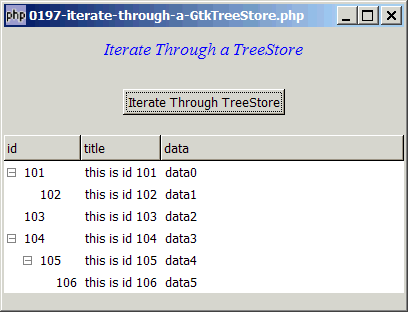
This article shows how to iterate through a GtkTreeStore as shown below:
Solution
- Just like a GtkListStore, we can iterate through each row of a GtkTreeStore with the method GtkTreemodel::foreach().
Sample Code
| 1 2 3 4 5 6 7 8 9 10 11 12 13 14 15 17 18 19 20 21 22 23 24 25 26 27 28 29 30 31 32 33 34 35 36 37 38 39 40 41 42 43 44 45 46 47 48 49 50 51 53 54 55 56 57 58 59 60 61 62 63 64 65 66 67 68 69 70 71 72 73 74 75 76 77 78 79 80 81 82 83 84 85 | <?php $window = new GtkWindow(); $window->set_size_request(400, 280); $window->connect_simple('destroy', array('Gtk','main_quit')); $window->add($vbox = new GtkVBox()); // display title $title = new GtkLabel("Iterate Through a TreeStore"); $title->modify_font(new PangoFontDescription("Times New Roman Italic 10")); $title->modify_fg(Gtk::STATE_NORMAL, GdkColor::parse("#0000ff")); $title->set_size_request(-1, 40); $title->set_justify(Gtk::JUSTIFY_CENTER); $alignment = new GtkAlignment(0.5, 0, 0, 0); $alignment->add($title); $vbox->pack_start($alignment, 0, 0); $vbox->pack_start(new GtkLabel(), 0, 0); // setup button $button = new GtkButton('Iterate Through TreeStore'); $button->connect('clicked', 'on_click'); $alignment = new GtkAlignment(0.5, 0, 0, 0); $alignment->add($button); $vbox->pack_start($alignment, 0); $vbox->pack_start(new GtkLabel(), 0, 0); $list = array( array ('id' => '101', 'parent' => '0', 'data' => 'data0'), array ('id' => '102', 'parent' => '101', 'data' => 'data1'), array ('id' => '103', 'parent' => '0', 'data' => 'data2'), array ('id' => '104', 'parent' => '0', 'data' => 'data3'), array ('id' => '105', 'parent' => '104', 'data' => 'data4'), array ('id' => '106', 'parent' => '105', 'data' => 'data5') ); // setup store if (defined("GObject::TYPE_STRING")) { $model = new GtkTreeStore(GObject::TYPE_LONG, GObject::TYPE_STRING, GObject::TYPE_STRING); } else { $model = new GtkTreeStore(Gtk::TYPE_LONG, Gtk::TYPE_STRING, Gtk::TYPE_STRING); } $nodes = array(); $nodes[0] = null; // root foreach($list as $item) { $id = $item['id']; $parent = $item['parent']; $data = $item['data']; $nodes[$id] = $model->append($nodes[$parent], array($id, "this is id $id", $data)); } //create the view with the tree store set as model $view = new GtkTreeView($model); //set up the columns $cell_renderer = new GtkCellRendererText(); $view->append_column(new GtkTreeViewColumn('id', $cell_renderer, 'text', 0)); $view->append_column(new GtkTreeViewColumn('title', $cell_renderer, 'text', 1)); $view->append_column(new GtkTreeViewColumn('data', $cell_renderer, 'text', 2)); //display it $view->expand_all(); $vbox->pack_start($view, 0); $window->show_all(); Gtk::main(); function on_click($button) { global $model; $model->foreach('process'); // note 1 } function process($model, $path, $iter) { $id = $model->get_value($iter, 0); $title = $model->get_value($iter, 1); $data = $model->get_value($iter, 2); $path2 = implode('-', $path); echo "Processing $path2. $id: $title ($data)\n"; // note 2 } ?> |
Output
As shown above.
Explanation
We make use of the code in How to display a tree structure from array? to display a tree structure from array.
What's new here:
- Setup
foreachto call the functionprocess()for each node in the treestore. - With the
$modeland$iterpassed to you by php-gtk2, you can perform any processing you like here. In this example, we only display the path and output the column values of each row.
Read more...