Problem
In Part 3, I've showed you how to display an image in a tooltip.
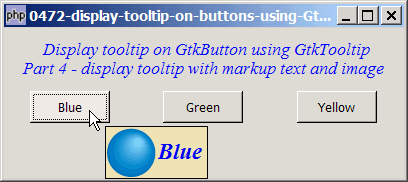
In this Part 4, we will display an image as well as a markup text in the tooltip as shown below:
Key method used: GtkTooltip::set_markup(), GtkTooltip::set_icon().
Solution
- We use the technique as outlined in Part 2 to display the markup text in a tooltip.
- To display the image, we use the method
GtkTooltip::set_icon().
Important Note: This only works for PHP-GTK v2.0 (or PHP-GTK2 compliled with gtk+ v2.12 and above. If you are using an older version, for linux, you may follow the step-by-step instructions to recompile php-gtk2 with gtk+ v2.12. For windows, please refer to How to install php gtk2 on windows?
Sample Code
The following image files are required by the sample code below. Please save a copy of the image files and put them in the same directory where you store the sample code.
 | ball_blue48.png |
 | ball_green48.png |
 | ball_yellow48.png |
| 1 2 3 4 5 6 7 8 9 10 11 12 13 14 15 16 17 18 19 20 21 22 23 24 25 26 27 28 30 31 32 33 34 35 36 37 38 39 41 46 47 48 49 50 51 52 53 54 55 | <?php $window = new GtkWindow(); $window->set_title($argv[0]); $window->connect_simple('destroy', array( 'Gtk', 'main_quit')); $window->set_size_request(400,150); $window->add($vbox = new GtkVBox()); // display title $title = new GtkLabel(" Display tooltip on GtkButton using GtkTooltip\n". "Part 4 - display tooltip with markup text and image"); $title->modify_font(new PangoFontDescription("Times New Roman Italic 10")); $title->modify_fg(Gtk::STATE_NORMAL, GdkColor::parse("#0000ff")); $title->set_size_request(-1, 60); $vbox->pack_start($title, 0, 0); $vbox->pack_start($hbox=new GtkHBox(), 0, 0); create_button($hbox, 'Blue', 'ball_blue48.png'); create_button($hbox, 'Green', 'ball_green48.png'); create_button($hbox, 'Yellow', 'ball_yellow48.png'); $window->show_all(); Gtk::main(); function create_button($hbox, $button_label, $img) { $button = new GtkButton($button_label); $button->set_size_request(80, 32); $hbox->pack_start($button, 1, 0); $button->connect('clicked', "on_button", $button_label); $button->set_property('has-tooltip', true); // note 1 $button->connect('query-tooltip', 'on_tooltip', $img); // note 2 } function on_button($button, $button_label) { echo "You have clicked: $button_label!\n"; } function on_tooltip($widget, $x, $y, $keyboard_mode, $tooltip, $img_file) { $label = $widget->get_label(); global $images; $tooltip->set_markup("<span font_desc=\"Times New Roman Bold Italic 14\" ". "foreground=\"$label\">$label</span> "); // note 3 $img = GdkPixbuf::new_from_file($img_file); $tooltip->set_icon($img); // note 4 return true; } ?> |
Output
As shown above.
Explanation
- Enable tooltip on the widget.
- Connect to the signal
'query-tooltip'. - Set the markup text in tooltip.
- Set the image in the tooltip.
Related Links
- How to display tooltips in GtkTreeView - Part 4?
- How to display tooltip on buttons using GtkTooltip - Part 1 - plain text?
- How to display tooltip on buttons using GtkTooltip - Part 2 - markup text?
- How to display tooltip on buttons using GtkTooltip - Part 3 - tooltip with image?
- How to display tooltip on buttons using GtkTooltip - Part 5 - tooltip with image and label below image?
Read more...