Problem
This example shows you how to use the new widget GtkCellRendererAccel available in gtk+2.10 and above.
This widget took me 3 whole nights to figure out! Please refer to my blog titled GtkCellRendererAccel - it's working! for more details.
There are 3 parts to this series.
- Part 1 shows you how to display the keyboard accelerator.
- Part 2 shows how you can allow the users to change the hot key "on the fly".
- Part 3 shows you how to respond to the keyboard accelerator.
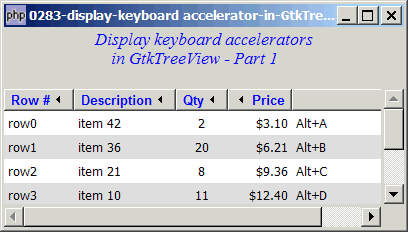
So let's first start with Part 1 - how to display keyboard accelerator in a treeview as shown below:
Solution
To display the keyboard accelerator, all you need is to:
- Create a new GtkCellRendererAccel.
- Set the property 'accel-key' with the keyval of the accelerator. E.g. 1 is '49', 'A' is 65, 'a' is 97.
- Set the property 'accel-mods' with the modifier keys of the accelerator. For control, use Gdk::CONTROL_MASK. For alt, use Gdk::MOD1_MASK. For other keys, please refer to GdkModifierType.
Important Note: This only works for PHP-GTK2 compliled with gtk+ v2.10 and above. If you are using an older version, for linux, you may follow the step-by-step instructions to recompile php-gtk2 with gtk+ v2.10. For windows, please refer to How to install php gtk2 on windows? You may also want to take a look here to see some of the new exciting PHP-GTK2 Functionalities.
Sample Code
| 1 2 3 4 5 6 7 8 9 10 11 12 13 14 15 16 17 18 19 20 21 22 23 24 25 26 27 28 29 30 31 32 33 34 35 36 37 38 39 40 41 42 43 44 45 46 47 48 49 50 51 52 53 54 55 56 57 58 59 60 61 62 63 64 65 66 67 68 69 70 71 72 73 74 75 76 77 78 79 80 81 82 83 84 85 86 87 88 90 91 92 93 94 95 96 97 98 99 103 105 106 107 108 109 110 111 112 113 114 115 116 117 118 119 120 121 122 123 124 | <?php $window = new GtkWindow(); $window->set_title($argv[0]); $window->set_size_request(400, 200); $window->connect_simple('destroy', array('Gtk','main_quit')); $window->add($vbox = new GtkVBox()); // display title $title = new GtkLabel("Display keyboard accelerators\n". " in GtkTreeView - Part 1"); $title->modify_font(new PangoFontDescription("Times New Roman Italic 10")); $title->modify_fg(Gtk::STATE_NORMAL, GdkColor::parse("#0000ff")); $title->set_size_request(-1, 40); $vbox->pack_start($title, 0, 0); $vbox->pack_start(new GtkLabel(), 0, 0); // the 2D table $data = array( array('row0', 'item 42', 2, 3.1), array('row1', 'item 36', 20, 6.21), array('row2', 'item 21', 8, 9.36), array('row3', 'item 10', 11, 12.4), array('row4', 'item 7', 5, 15.5), array('row5', 'item 4', 17, 18.6), array('row6', 'item 3', 20, 21.73)); display_table($vbox, $data); $window->show_all(); Gtk::main(); function display_table($vbox, $data) { // Set up a scroll window $scrolled_win = new GtkScrolledWindow(); $scrolled_win->set_policy( Gtk::POLICY_AUTOMATIC, Gtk::POLICY_AUTOMATIC); $vbox->pack_start($scrolled_win); // Creates the list store if (defined("GObject::TYPE_STRING")) { $model = new GtkListStore(GObject::TYPE_STRING, GObject::TYPE_STRING, GObject::TYPE_LONG, GObject::TYPE_DOUBLE); } else { $model = new GtkListStore(Gtk::TYPE_STRING, Gtk::TYPE_STRING, Gtk::TYPE_LONG, Gtk::TYPE_DOUBLE); } $field_header = array('Row #', 'Description', 'Qty', 'Price'); $field_justification = array(0.0, 0.0, 0.5, 1.0); // Creates the view to display the list store $view = new GtkTreeView($model); $scrolled_win->add($view); // Creates the columns for ($col=0; $col<count($field_header); ++$col) { $cell_renderer = new GtkCellRendererText(); $cell_renderer->set_property("xalign", $field_justification[$col]); $column = new GtkTreeViewColumn($field_header[$col], $cell_renderer, 'text', $col); $column->set_alignment($field_justification[$col]); $column->set_sort_column_id($col); // set the header font and color $label = new GtkLabel($field_header[$col]); $label->modify_font(new PangoFontDescription("Arial Bold")); $label->modify_fg(Gtk::STATE_NORMAL, GdkColor::parse("#0000FF")); $column->set_widget($label); $label->show(); // setup self-defined function to display alternate row color $column->set_cell_data_func($cell_renderer, "format_col", $col); $view->append_column($column); } // pupulates the data for ($row=0; $row<count($data); ++$row) { $values = array(); for ($col=0; $col<count($data[$row]); ++$col) { $values[] = $data[$row][$col]; } $model->append($values); } $selection = $view->get_selection(); $selection->connect('changed', 'on_selection'); $cell_renderer = new GtkCellRendererAccel(); // note 1 $column = new GtkTreeViewColumn(); // note 2 $column->pack_start($cell_renderer, false); // note 3 $view->append_column($column); // note 4 $column->set_cell_data_func($cell_renderer, "format_col", $col); // note 5 } // self-defined function to format the price column function format_col($column, $cell, $model, $iter, $col_num) { $path = $model->get_path($iter); // get the current path $row_num = $path[0]; // get the row number if ($col_num==4) { $cell->set_property("accel-key", 97+$row_num); // note 6 $cell->set_property("accel-mods", Gdk::MOD1_MASK); // note 7 } elseif ($col_num==3) { $amt = $model->get_value($iter, 3); $cell->set_property('text', '$'.number_format($amt,2)); } $row_color = ($row_num%2==1) ? '#dddddd' : '#ffffff'; $cell->set_property('cell-background', $row_color); } // the function that is called when user selects a row function on_selection($selection) { list($model, $iter) = $selection->get_selected(); $desc = $model->get_value($iter, 1); $qty = $model->get_value($iter, 2); $price = $model->get_value($iter, 3); print "You have selected $desc: $qty ($price)\n"; } ?> |
Output
As shown above.
Explanation
This example uses exactly the same code from the familiar treeview example How to display a 2D array in GtkTreeView - Part 5 - get user selection?.
I've only added 7 more lines to display the keyboard accelerators, as explained below:
- Create a new GtkCellRendererAccel.
- Create a new GtkTreeViewColumn.
- Pack the GtkCellRendererAccel into the GtkTreeViewColumn.
- Add the column to the treeview (which will appear as column #4).
- Use the same cell_data_func as the other columns.
- Set the key value of the keyboard accelerator. Note that in this example, we set row 1 to be Alt-A, row 2 to be Alt-B, etc.
- Set the modifier key of the keyboard accelerator. Note that in this example, we use Alt as the modifier key.
Note
As mentioned above, this example only displays the keyboard accelerator.
In Part 2, I will show you how you can allow the users to change the hot key "on the fly", and in Part 3 I will show you how to respond to these keyboard accelerator.
Read more...