Problem
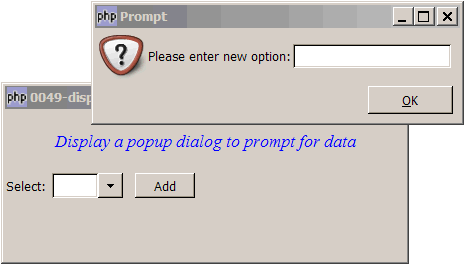
You would like to display a popup dialog to prompt for data (similar to javascript command prompt()) as shown below:
Solution
- The prompt is displayed using a standard GtkDialog.
- We wrap the above into in a class for cleaner code reuse.
- We also created the function
prompt()so that one can call up a prompt dialog with a one-liner:$input=prompt($msg).
Sample Code
| 1 2 3 4 5 6 7 8 9 10 11 12 13 14 15 16 17 18 19 20 21 22 23 24 25 26 27 28 29 30 31 32 33 34 35 36 37 38 39 40 41 42 43 44 45 49 50 51 52 53 54 55 57 59 60 61 62 63 64 65 66 67 68 69 71 72 74 75 76 77 78 79 80 81 82 83 84 88 89 90 91 93 94 95 96 97 99 100 101 102 103 104 105 107 108 109 110 111 112 113 114 115 116 117 118 119 120 121 122 | <?php $window = &new GtkWindow(); $window->connect_simple('destroy', array( 'Gtk', 'main_quit')); $window->set_size_request(400,150); $window->add($vbox = new GtkVBox()); // display title $title = new GtkLabel("Display a popup dialog to prompt for data"); $title->modify_font(new PangoFontDescription("Times New Roman Italic 10")); $title->modify_fg(Gtk::STATE_NORMAL, GdkColor::parse("#0000ff")); $title->set_size_request(-1, 60); $vbox->pack_start($title, 0, 0); // the initial selection $list = array('item 1', 'item 2', 'item 3', 'item 4'); $vbox->pack_start($hbox=new GtkHBox(), 0, 0); $hbox->pack_start(new GtkLabel('Select: '), 0, 0); // Create a combobox $combobox = new GtkComboBox(); // Create a model if (defined("GObject::TYPE_STRING")) { $model = new GtkListStore(GObject::TYPE_STRING); } else { $model = new GtkListStore(Gtk::TYPE_STRING); } // Set up the combobox $combobox->set_model($model); $cellRenderer = new GtkCellRendererText(); $combobox->pack_start($cellRenderer); $combobox->set_attributes($cellRenderer, 'text', 0); $combobox->connect('changed', 'on_change'); // let us know when user selects an item // Stuff the choices in the model foreach($list as $choice) { $model->append(array($choice)); } // Set up a hbox to contain the combobox as well as the Add button $hbox->pack_start($combobox, 0, 0); $hbox->pack_start(new GtkLabel(' '), 0, 0); $hbox->pack_start($button = new GtkButton('Add'), 0, 0); $button->set_size_request(60, 24); $button->connect('clicked', "on_button", $combobox); function on_button($button, $combobox) { // process button click $model = $combobox->get_model(); $button_label = $button->child->get_text(); $new_option = prompt("Please enter new option:"); if ($new_option!='') $model->append(array($new_option)); } function on_change($combobox) { // process user selection $model = $combobox->get_model(); $selection = $model->get_value($combobox->get_active_iter(), 0); echo "You have selected: $selection!\n"; } //function to prompt for user data function prompt($str) { $prompt = new Prompt($str); // creates a new prompt $input = $prompt->entry->get_text(); // get the user input return $input; // and returns the user input } class Prompt{ var $entry; // the user input function Prompt($str) { $dialog = new GtkDialog('Prompt', null, Gtk::DIALOG_MODAL); $dialog->set_position(Gtk::WIN_POS_CENTER_ALWAYS); $top_area = $dialog->vbox; $top_area->pack_start($hbox = new GtkHBox()); $stock = GtkImage::new_from_stock(Gtk::STOCK_DIALOG_QUESTION, Gtk::ICON_SIZE_DIALOG); $hbox->pack_start($stock, 0, 0); $hbox->pack_start(new GtkLabel($str)); $this->entry = new GtkEntry(); $hbox->pack_start($this->entry, 0, 0); $hbox->pack_start(new GtkLabel(' '), 0, 0); $dialog->add_button(Gtk::STOCK_OK, Gtk::RESPONSE_OK); $buttons = $dialog->action_area->get_children(); $button_ok = $buttons[0]; // get the ID of the OK button // simulate button click when user press enter $this->entry->connect('activate', array(&$this, 'on_enter'), $button_ok); $dialog->set_has_separator(false); $dialog->show_all(); $dialog->run(); $dialog->destroy(); } // simulate button click when user press enter function on_enter($entry, $button) { $button->clicked(); } } $window->show_all(); Gtk::main(); ?> |
Output
As shown above.
Explanation
- For more explanation on the setting up of combobox, please refer to How to setup and process GtkComboBox?
- For more explanation on simulating button click when user press Enter, please refer to How to set a button as default action when user press Enter?
Read more...