Problem
This is in response to Vadim's comments with regards to "attaching the handle of a toolbar to another place".
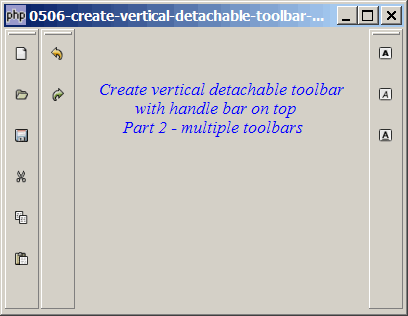
I created this example to show that it's not possible to do so using the standard GtkHandleBox. Try dragging the toolbars to a different position. Although you can place it in a different position manually, when you click on the main window, the toolbar will be hidden behind the main window. (You have to drag the main window away to reveal the toolbars hiding behind.)
Solution
- You will find that in PHP-GTK the detachable toolbar remembers where is its "home". It refuse to stay in other's home.
- For example, for toolbar 1, snapping will only occur with its own "home".
- If you try to drag toolbar 1 to the "home" of toolbar 2 or 3, it won't snap to either home.
- This is the reason why you cannot swap two detachable toolbars by dragging to each other's home.
Sample Code
| 1 2 3 4 5 6 7 10 11 12 13 14 15 16 17 18 19 20 21 22 23 25 26 27 28 29 30 31 32 33 34 35 36 38 40 41 42 43 45 47 48 49 50 52 53 54 55 56 57 59 60 61 62 63 66 67 68 69 70 71 72 74 76 77 78 | <?php $window = new GtkWindow(); $window->set_title($argv[0]); $window->set_size_request(400, 284); $window->connect_simple('destroy', array('Gtk','main_quit')); $window->add($vbox = new GtkVBox()); $vbox->pack_start($hbox = new GtkHBox(), 0); // note 1 // define toolbar definition $toolbar_definition = array('New', 'Open', 'Save','Cut', 'Copy', 'Paste'); setup_toolbar($hbox, $toolbar_definition); // note 2 $toolbar_definition = array('Undo','Redo'); setup_toolbar($hbox, $toolbar_definition); // note 3 // display title $title = new GtkLabel("Create vertical detachable toolbar\n". " with handle bar on top\n". " Part 2 - multiple toolbars"); $title->modify_font(new PangoFontDescription("Times New Roman Italic 10")); $title->modify_fg(Gtk::STATE_NORMAL, GdkColor::parse("#0000ff")); $hbox->pack_start($vbox2 = new GtkVBox()); $vbox2->pack_start($title); $vbox2->pack_start(new GtkLabel('')); $toolbar_definition = array('Bold','Italic','Underline'); setup_toolbar($hbox, $toolbar_definition); // note 4 $window->show_all(); Gtk::main(); // setup toolbar function setup_toolbar($hbox, $toolbar_definition) { $toolbar = new GtkToolBar(); $handlebox = new GtkHandleBox(); $handlebox->add($toolbar); $handlebox->set_handle_position(Gtk::POS_TOP); $handlebox->set_snap_edge(Gtk::POS_TOP); $toolbar->set_size_request(34, 270); $toolbar->set_property('icon-size', Gtk::ICON_SIZE_MENU); $toolbar->set_orientation(Gtk::ORIENTATION_VERTICAL); $hbox->pack_start($handlebox, 0); foreach($toolbar_definition as $item) { if ($item=='<hr>') { $toolbar->insert(new GtkSeparatorToolItem(), -1); } else { $stock_image_name = 'Gtk::STOCK_'.strtoupper($item); if (defined($stock_image_name)) { $toolbar_item = GtkToolButton::new_from_stock( constant($stock_image_name)); $toolbar_item->set_label(null); $toolbar->insert($toolbar_item, -1); $toolbar_item->connect('clicked', 'on_toolbar_button', $item); } } } } // process toolbar function on_toolbar_button($button, $item) { echo "toolbar clicked: $item\n"; } ?> |
Output
As shown above.Explanation
This example make use of the code in How to create vertical detachable toolbar with handle bar on top - Part 1?.
What's new here:
- Set up an hbox to contain the three vertical toolbars.
- Set up toolbar 1.
- Set up toolbar 2.
- Set up toolbar 3.
Read more...