Problem
In How to add mnemonic to GtkLabel?, we added mnemonics, or keyboard accelerators, to GtkLabels.
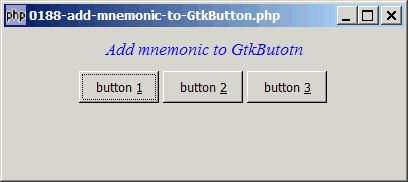
In this example, we will add mnemonics to GtkButtons as shown below:
Solution
- First create a standard GtkButton.
- Get the button label with GtkBin::child.
- Then set the label text using GtkLabel::set_text_with_mnemonic() as outlined in the article How to add mnemonic to GtkLabel?
Sample Code
| 1 2 3 4 5 6 7 8 9 10 11 12 13 14 15 16 17 18 22 23 24 25 26 27 28 29 30 31 32 33 34 35 36 37 38 39 40 41 | <?php $window = new GtkWindow(); $window->set_size_request(400, 150); $window->connect_simple('destroy', array('Gtk','main_quit')); $window->add($vbox = new GtkVBox()); // display title $title = new GtkLabel("Add mnemonic to GtkButotn"); $title->modify_font(new PangoFontDescription("Times New Roman Italic 10")); $title->modify_fg(Gtk::STATE_NORMAL, GdkColor::parse("#0000ff")); $title->set_size_request(-1, 40); $vbox->pack_start($title, 0, 0); $hbox = new GtkHBox(); for ($i=0; $i<3; ++$i) { $button = new GtkButton(''); $button_label = $button->child; // note 1 $button_label->set_text_with_mnemonic('button _'.($i+1)); // note 2 $button->set_size_request(80, 32); $button->connect('clicked', 'on_click'); $hbox->pack_start($button); $hbox->pack_start(new GtkLabel('')); } $alignment = new GtkAlignment(0.5, 0, 0, 0); $alignment->add($hbox); $vbox->pack_start($alignment); $window->show_all(); Gtk::main(); function on_click($button) { echo "button pressed: ".$button->child->get_text()."\n"; } ?> |
Output
As shown above.
Explanation
The example above makes use of the code from How to set the button to the exact size you want - Part 3 - group of buttons? to display the three buttons.
What's new here:
- Get the button label.
- Set the label text with mnemonic. Note the use of underscore to indicate the mnemonic.
You can now press Alt-1, Alt-2, Alt-3 to activate these buttons.
Note
Note that in the article How to add mnemonic to GtkLabel?, we need to use the method GtkLabel::set_mnemonic_widget() to associate each mnemonic to the widget that will be activated.
This method is not required in this example because php-gtk2 is smart enough to automatically associate the mnemonic we set on the button label to its parent (i.e. the button).
Read more...