Problem
How to get started in PHP-GTK2?
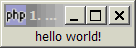
As with many other programming languages, let start with this simple yet complete "hello world!" PHP-GTK2 example as shown below:
Solution
Do take some time to understand this simple yet complete "hello world!" PHP-GTK2 script.
Once you understand this script, you are on your way to picking up other widgets one by one and add onto this script.
Sample Code
| 1 2 3 4 5 6 7 8 | <?php $window = new GtkWindow(); $window->connect_simple('destroy', array('Gtk','main_quit')); $label = new GtkLabel("hello world!"); $window->add($label); $window->show_all(); Gtk::main(); ?> |
Output
As shown above.Explanation
new GtkWindow()creates a new window.connect('destroy', array('Gtk','main_quit'))ensures a clean exit when you close the window. This basically says callGtk::main_quit()when the user close the window.new GtkLabel("hello world!")creates the text string as label.- And we use
$window->addto place the label in the window. $window->show_all()shows the window and all its contents.Gtk::main()- GTK takes over and starts waiting for events (e.g. mouse or keyboard input).
Comments
I am using Xampp for my project ,but problem is that it is not working it gives error "Fatal error: Class 'GtkWindow' not found in D:\Program Files\xampp\xampp\htdocs\Outpass\majak.php on line 101"
I am new to this and don't know if i have to make any chane to my current php version AND one more thing
Is it also a programming scripting language or it is a programming language.
Sorry if i asked anything foolish
PHP-GTK is an extension of PHP. As the name suggests, it's PHP plus GTK+. (GTK+is a cross-platform graphical user interface library which has been around for more than 10 years.)
More info here:
1) http://gtk.php.net/
2) http://en.wikipedia.org/wiki/PHP-GTK
3) http://www.gtk.org/
4) http://en.wikipedia.org/wiki/GTK%2B
The PHP that you've been using are for your web servers in a web environment. On the other hand, PHP-GTK is used to develop standalone desktop applications (similar to all your windows applications e.g. notepad or Microsoft Word) without going through a web browser.
You current PHP will not be able to run PHP-GTK because it does not have the php-gtk dll loaded. To run PHP-GTK, you need to download the compiled windows binary version from: http://gtk.php.net/download.php
Most of us running PHP-GTK will have 2 copies of PHP on our machine - one for the web server, the other for PHP-GTK. Each of them uses its own PHP.ini for different setup and to load different DLLs. Also, currently all your PHP apps are run from web browser. For PHP-GTK, it's usually run from the command prompt.
If you cannot think of any reasons why you would run an application from a command prompt, then most likely you do not need PHP-GTK. But if you need to say control hardware deviccs via your computer, and you want to provide some graphical user interface instead of plain command prompt, PHP-GTK is a good choice, especially if you already have a huge collection of PHP libraries.
Hope this gives you a slightly better picture of PHP-GTK.
Regards,
/kksou
But I have one more question...
Our team is going to start a Project
which include file sharing ,chatting and more network related things over University network which include about 2000 pc's.
So is it good idea to start with php-gtk2
and can i use oracle or mysql as backend.
Thanks
Pherry
Yes, PHP-GTK2 sits on top of PHP. So you can use the mysql and oracle DLL that works with standard PHP.
However, there are now a lot more open-source web-based PHP libraries for the things you want to do - file sharing ,chatting and more network related things, etc. Also, you can look into very established PHP platform such as Joomla or Drupal which will save you a lot of time.
Another point is about maintenance. Web-based applications are so much easier to maintain. You only need to update your server apps, and the rest of the 2000pcs simply uses standard web browser.
For PHP-GTK2, it's a client-server architecture. What this means is that while your mysql database can reside at your data server, you need to install client app on each of the 2000 machines! Though you can definitely automate this through some scripts, if you can go with web-based applications, I would strongly recommend you to do so.
We use PHP-GTK2 when a web-based application does not work e.g. if you need real-time interface to some MIDI or photographic instruments to read real-time data or to control devices in real-time via serial or parallel ports.
Of course you can achieve all these with .NET or C++. But if you only know PHP, and you really need to develop a real-time cross-platform GUI app, PHP-GTK2 is a good choice.
Regards,
/kksou
By the way, you can also view PHP-GTK as a gtk+ port for PHP.
There is also a port for Python: http://www.pygtk.org/
with a much stronger and active group of users there.
Regards,
/kksou
http://maltepeevdenevenakliyat.eu ekibi
RSS feed for comments to this post