Problem
You have displayed a list of thumbnail images using GtkIconView in How to display a list of thumbnail images using GtkIconView?, and added support for drag-and-drop selection in Part 1.
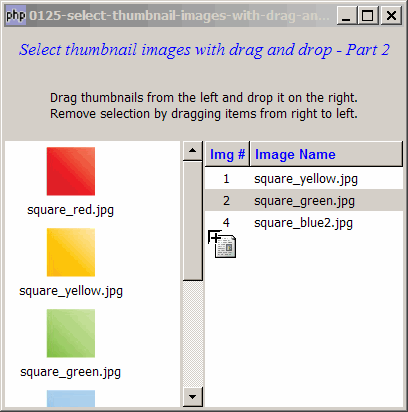
Now you would like to allow removal of selection by dragging from right to left. You would also like to eliminate any duplication of selection as shown below:
Solution
We add in support for drag-and-drop in both directions using exactly the same technique as outlined in the article How to drag and drop between 2 GtkTreeViews - Part 2 - in both directions?
Sample Code
Note: The following image files are required by the sample code below. Please save a copy of the image files and put them in the same directory where you store the sample code.
 | square_red.jpg |
 | square_yellow.jpg |
 | square_green.jpg |
 | square_blue.jpg |
 | square_blue2.jpg |
 | square_blue3.jpg |
| 1 2 3 4 5 6 7 8 9 10 11 12 13 14 15 16 17 18 19 20 21 22 23 24 25 26 27 28 29 30 31 32 33 34 35 36 37 38 39 41 42 43 44 45 46 47 48 49 50 51 52 53 54 55 56 57 58 59 60 61 62 63 64 65 66 67 68 69 70 71 72 73 74 75 76 77 78 79 80 81 82 83 84 85 86 87 88 89 90 91 92 93 94 95 96 97 98 99 100 101 102 103 104 105 106 107 108 109 110 111 112 113 114 115 116 117 118 119 124 125 126 127 128 129 130 131 132 133 134 135 136 137 138 139 140 141 142 143 144 145 146 147 148 149 152 154 155 156 157 158 159 160 161 162 163 164 165 166 167 168 169 170 172 173 174 175 176 177 178 179 180 181 182 183 184 185 186 187 188 189 190 191 192 193 194 195 196 197 198 199 200 201 202 206 207 208 | <?php $window = new GtkWindow(); $window->set_size_request(400, 380); $window->connect_simple('destroy', array('Gtk','main_quit')); $window->add($vbox = new GtkVBox()); // display title $title = new GtkLabel("Select thumbnail images with drag and drop - Part 2"); $title->modify_font(new PangoFontDescription("Times New Roman Italic 10")); $title->modify_fg(Gtk::STATE_NORMAL, GdkColor::parse("#0000ff")); $title->set_size_request(-1, 40); $vbox->pack_start($title, 0, 0); $vbox->pack_start(new GtkLabel(), 0, 0); // add a small gap $vbox->pack_start(new GtkLabel( "Drag thumbnails from the left and drop it on the right.\n". "Remove selection by dragging items from right to left."), 0, 0); $vbox->pack_start(new GtkLabel(), 0, 0); // add a small gap // Set up a scroll window $scrolled_win = new GtkScrolledWindow(); $scrolled_win->set_policy( Gtk::POLICY_AUTOMATIC, Gtk::POLICY_AUTOMATIC); $images = array('square_red.jpg', 'square_yellow.jpg', 'square_green.jpg', 'square_blue.jpg', 'square_blue2.jpg', 'square_blue3.jpg'); if (defined("GObject::TYPE_STRING")) { $model = new GtkListStore(GdkPixbuf::gtype, GObject::TYPE_STRING); } else { $model = new GtkListStore(GdkPixbuf::gtype, Gtk::TYPE_STRING); } foreach($images as $img) { $pixbuf = GdkPixbuf::new_from_file($img); $model->append(array($pixbuf, $img)); } $view = new GtkIconView($model); $view->set_pixbuf_column(0); // col 0 of the model $view->set_text_column(1); // col 1 of the model $view->set_selection_mode(Gtk::SELECTION_MULTIPLE); $view->set_columns(0); $view->set_item_width(120); $view->drag_source_set(Gdk::BUTTON1_MASK, array( array( 'text/plain', 0, 0)), Gdk::ACTION_COPY|Gdk::ACTION_MOVE); $view->connect('drag-data-get', 'on_drag'); // Set up treeview $scrolled_win2 = &new GtkScrolledWindow(); $scrolled_win2->set_policy( Gtk::POLICY_AUTOMATIC, Gtk::POLICY_AUTOMATIC); $data2 = array(); $view2 = display_table ($scrolled_win2, $data2); $view2->drag_dest_set(Gtk::DEST_DEFAULT_ALL, array( array( 'text/plain', 0, 0)), Gdk::ACTION_COPY|Gdk::ACTION_MOVE); $view2->connect('drag-data-received', 'on_drop', $images); // set up drag and drop in the other direction $view->drag_dest_set(Gtk::DEST_DEFAULT_ALL, array( array( 'text/plain', 0, 0)), Gdk::ACTION_COPY|Gdk::ACTION_MOVE); // note 1 $view->connect('drag-data-received', 'on_drop_right_to_left', $view2); // note 1 $view2->drag_source_set(Gdk::BUTTON1_MASK, array( array( 'text/plain', 0, 0)), Gdk::ACTION_COPY|Gdk::ACTION_MOVE); // note 2 $view2->connect('drag-data-get', 'on_drag_right_to_left'); // note 2 $scrolled_win->add($view); $hbox = new GtkHBox(); $hbox->pack_start($scrolled_win); $hbox->pack_start($scrolled_win2); $vbox->pack_start($hbox); $window->show_all(); Gtk::main(); function display_table($scrolled_win, $data) { // Creates the list store if (defined("GObject::TYPE_STRING")) { $model = new GtkListStore(GObject::TYPE_LONG, GObject::TYPE_STRING); } else { $model = new GtkListStore(Gtk::TYPE_LONG, Gtk::TYPE_STRING); } $field_header = array('Img #', 'Image Name'); $field_justification = array(0.5, 0.0); // Creates the view to display the list store $view = new GtkTreeView($model); $scrolled_win->add($view); // Creates the columns for ($col=0; $col<count($field_header); ++$col) { $cell_renderer = new GtkCellRendererText(); $cell_renderer->set_property("xalign", $field_justification[$col]); $column = new GtkTreeViewColumn($field_header[$col], $cell_renderer, 'text', $col); $column->set_alignment($field_justification[$col]); $column->set_sort_column_id($col); // set the header font and color $label = new GtkLabel($field_header[$col]); $label->modify_font(new PangoFontDescription("Arial Bold")); $label->modify_fg(Gtk::STATE_NORMAL, GdkColor::parse("#0000FF")); $column->set_widget($label); $label->show(); // setup self-defined function to display alternate row color $column->set_cell_data_func($cell_renderer, "format_col", $col); $view->append_column($column); } // pupulates the data for ($row=0; $row<count($data); ++$row) { $values = array(); for ($col=0; $col<count($data[$row]); ++$col) { $values[] = $data[$row][$col]; } $model->append($values); } return $view; } // display alternate row color function format_col($column, $cell, $model, $iter, $col_num) { $path = $model->get_path($iter); // get the current path $row_num = $path[0]; // get the row number if ($col_num==3) { $amt = $model->get_value($iter, 3); $cell->set_property('text', '$'.number_format($amt,2)); } $row_color = ($row_num%2==1) ? '#dddddd' : '#ffffff'; $cell->set_property('cell-background', $row_color); } // process drag on the left function on_drag($widget, $context, $data, $info, $time) { $selection = $widget->get_selected_items(); if (count($selection)==0) return; // return if there's no selection $data->set_text(serialize($selection)); } // process drop on the right function on_drop($widget, $context, $x, $y, $data, $info, $time, $images) { // append the dragged item to the destination view $data = unserialize($data->data); if (!isset($data[0][0])) return; // note 3 $model = $widget->get_model(); foreach($data as $img) { $i = $img[0]; $img_name = $images[$i]; if (check_for_duplication($model, $i)) { // note 4 $model->append(array($i, $img_name)); } } } // check for duplication function check_for_duplication($model, $n) { // note 4 $total_rows = $model->iter_n_children(NULL); $found = 0; for ($i=0; $i<$total_rows; ++$i) { $iter = $model->get_iter($i); $id = $model->get_value($iter, 0); if ($id==$n) { $found = 1; echo "the image $i already exists!\n"; break; } } return ($found) ? 0 : 1; } // process drag on the right function on_drag_right_to_left($widget, $context, $data, $info, $time) {// note 5 $selection = $widget->get_selection(); list($model, $iter) = $selection->get_selected(); if ($iter==null) return; $id = $model->get_value($iter, 0); $img_name = $model->get_value($iter, 1); $data->set_text(serialize(array($id, $img_name))); } // process drop on the left function on_drop_right_to_left($widget, $context, $x, $y, $data, $info, $time, $src_view) {// note 6 // remove from src $data = unserialize($data->data); if (isset($data[0][0])) return; // note 7 $src_selection = $src_view->get_selection(); list($src_model, $src_iter) = $src_selection->get_selected(); if ($src_iter==null) { return; } $src_model->remove($src_iter); } ?> |
Output
As shown above.
Explanation
This example make use of the code from the article How to drag and drop between 2 GtkTreeViews - Part 2 - in both directions? and Part 1.
What's new here:
- Set up drag on the right side (the tree view).
- Set up drop on the left side (the icon view).
- This line is here to handle cases in which the user drag from the right and drop on the right. Try commenting out this line, and you will know what I mean.
- Check for any duplication. We basically loop through the existing items in the treeview. If there's no duplication, we will add the new item.
- Process drag from the right.
- Process drop on the left.
- This line is here to handle cases in which the user drag from the left and drop on the left. Try commenting out this line, and you will know what I mean.
Read more...