Problem
You would like to sort a tree struture using a GtkTreeStore with GtkTreeModelSort as shown below:
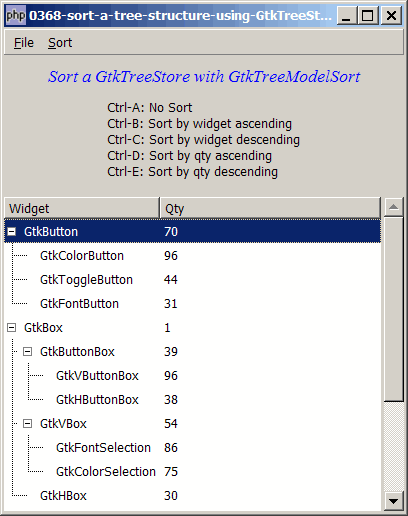
Solution
- We make use of the same technique as outlined in How to sort treeview using GtkTreeModelSort?
- Note that GtkTreeModelSort will sort by level 1 first, and then by level 2 within each level 1, etc.
- Compare this with How to selectively display nodes in GtkTreeStore with GtkTreeModelFilter? Note that I've added one more column – the quantity – to let you see clearly how GtkTreeModelSort renders the sorting.
Sample Code
| 1 2 3 4 5 6 7 8 9 10 11 12 13 17 18 19 20 21 22 23 24 25 26 27 28 29 30 32 33 34 35 36 37 39 40 41 42 43 44 45 46 47 48 49 50 51 52 53 54 55 56 57 58 59 60 61 62 63 64 65 66 67 68 69 70 71 72 73 74 75 76 77 78 79 80 81 82 83 85 86 87 90 91 92 93 94 95 96 97 98 99 100 101 102 104 105 106 107 108 109 110 111 112 113 114 115 116 117 118 119 120 121 124 125 126 127 128 129 130 132 133 135 136 137 139 140 141 146 147 148 149 150 151 152 153 154 155 156 157 158 159 160 161 162 163 164 165 166 167 168 169 170 171 172 173 174 175 176 177 178 179 180 181 182 183 184 185 186 187 188 189 190 191 192 193 194 195 196 197 198 199 200 201 204 205 206 207 208 214 215 216 217 218 219 221 222 223 224 225 | <?php $window = new GtkWindow(); $window->set_title($argv[0]); $window->set_size_request(400, 306); $window->connect_simple('destroy', array('Gtk','main_quit')); $window->add($vbox = new GtkVBox()); $accel_group = new GtkAccelGroup(); $window->add_accel_group($accel_group); // define menu definition $menu_definition = array( '_File' => array('_Quit|Q'), '_Sort' => array('No Sort|A', 'Sort by widget ascending|B', 'Sort by widget descending|C', 'Sort by quantity ascending|D', 'Sort by quantity descending|E') ); setup_menu($vbox, $menu_definition); // display title $title = new GtkLabel("Sort a GtkTreeStore with GtkTreeModelSort"); $title->modify_font(new PangoFontDescription("Times New Roman Italic 10")); $title->modify_fg(Gtk::STATE_NORMAL, GdkColor::parse("#0000ff")); $title->set_size_request(-1, 40); $vbox->pack_start($title, 0); $vbox->pack_start(new GtkLabel("Ctrl-A: No Sort\n". "Ctrl-B: Sort by widget ascending\n". "Ctrl-C: Sort by widget descending\n". "Ctrl-D: Sort by qty ascending\n". "Ctrl-E: Sort by qty descending\n"), 0); $data = array( array ('id' => 'GtkButton', 'parent' => '0'), array ('id' => 'GtkColorButton', 'parent' => 'GtkButton'), array ('id' => 'GtkToggleButton', 'parent' => 'GtkButton'), array ('id' => 'GtkFontButton', 'parent' => 'GtkButton'), array ('id' => 'GtkBox', 'parent' => '0'), array ('id' => 'GtkButtonBox', 'parent' => 'GtkBox'), array ('id' => 'GtkVButtonBox', 'parent' => 'GtkButtonBox'), array ('id' => 'GtkHButtonBox', 'parent' => 'GtkButtonBox'), array ('id' => 'GtkVBox', 'parent' => 'GtkBox'), array ('id' => 'GtkFontSelection', 'parent' => 'GtkVBox'), array ('id' => 'GtkColorSelection', 'parent' => 'GtkVBox'), array ('id' => 'GtkHBox', 'parent' => 'GtkBox'), array ('id' => 'test1', 'parent' => '0'), array ('id' => 'button_test1', 'parent' => 'test1'), array ('id' => 'box_test1', 'parent' => 'test1'), array ('id' => 'button_test_root', 'parent' => '0'), array ('id' => 'button_test2', 'parent' => 'button_test_root'), array ('id' => 'box_test2', 'parent' => 'button_test_root'), ); display_table($vbox, $data); $window->show_all(); Gtk::main(); function display_table($vbox, $data) { // Set up a scroll window $scrolled_win = new GtkScrolledWindow(); $scrolled_win->set_policy( Gtk::POLICY_AUTOMATIC, Gtk::POLICY_AUTOMATIC); $vbox->pack_start($scrolled_win); // Creates the list store global $model, $modelfilter1, $modelfilter2, $view; if (defined("GObject::TYPE_STRING")) { $model = new GtkTreeStore(GObject::TYPE_STRING, GObject::TYPE_LONG, GObject::TYPE_BOOLEAN, GObject::TYPE_BOOLEAN); } else { $model = new GtkTreeStore(Gtk::TYPE_STRING, Gtk::TYPE_LONG, Gtk::TYPE_BOOLEAN, Gtk::TYPE_BOOLEAN); } $field_header = array('Widget', 'Qty'); // setup GtkTreeModelSort global $modelsort, $current_sort; $current_sort = 0; $modelsort[0] = $model; $modelsort[1] = new GtkTreeModelSort($model); // note 1 $modelsort[1]->set_sort_column_id(0, Gtk::SORT_ASCENDING); $modelsort[2] = new GtkTreeModelSort($model); $modelsort[2]->set_sort_column_id(0, Gtk::SORT_DESCENDING); $modelsort[3] = new GtkTreeModelSort($model); $modelsort[3]->set_sort_column_id(1, Gtk::SORT_ASCENDING); $modelsort[4] = new GtkTreeModelSort($model); $modelsort[4]->set_sort_column_id(1, Gtk::SORT_DESCENDING); // Creates the view to display the list store $view = new GtkTreeView($model); $scrolled_win->add($view); // Creates the columns for ($col=0; $col<count($field_header); ++$col) { $cell_renderer = new GtkCellRendererText(); $column = new GtkTreeViewColumn($field_header[$col], $cell_renderer, 'text', $col); $view->append_column($column); } // pupulates the data $nodes = array(); $nodes[0] = null; // root foreach($data as $item) { $id = $item['id']; $parent = $item['parent']; $qty = rand(0, 100); // sets the flag for filter 1 $filter1_flag = (preg_match('/button/i', $id)) ? 1 : 0; // sets the flag for filter 2 $filter2_flag = (preg_match('/box/i', $id)) ? 1 : 0; $nodes[$id] = $model->append($nodes[$parent], array($id, $qty, $filter1_flag, $filter2_flag)); } $view->expand_all(); if (method_exists($view, 'set_enable_tree_lines')) $view->set_enable_tree_lines(1); // setup GtkTreeModelSort } // setup menu function setup_menu($vbox, $menus) { global $accel_group; $menubar = new GtkMenuBar(); $vbox->pack_start($menubar, 0, 0); foreach($menus as $toplevel => $sublevels) { $menubar->append($top_menu = new GtkMenuItem($toplevel)); $menu = new GtkMenu(); $top_menu->set_submenu($menu); foreach($sublevels as $submenu) { if (strpos("$submenu", '|') === false) { $accel_key = ''; } else { list($submenu, $accel_key) = explode('|', $submenu); } if (is_array($submenu)) { // set up radio menus $i=0; $radio[0] = null; foreach($submenu as $radio_item) { $radio[$i] = new GtkRadioMenuItem($radio[0], $radio_item); $radio[$i]->connect('toggled', "on_toggle"); $menu->append($radio[$i]); ++$i; } $radio[0]->set_active(1); // select the first item } else { if ($submenu=='<hr>') { $menu->append(new GtkSeparatorMenuItem()); } else { $submenu2 = str_replace('_', '', $submenu); $submenu2 = str_replace(' ', '_', $submenu2); $stock_image_name = 'Gtk::STOCK_'.strtoupper($submenu2); if (defined($stock_image_name)) { $menu_item = new GtkImageMenuItem( constant($stock_image_name)); } else { $menu_item = new GtkMenuItem($submenu); } if ($accel_key!='') { $menu_item->add_accelerator("activate", $accel_group, ord($accel_key), Gdk::CONTROL_MASK, 1); } $menu->append($menu_item); $menu_item->connect('activate', 'on_menu_select'); } } } } } // process menu item selection function on_menu_select($menu_item) { global $modelsort, $current_sort, $view; $item = $menu_item->child->get_label(); echo "menu selected: $item\n"; switch($item) { case '_Quit': Gtk::main_quit(); break; case 'No Sort': $current_sort = 0; break; case 'Sort by widget ascending': $current_sort = 1; break; case 'Sort by widget descending': $current_sort = 2; break; case 'Sort by quantity ascending': $current_sort = 3; break; case 'Sort by quantity descending': $current_sort = 4; break; } $view->set_model($modelsort[$current_sort]); // note 2 $view->expand_all(); } ?> |
Output
As shown above.Explanation
The above code is based on How to display a tree structure from array? and How to sort treeview using GtkTreeModelSort?.
We also make use of the codes in How to set up menu and radio menu - Part 3 - add accelerators? to display a menu with accelerators so that we can use Ctrl-A, Ctrl-B, Ctrl-C, Ctrl-D and Ctrl-E to switch between the different sorted views.
What's new here:
- Set up the sort models.
- Switch to respective sort model accordingly.
Read more...