Problem
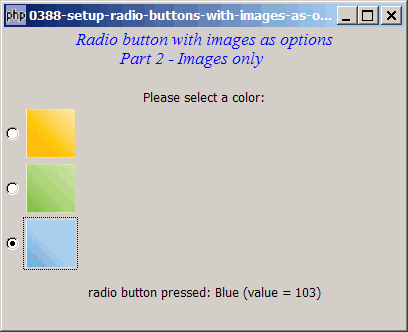
Suppose you would like to set up radio buttons with images as options. In Part 1, each option comprises an image with a text label. In this Part 2, each option is just an image (without the text label) as shown below:
Solution
- We make use of exactly the same technique as outlined in How to setup radio buttons with images as options - Part 1?
- Instead of packing both an image and a text label, we pack only the image in this case.
- However, since there is no text label, we need to manually pass the text label along with the 'toggled' signal for the radio buttons.
Sample Code
Note: The following image files are required by the sample code below. Please save a copy of the image files and put them in the same directory where you store the sample code.
 | square_yellow.jpg |
 | square_green.jpg |
 | square_blue.jpg |
| 1 2 3 4 5 6 7 8 9 10 11 12 13 14 15 16 17 18 19 20 21 22 23 24 25 26 27 28 29 30 31 32 33 34 35 37 38 44 45 46 47 48 49 50 53 54 55 56 57 58 59 63 64 65 66 67 68 69 70 | <?php $window = new GtkWindow(); $window->set_size_request(400, 300); $window->connect_simple('destroy', array('Gtk','main_quit')); $window->add($vbox = new GtkVBox()); // display title $title = new GtkLabel("Radio button with images as options\n". " Part 2 - Images only"); $title->modify_font(new PangoFontDescription( "Times New Roman Italic 10")); $title->modify_fg(Gtk::STATE_NORMAL, GdkColor::parse("#0000ff")); $title->set_size_request(-1, 40); $vbox->pack_start($title, 0, 0); $vbox->pack_start(new GtkLabel(), 0, 0); $vbox->pack_start(new GtkLabel('Please select a color:'), 0, 0); // setup grouped radio buttons $radio1 = setup_radio(null, 'Yellow', '101', 'square_yellow.jpg'); $radio2 = setup_radio($radio1, 'Green', '102', 'square_green.jpg'); $radio3 = setup_radio($radio1, 'Blue', '103', 'square_blue.jpg'); // pack them inside vbox $vbox->pack_start($radio1, 0, 0); $vbox->pack_start($radio2, 0, 0); $vbox->pack_start($radio3, 0, 0); // add a status area $vbox->pack_start($status_area = new GtkLabel('Click a Button')); // function to simplify the display of grouped radio buttons function setup_radio($radio_button_grp, $button_label, $button_value, $img_filename) { $radio = new GtkRadioButton($radio_button_grp); $radio->connect('toggled', "on_toggle", $button_label, $button_value); // note 1 $button_hbox = new GtkHBox(); $radio->add($button_hbox); $img = GtkImage::new_from_file($img_filename); $button_hbox->pack_start($img, 0, 0); return $radio; } // call-back function when user pressed a radio button function on_toggle($radio, $label, $value) { // note 2 global $status_area; $active = $radio->get_active(); if ($active) $status_area->set_text( "radio button pressed: $label (value = $value)\n"); } $window->show_all(); Gtk::main(); ?> |
Output
As shown above.
Explanation
The above makes use of the code from How to setup radio buttons with images as options - Part 1?
What's new here:
- Pass the text label along with each 'toggled' signal.
- Note that the text label is now contained in the second parameter
$label
Read more...