Problem
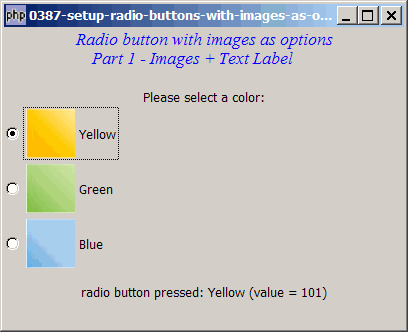
Suppose you would like to set up radio buttons with images as options as shown below:
Solution
- A GtkRadioButton is a subclass of GtkButton.
- As such, we can make use of exactly the same technique as outlined in How to display button with image? to display images in the radio button label.
Sample Code
Note: The following image files are required by the sample code below. Please save a copy of the image files and put them in the same directory where you store the sample code.
 | square_yellow.jpg |
 | square_green.jpg |
 | square_blue.jpg |
| 1 2 3 4 5 6 7 8 9 10 11 12 13 14 15 16 17 18 19 20 21 22 23 24 25 26 27 28 29 30 31 32 33 34 35 37 38 44 45 46 47 48 49 50 51 52 53 54 55 56 57 58 59 61 62 63 64 65 66 67 68 69 70 | <?php $window = new GtkWindow(); $window->set_size_request(400, 300); $window->connect_simple('destroy', array('Gtk','main_quit')); $window->add($vbox = new GtkVBox()); // display title $title = new GtkLabel("Radio button with images as options\n". " Part 1 - Images + Text Label"); $title->modify_font(new PangoFontDescription( "Times New Roman Italic 10")); $title->modify_fg(Gtk::STATE_NORMAL, GdkColor::parse("#0000ff")); $title->set_size_request(-1, 40); $vbox->pack_start($title, 0, 0); $vbox->pack_start(new GtkLabel(), 0, 0); $vbox->pack_start(new GtkLabel('Please select a color:'), 0, 0); // setup grouped radio buttons $radio1 = setup_radio(null, 'Yellow', '101', 'square_yellow.jpg'); // note 1 $radio2 = setup_radio($radio1, 'Green', '102', 'square_green.jpg'); // note 1 $radio3 = setup_radio($radio1, 'Blue', '103', 'square_blue.jpg'); // note 1 // pack them inside vbox $vbox->pack_start($radio1, 0, 0); $vbox->pack_start($radio2, 0, 0); $vbox->pack_start($radio3, 0, 0); // add a status area $vbox->pack_start($status_area = new GtkLabel('Click a Button')); // function to simplify the display of grouped radio buttons function setup_radio($radio_button_grp, $button_label, $button_value, $img_filename) { $radio = new GtkRadioButton($radio_button_grp); $radio->connect('toggled', "on_toggle", $button_value); $button_hbox = new GtkHBox(); // note 2 $radio->add($button_hbox); $img = GtkImage::new_from_file($img_filename); // note 3 $button_hbox->pack_start($img, 0, 0); // note 3 $button_hbox->pack_start(new GtkLabel(), 0, 0); $button_hbox->pack_start(new GtkLabel($button_label), 0, 0); // note 4 return $radio; } // call-back function when user pressed a radio button function on_toggle($radio, $value) { global $status_area; $button_hbox = $radio->child->get_children(); // note 5 $label = $button_hbox[2]->get_text(); // note 5 $active = $radio->get_active(); // note 6 if ($active) $status_area->set_text( "radio button pressed: $label (value = $value)\n"); } $window->show_all(); Gtk::main(); ?> |
Output
As shown above.
Explanation
The above makes use of the code from How to display and process grouped radio buttons? and How to display button with image?
What's new here:
- Note that the filename of the image is passed as the last parameter.
- Create an hbox to hold both the image and the label.
- Load the image and stuff it into the hbox.
- Now attach the text label too.
- To retrieve the radio button label, we need to access the hbox first then get the text label.
- Check whether the radio button is selected.
Read more...