Problem
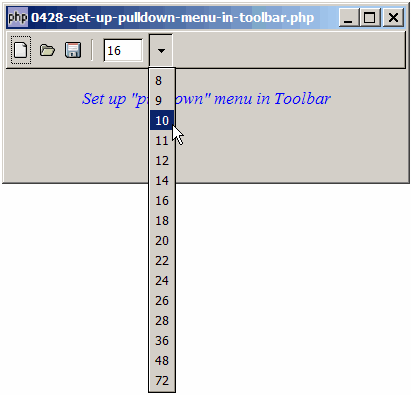
Suppose you want to set up a pull down or drop down menu in the toolbar (e.g. for selection of fonts or font size) as shown below:
Solution
- Pull down menus are created in the toolbar using GtkMenuToolButton.
- However, note that the pulldown menu is not the same as a combobox. Rather, it's implemented using a popup GtkMenu.
Sample Code
| 1 2 3 4 5 9 10 11 14 15 16 17 18 19 20 22 23 24 25 26 27 28 29 31 33 40 41 42 48 49 51 52 53 54 55 56 57 58 59 60 61 62 63 64 65 66 67 68 69 70 71 72 73 74 75 76 77 79 81 83 84 85 86 87 88 89 91 92 93 94 97 98 99 100 101 106 107 108 109 110 113 114 116 117 118 119 120 121 | <?php $window = new GtkWindow(); $window->set_size_request(400, 150); $window->connect_simple('destroy', array('Gtk','main_quit')); $window->add($vbox = new GtkVBox()); // define menu definition $toolbar_definition = array('New', 'Open', 'Save', '<hr>', // note 1 ); setup_toolbar($vbox, $toolbar_definition); // display title $title = new GtkLabel("Set up \"pulldown\" menu in Toolbar"); $title->modify_font(new PangoFontDescription("Times New Roman Italic 10")); $title->modify_fg(Gtk::STATE_NORMAL, GdkColor::parse("#0000ff")); $vbox->pack_start($title); $vbox->pack_start(new GtkLabel('')); $window->show_all(); Gtk::main(); // process toolbar function on_toolbar_button($menuitem, $item='') { $menuitem_type = $menuitem->get_name(); if ($menuitem->get_name() == 'GtkMenuToolButton') { global $fontsize; echo "fontsize selected: ".$fontsize->get_text()."\n"; } else { echo "toolbar clicked: $item\n"; } } function setup_popup_menu($menu_definition) { $menu = new GtkMenu(); foreach($menu_definition as $menuitem_definition) { if ($menuitem_definition=='<hr>') { $menu->append(new GtkSeparatorMenuItem()); } else { $menu_item = new GtkMenuItem($menuitem_definition); $menu->append($menu_item); $menu_item->connect('activate', 'on_popup_menu_select'); } } $menu->show_all(); return $menu; } // process popup menu item selection function on_popup_menu_select($menu_item) { $item = $menu_item->child->get_label(); echo "popup menu selected: $item\n"; global $fontsize; $fontsize->set_text($item); } // setup toolbar function setup_toolbar($vbox, $toolbar_definition) { $toolbar = new GtkToolBar(); $toolbar->set_property('toolbar-style', Gtk::TOOLBAR_ICONS); $vbox->pack_start($toolbar, 0, 0); foreach($toolbar_definition as $item) { if ($item=='<hr>') { $toolbar->insert(new GtkSeparatorToolItem(), -1); } else { $stock_image_name = 'Gtk::STOCK_'.strtoupper($item); if (defined($stock_image_name)) { $toolbar_item = GtkToolButton::new_from_stock( constant($stock_image_name)); $toolbar->insert($toolbar_item, -1); $toolbar_item->connect('clicked', 'on_toolbar_button', $item); } } } // setup fontsize toolbar global $fontsize; $fontsize = new GtkEntry(); // note 2 $fontsize->set_size_request(40, -1); $toolbar_item = new GtkMenuToolButton($fontsize, 'fontsize'); // note 3 $toolbar_item->connect('clicked', 'on_toolbar_button'); $toolbar->insert($toolbar_item, -1); // note 4 $menu = setup_popup_menu(array(8,9,10,11,12,14,16,18,20, 22,24,26,28,36,48,72)); // note 5 $toolbar_item->set_menu($menu); // note 6 } ?> |
Output
As shown above.Explanation
- This is the menu definitions for the standard toolbar items.
- Create a new GtkEntry that will hold the selected font size.
- Create the menutoolbutton. Note that you can pass in any standard GtkWidget for the first parameter. In this example, we used a GtkEntry.
- Add this to the toolbar.
- Set up the "pulldown" menu (it's actually a popup menu).
- Binds the popup menu to this menutoolbutton.
Note
You may want to compare this with the setting up of GtkMenu - How to set up menu and radio menu - Part 1?. The two are very similar.
Related Links
- How to set up toolbar?
- How to create detachable toolbar?
- How to set up toolbar with custom text and graphics - Part 1 - labels below graphics?
- How to set up toolbar with custom text and graphics - Part 2 - labels on right of graphics?
- How to set up toolbar with custom text and graphics - Part 3 - exact positioning of labels?
Read more...