Problem
In case you're still puzzled by why going through all the troubles of creating menus and toolbars using GtkAction, I think this example should clarify your doubts.
What's interesting about this example:
- Set up both menus and toolbars in one go using GtkAction.
- When the application is first started, only the File New and File Open menu/toolbar item is active.
- Once a file is created or opened, we activate all the editing menu/toolbar items with the one-liner: $actiongrp['open']->set_sensitive(true);
- When the user closes the document, we deactivate all the editing menu/toolbar items with the one-liner: $actiongrp['open']->set_sensitive(false); as shown below.
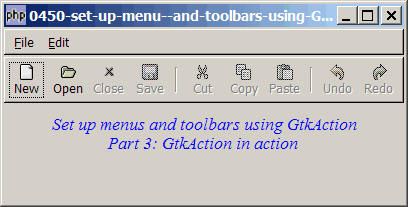
Solution
We use exactly the same techniques as outlined in How to set up toolbar using GtkAction - Part 2 - add accelerators? and How to set up menu using GtkAction - Part 3 - add accelerators with labels?
Sample Code
| 1 2 3 4 5 6 7 8 10 11 12 13 14 15 16 17 18 19 20 21 22 23 24 25 26 27 28 29 30 31 32 33 34 38 39 40 41 42 43 44 45 46 47 48 49 50 51 52 53 55 56 57 58 59 60 61 62 64 65 66 67 68 69 71 72 73 74 75 76 77 78 79 80 81 82 83 85 86 87 88 89 90 92 95 96 97 98 99 100 101 102 103 104 105 106 107 108 109 110 111 112 114 115 116 117 118 120 121 123 124 125 126 128 130 131 132 133 135 136 137 138 139 140 141 142 143 144 145 146 147 148 149 150 151 153 154 155 156 157 158 159 160 161 162 163 164 165 | <?php $window = new GtkWindow(); $window->set_title($argv[0]); $window->set_size_request(400, 175); $window->connect_simple('destroy', array('Gtk','main_quit')); $window->add($vbox = new GtkVBox()); $accel_group = new GtkAccelGroup(); $window->add_accel_group($accel_group); // global definitions for both menu and toolbar items $global_definitions = array( // note 1 'file_new' => '_New|N', 'file_open' => '_Open|O', 'file_close' => '_Close', 'file_save' => '_Save|S', 'file_saveas' => 'Save _As', 'file_quit' => '_Quit', 'edit_cut' => 'Cut|X', 'edit_copy' => 'Copy|C', 'edit_paste' => '_Paste|V', 'edit_selectall' => 'Select All|A', 'edit_undo' => '_Undo|Z', 'edit_redo' => '_Redo|Y', '<hr>' => '<hr>', '<hr2>' => '<hr2>' ); // define menu definition $menu_definition = array( // note 2 '_File' => array('file_new', 'file_open', 'file_close', '<hr>', 'file_save', 'file_saveas', '<hr2>', 'file_quit'), '_Edit' => array('edit_cut', 'edit_copy', 'edit_paste', '<hr2>', 'edit_selectall', '<hr>', 'edit_undo', 'edit_redo'), ); $toolbar_definition = array( // note 3 'file_new', 'file_open', 'file_close', 'file_save', 'edit_cut', 'edit_copy', 'edit_paste', 'edit_undo', 'edit_redo' ); $actiongrp = array(); // note 4 $actiongrp_def['new'] = array('file_new', 'file_open', 'file_quit'); $actiongrp_def['open'] = array('file_close', 'file_save', 'file_saveas', 'file_quit', 'edit_cut', 'edit_copy', 'edit_paste', 'edit_selectall', 'edit_undo', 'edit_redo'); $actiongrp['new'] = new GtkActionGroup('new'); $actiongrp['open'] = new GtkActionGroup('open'); $menubar = new GtkMenuBar(); $vbox->pack_start($menubar, 0, 0); $toolbar = new GtkToolBar(); $toolbar->set_show_arrow(false); $vbox->pack_start($toolbar, 0, 0); setup_action($vbox); // display title $title = new GtkLabel("Set up menus and toolbars using GtkAction\n". " Part 3: GtkAction in action"); $title->modify_font(new PangoFontDescription("Times New Roman Italic 10")); $title->modify_fg(Gtk::STATE_NORMAL, GdkColor::parse("#0000ff")); $vbox->pack_start($title); $vbox->pack_start(new GtkLabel('')); $actiongrp['new']->set_sensitive(true); $actiongrp['open']->set_sensitive(false); $window->show_all(); Gtk::main(); function setup_action($vbox) { global $menu_definition, $toolbar_definition; global $menubar, $toolbar, $actiongrp, $actiongrp_def; foreach($menu_definition as $toplevel => $sublevels) { $menubar->append($top_menu = new GtkMenuItem($toplevel)); $menu = new GtkMenu(); $top_menu->set_submenu($menu); foreach($sublevels as $item_id) { global $global_definitions; $item = $global_definitions[$item_id]; if (strpos("$item", '|') === false) { $accel_key = ''; } else { list($item, $accel_key) = explode('|', $item); } if ($item=='<hr2>') { $menu->append(new GtkSeparatorMenuItem()); $toolbar->insert(new GtkSeparatorToolItem(), -1); } elseif ($item=='<hr>') { $menu->append(new GtkSeparatorMenuItem()); } else { $item2 = str_replace('_', '', $item); $item2 = str_replace(' ', '_', $item2); $stock_image_name = 'Gtk::STOCK_'.strtoupper($item2); $stock_image = ''; if (defined($stock_image_name)) $stock_image = constant($stock_image_name); $action = new GtkAction($item, $item, '', $stock_image); global $accel_group; foreach($actiongrp_def as $k=>$v) { if (in_array($item_id, $v)) { // note 5 $key = $k; break; } } if ($accel_key!='') { $accel = "<control>$accel_key"; $actiongrp[$key]->add_action_with_accel($action, $accel); // note 6 $action->set_accel_group($accel_group); $action->connect_accelerator(); } else { $actiongrp[$key]->add_action($action); // note 6 } $menu_item = $action->create_menu_item(); // note 7 $menu->append($menu_item); if (in_array($item_id, $toolbar_definition)) { $toolitem = $action->create_tool_item(); // note 8 $toolbar->insert($toolitem, -1); } $action->connect('activate', 'on_item_select', $item); } } } } // process toolbar function on_item_select($button, $item) { global $actiongrp; echo "item selected: $item\n"; if ($item=='_Quit') Gtk::main_quit(); elseif ($item=='_New' || $item=='_Open') { $actiongrp['new']->set_sensitive(true); $actiongrp['open']->set_sensitive(true); } elseif ($item=='_Close') { $actiongrp['new']->set_sensitive(true); $actiongrp['open']->set_sensitive(false); } } ?> |
Output
As shown above.Explanation
- The global definitions for menu and toolbar items.
- The menu definition.
- The toolbar definition.
- The action group definitions./li>
- Checks which action group the menu/toolbar belongs to.
- Add the action to the respective action group./li>
- Create the menu item from GtkAction.
- Create the toolbar item from GtkAction.
Related Links
- How to set up menu and toolbars using GtkAction - Part 1?
- How to set up menu using GtkAction - Part 1?
- How to set up menu using GtkAction - Part 2 - add accelerators?
- How to set up menu using GtkAction - Part 3 - add accelerators with labels?
- How to set up menu and radio menu - Part 1?
- How to set up toolbar using GtkAction - Part 1?
Read more...