Problem
This very interesting and useful sample code is contributed by Andre Colomb.
In Part 1, you have set up the treeview such that the options of the pulldown menu are displayed with different background color.
However, one "problem" is that after the options are selected, the background color disappeared when you move the cursor to other rows.
Suppose you would like the background color to stay after the options are made as shown below.
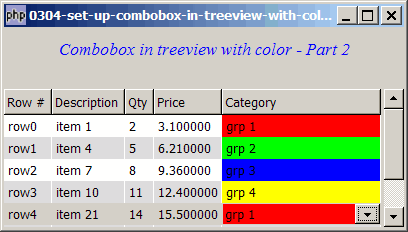
Solution
- To make the background color of the options stay, we achieve this in the cell display function of the base treeview (as oppose to that of the combobox).
Sample Code
| 1 2 3 4 5 6 7 8 9 10 11 12 13 14 15 16 17 18 19 20 21 22 23 24 25 26 27 28 29 30 31 32 33 34 35 36 37 38 39 40 41 42 43 44 45 46 47 48 49 50 51 52 53 54 55 56 57 58 59 60 61 62 63 64 65 66 67 68 69 70 71 72 73 74 75 76 77 78 79 80 81 82 83 84 85 86 87 88 89 90 91 92 93 94 95 97 98 99 100 101 102 103 104 105 108 109 110 111 112 115 116 117 118 119 120 121 122 133 134 135 136 137 138 139 140 141 142 143 144 145 146 147 148 149 150 151 152 153 154 155 156 157 158 159 161 162 163 164 | <?php $window = new GtkWindow(); $window->set_size_request(400, 200); $window->connect_simple('destroy', array('Gtk','main_quit')); $window->add($vbox = new GtkVBox()); // display title $title = new GtkLabel("Combobox in treeview with color - Part 2"); $title->modify_font(new PangoFontDescription("Times New Roman Italic 10")); $title->modify_fg(Gtk::STATE_NORMAL, GdkColor::parse("#0000ff")); $title->set_size_request(-1, 40); $vbox->pack_start($title, 0, 0); $vbox->pack_start(new GtkLabel(), 0, 0); // the 2D table $data = array( array('row0', 'item 1', 2, 3.1), array('row1', 'item 4', 5, 6.21), array('row2', 'item 7', 8, 9.36), array('row3', 'item 10', 11, 12.4), array('row4', 'item 21', 14, 15.5), array('row5', 'item 36', 17, 18.6), array('row6', 'item 42', 20, 21.73)); display_table($vbox, $data); $window->show_all(); Gtk::main(); function display_table($vbox, $data) { // Set up a scroll window $scrolled_win = new GtkScrolledWindow(); $scrolled_win->set_policy( Gtk::POLICY_AUTOMATIC, Gtk::POLICY_AUTOMATIC); $vbox->pack_start($scrolled_win); // creates the list store if (defined("GObject::TYPE_STRING")) { $model = new GtkListStore(GObject::TYPE_STRING, GObject::TYPE_STRING, GObject::TYPE_LONG, GObject::TYPE_DOUBLE, GObject::TYPE_STRING); } else { $model = new GtkListStore(Gtk::TYPE_STRING, Gtk::TYPE_STRING, Gtk::TYPE_LONG, Gtk::TYPE_DOUBLE, Gtk::TYPE_STRING); } $field_header = array('Row #', 'Description', 'Qty', 'Price'); // creates the view to display the list store $view = new GtkTreeView($model); $scrolled_win->add($view); // creates columns for ($col=0; $col<count($field_header); ++$col) { $cell_renderer = new GtkCellRendererText(); $column = new GtkTreeViewColumn($field_header[$col], $cell_renderer, 'text', $col); $column->set_cell_data_func($cell_renderer, "format_col", $col); $view->append_column($column); } // setup combo box $cell_renderer = new GtkCellRendererCombo(); if (defined("GObject::TYPE_STRING")) { $category = new GtkListStore(GObject::TYPE_STRING, GObject::TYPE_STRING); } else { $category = new GtkListStore(Gtk::TYPE_STRING, Gtk::TYPE_STRING); } global $options; $options = array('grp 1'=>'#ff0000', 'grp 2'=>'#00ff00', 'grp 3'=>'#0000ff', 'grp 4'=>'#ffff00'); foreach($options as $option=>$color) { $category->append(array($option, $color)); } $cell_renderer->set_property('model', $category); $cell_renderer->set_property('text-column', 0); $cell_renderer->set_property('editable', true); $cell_renderer->set_property('has-entry', false); $cell_renderer->connect('editing-started', 'editing_started'); $cell_renderer->connect('edited', 'on_combo', $model); $column = new GtkTreeViewColumn('Category', $cell_renderer, 'text', 4); $column->set_cell_data_func($cell_renderer, "format_col", 4); $view->append_column($column); $selection = $view->get_selection(); $selection->connect('changed', 'on_selection'); // pupulates the data for ($row=0; $row<count($data); ++$row) { $values = array(); for ($col=0; $col<count($data[$row]); ++$col) { $values[] = $data[$row][$col]; } $values[] = ''; $model->append($values); } } // self-defined function to display alternate row color function format_col($column, $cell, $model, $iter, $col_num) { $path = $model->get_path($iter); $row_num = $path[0]; $category_color = ''; if ($col_num==4) { // note 1 global $options; $category = $model->get_value($iter, 4); // note 2 $category_color = @$options[$category]; // note 3 } $row_color = ($row_num%2==1) ? '#dddddd' : '#ffffff'; if ($col_num==4 && $category_color!='') $row_color = $category_color; // note 4 $cell->set_property('cell-background', $row_color); } function on_combo($renderer, $path, $selection, $model) { $iter = $model->get_iter($path); $model->set($iter, 4, $selection); } // the function that is called when user selects a row function on_selection($selection) { list($model, $iter) = $selection->get_selected(); $desc = $model->get_value($iter, 1); $qty = $model->get_value($iter, 2); $price = $model->get_value($iter, 3); $grp = $model->get_value($iter, 4); echo "You have selected $desc: $qty ($price) category = $grp\n"; } function editing_started($renderer, $editable, $path) { $cellview = $editable->child; $renderers = $cellview->get_cell_renderers(); foreach ($renderers as $comborenderer) { $editable->set_cell_data_func($comborenderer, 'set_combo_renderer_background'); } } function set_combo_renderer_background($column, $renderer, $model, $iter) { // Get the relevant values $color = $model->get_value($iter, 1); // Set the background color $renderer->set_property('cell-background', $color); } ?> |
Output
As shown above.
Explanation
The above cocde is based on How to use GtkCellRendererCombo - Part 3 - process user selection?
What's new here:
- Check if this the combobox column (col 4).
- Get the value selected by the user.
- Get the corresponding color. We use the "@" here to suppress any warnings - when no value is selected yet by the user.
- If there is a color defined for the selected value, set it as the background color instead of the default background color.
Note
- If you run the above script, you will see the error
Gtk-CRITICAL **: gtk_cell_view_set_cell_data: assertion `cell_view->priv->displayed_row != NULL' failed - This is caused by the statement
$renderers = $cellview->get_cell_renderers()
(Note 5). - I'm not sure if this is a bug. Or it's just that PHP-GTK2 doesn't like us to get access to this cellrenderer, whcih is supposed to be used internally.
- Anyway, it seems that this is just a warning. The script runs fine, though.
Read more...