Problem
This is in response to duez1981's post titled 'php-gtk2 point of sale system'.
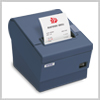
He is writing a point-of-sale (POS) system using PHP-GTK2, and he wants to know how to link to a receipt printer as shown below.
Solution
- A standard receipt printer such as the Epson TM-T88III receipt printer uses the parallel port.
- To print to the parallel-port receipt printer, you print through port PRN (exactly the same as printing from DOS prompt).
- From within PHP-GTK2, you need to first establish the connection with the printer by using
$handle = fopen("PRN", "w"); - Thereafter, to print anything to the printer, you just "write" to it like the file handle:
fwrite($handle, 'text to printer'); - There are newer receipt printer that uses USB. I believe you should be able to print to such printers through PRN too.
Sample Code
| 1 2 3 4 5 | <?php $handle = fopen("PRN", "w"); // note 1 fwrite($handle, 'text to printer'); // note 2 fclose($handle); // note 3 ?> |
Output
Explanation
- Establish the connection with the receipt printer through PRN.
- Writes to the receipt printer through the file handle.
- Disconnect the printer.
Read more...