Problem
You want to have a GtkLabel with background color and border as shown below:
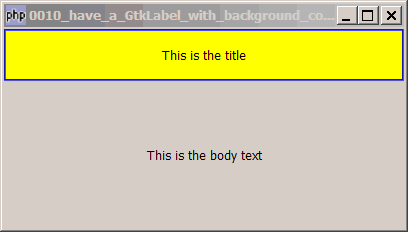
Solution
- Create a GtkEventBox
- Place the label in the EventBox
- Set the background color of the eventbox with modify_bg
- Then create a GtkFrame
- Stuff the EventBox inside the Frame
- Set the color of the frame with modify_bg
Sample Code
| 1 2 3 4 5 6 7 8 9 10 11 12 13 14 15 16 17 18 19 20 21 22 23 24 25 26 27 28 29 30 31 | <?php $window = &new GtkWindow(); $window->connect_simple('destroy', array( 'Gtk', 'main_quit')); $window->set_size_request(400,200); // create a vbox to hold multiple labels $vbox = new GtkVBox(); // create an eventbox that allows you set background color $eventbox = new GtkEventBox(); $eventbox->modify_bg(Gtk::STATE_NORMAL, GdkColor::parse('#ffff00')); // note 1 // create the title label and stuff it in the eventbox $title = new GtkLabel('This is the title'); $title->set_size_request(100,48); $eventbox->add($title); // note 2 // create a frame to act as border $frame = new GtkFrame(); $frame->modify_bg(Gtk::STATE_NORMAL, GdkColor::parse('#0000ff')); // note 3 $frame->add($eventbox); // note 4 $vbox->pack_start($frame, 0, 0); // create the body_text and place it below the title $label2 = new GtkLabel('This is the body text'); $vbox->pack_start($label2); // $window->add($vbox); $window->show_all(); Gtk::main(); ?> |
Output
As shown above.Explanation
Please take a look at the following two articles if you haven't:
Note 1: creates an eventbox and sets its background to yellow.
Note 2: place the title inside the eventbox.
Note 3: creates a frame and sets its border to blue.
Note 4: stuff the eventbox inside the frame. Now you have a label with yellow background and blue border!
Read more...