Problem
You would like to enable rubber banding in a GtkTreeView for selecting multiple rows by draging the mouse as shown below:
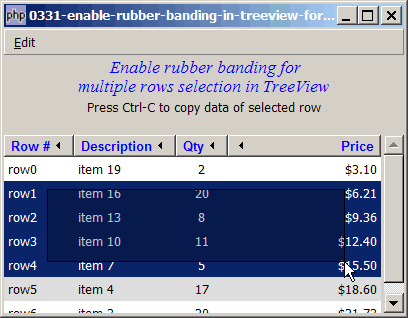
Solution
- To enable rubber banding, use this method (available in gtk+2.10 and above):
GtkTreeView::set_rubber_banding(true)
Important Note: This only works for PHP-GTK2 compliled with gtk+ v2.10 and above. If you are using an older version, for linux, you may follow the step-by-step instructions to recompile php-gtk2 with gtk+ v2.10. For windows, please refer to How to install php gtk2 on windows? You may also want to take a look here to see some of the new exciting PHP-GTK2 Functionalities.
Sample Code
| 1 2 3 4 5 6 7 8 9 10 11 13 14 15 16 17 18 19 20 21 22 23 24 25 26 27 28 29 30 31 32 33 34 35 36 37 38 39 40 41 42 43 44 45 46 47 48 50 51 52 53 54 55 56 57 58 59 60 61 62 63 64 65 66 67 68 69 70 71 72 73 74 75 76 77 78 79 80 81 82 83 84 85 86 87 88 89 90 91 92 93 94 95 96 97 98 99 100 101 102 103 104 105 106 107 108 109 110 111 115 116 117 118 119 120 121 122 123 124 125 126 127 128 129 130 131 132 133 134 135 136 137 138 139 140 141 142 144 145 146 147 148 150 151 152 153 154 155 156 157 158 159 160 161 162 163 164 165 166 167 168 170 171 172 173 174 175 181 182 183 184 185 189 190 191 192 193 194 195 196 197 198 199 200 201 202 203 204 205 206 207 208 209 210 211 213 214 215 216 217 218 225 226 227 228 231 232 233 234 235 236 237 238 239 240 241 242 243 244 245 246 | <?php $window = new GtkWindow(); $window->set_title($argv[0]); $window->set_size_request(400, 286); $window->connect_simple('destroy', array('Gtk','main_quit')); $window->add($vbox = new GtkVBox()); $accel_group = new GtkAccelGroup(); // create a new accelerator $window->add_accel_group($accel_group); // attach it to the window // define menu definition $menu_definition = array( '_Edit' => array('Cut|X', 'Copy|C', '_Paste|V', '<hr>', 'Select _All|A', '<hr>', '_Undo|Z','_Redo|Y'), ); setup_menu($vbox, $menu_definition); // display title $title = new GtkLabel(" Enable rubber banding for\n". "multiple rows selection in TreeView"); $title->modify_font(new PangoFontDescription("Times New Roman Italic 10")); $title->modify_fg(Gtk::STATE_NORMAL, GdkColor::parse("#0000ff")); $title->set_size_request(-1, 40); $vbox->pack_start($title, 0, 0); $vbox->pack_start(new GtkLabel( 'Press Ctrl-C to copy data of selected row'), 0, 0); $vbox->pack_start(new GtkLabel(), 0, 0); // Set up a scroll window $scrolled_win = new GtkScrolledWindow(); $scrolled_win->set_policy( Gtk::POLICY_AUTOMATIC, Gtk::POLICY_AUTOMATIC); $vbox->pack_start($scrolled_win); // the 2D table $data = array( array('row0', 'item 19', 2, 3.1), array('row1', 'item 16', 20, 6.21), array('row2', 'item 13', 8, 9.36), array('row3', 'item 10', 11, 12.4), array('row4', 'item 7', 5, 15.5), array('row5', 'item 4', 17, 18.6), array('row6', 'item 3', 20, 21.73)); display_table ($scrolled_win, $data); $clipboard = new GtkClipboard($window->get_display(), Gdk::atom_intern('CLIPBOARD')); // note 1 $window->show_all(); Gtk::main(); function display_table($scrolled_win, $data) { // Creates the list store if (defined("GObject::TYPE_STRING")) { $model = new GtkListStore(GObject::TYPE_STRING, GObject::TYPE_STRING, GObject::TYPE_LONG, GObject::TYPE_DOUBLE); } else { $model = new GtkListStore(Gtk::TYPE_STRING, Gtk::TYPE_STRING, Gtk::TYPE_LONG, Gtk::TYPE_DOUBLE); } $field_header = array('Row #', 'Description', 'Qty', 'Price'); $field_justification = array(0.0, 0.0, 0.5, 1.0); // Creates the view to display the list store $view = new GtkTreeView($model); $scrolled_win->add($view); // Creates the columns for ($col=0; $col<count($field_header); ++$col) { $cell_renderer = new GtkCellRendererText(); $cell_renderer->set_property("xalign", $field_justification[$col]); $column = new GtkTreeViewColumn($field_header[$col], $cell_renderer, 'text', $col); $column->set_alignment($field_justification[$col]); $column->set_sort_column_id($col); // set the header font and color $label = new GtkLabel($field_header[$col]); $label->modify_font(new PangoFontDescription("Arial Bold")); $label->modify_fg(Gtk::STATE_NORMAL, GdkColor::parse("#0000FF")); $column->set_widget($label); $label->show(); // setup self-defined function to display alternate row color $column->set_cell_data_func($cell_renderer, "format_col", $col); $view->append_column($column); } // pupulates the data for ($row=0; $row<count($data); ++$row) { $values = array(); for ($col=0; $col<count($data[$row]); ++$col) { $values[] = $data[$row][$col]; } $model->append($values); } // setup selection global $view_selection; $view_selection = $view->get_selection(); $view_selection->set_mode(Gtk::SELECTION_MULTIPLE); $view_selection->connect('changed', 'on_selection'); $view->set_rubber_banding(true); // note 1 } // self-defined function to format the price column function format_col($column, $cell, $model, $iter, $col_num) { $path = $model->get_path($iter); // get the current path $row_num = $path[0]; // get the row number if ($col_num==3) { $amt = $model->get_value($iter, 3); $cell->set_property('text', '$'.number_format($amt,2)); } $row_color = ($row_num%2==1) ? '#dddddd' : '#ffffff'; $cell->set_property('cell-background', $row_color); } // the function that is called when user selects a row function on_selection($selection) { return; list($model, $iter) = $selection->get_selected(); $desc = $model->get_value($iter, 1); $qty = $model->get_value($iter, 2); $price = $model->get_value($iter, 3); print "You have selected $desc: $qty ($price)\n"; } // setup menu function setup_menu($vbox, $menus) { global $accel_group; $menubar = new GtkMenuBar(); $vbox->pack_start($menubar, 0, 0); foreach($menus as $toplevel => $sublevels) { $menubar->append($top_menu = new GtkMenuItem($toplevel)); $menu = new GtkMenu(); $top_menu->set_submenu($menu); foreach($sublevels as $submenu) { if (strpos("$submenu", '|') === false) { $accel_key = ''; } else { list($submenu, $accel_key) = explode('|', $submenu); } if (is_array($submenu)) { // set up radio menus $i=0; $radio[0] = null; foreach($submenu as $radio_item) { $radio[$i] = new GtkRadioMenuItem($radio[0], $radio_item); $radio[$i]->connect('toggled', "on_toggle"); $menu->append($radio[$i]); ++$i; } $radio[0]->set_active(1); // select the first item } else { if ($submenu=='<hr>') { $menu->append(new GtkSeparatorMenuItem()); } else { $submenu2 = str_replace('_', '', $submenu); $submenu2 = str_replace(' ', '_', $submenu2); $stock_image_name = 'Gtk::STOCK_'.strtoupper($submenu2); if (defined($stock_image_name)) { $menu_item = new GtkImageMenuItem( constant($stock_image_name)); } else { $menu_item = new GtkMenuItem($submenu); } if ($accel_key!='') { $menu_item->add_accelerator("activate", $accel_group, ord($accel_key), Gdk::CONTROL_MASK, 1); } $menu->append($menu_item); $menu_item->connect('activate', 'on_menu_select'); } } } } } // process menu item selection function on_menu_select($menu_item) { $item = $menu_item->child->get_label(); echo "menu selected: $item\n"; switch($item) { case '_Quit': Gtk::main_quit(); case '_Copy': copy_selection(); break; case 'Select _All': select_all(); break; } } // copy the row data function copy_selection() { global $clipboard; global $view_selection; list($model, $selected_rows) = $view_selection->get_selected_rows(); $num_selected_rows = count($selected_rows); print "num_selected_rows = $num_selected_rows\n"; if ($num_selected_rows==0) return; // return if there's no selection $text_to_copy = ''; foreach($selected_rows as $path) { $row = $model[$path]; for ($i=0; $i<count($row); ++$i) { $text_to_copy .= $row[$i]; if ($i<count($row)-1) $text_to_copy .= "\t"; // tab-delimited } $text_to_copy .= "\n"; } echo "text_to_copy = $text_to_copy\n"; $clipboard->set_text($text_to_copy); } // select all function select_all() { global $view_selection; $view_selection->select_all(); } ?> |
Output
As shown above.Explanation
We make use of the code from How to copy row data from GtkTreeView using GtkClipboard - Part 2 - copy multiple rows?
What's new here:
- Enable rubber banding for multiple rows selection.
Read more...