Problem
Suppose you have displayed two lists of thumbnail images using GtkIconView, and you would like to allow users to drag and drop images between the two views.
If you've tried the sample code in Part 3, you will find that it has one potential problem. If the user tries to drag an image and drop it in the same view, the program does not respond correctly.
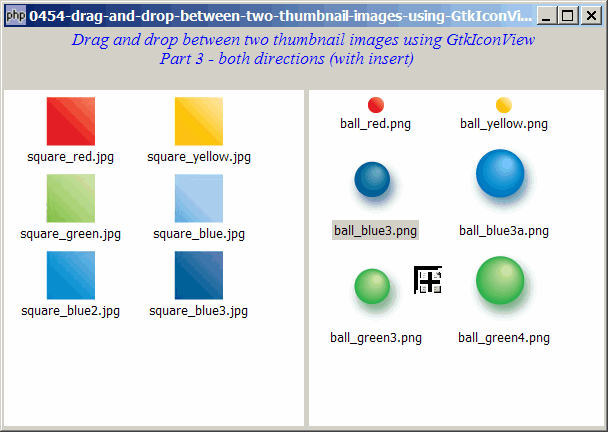
In this Part 4, we will fix this (i.e. preventing users from dragging and dropping to same view) as shown below:
Solution
- We need to pass along additional info to the signal handler so that it knows from where it is dragged from.
- If it's from the same side (e.g. left to left, or right to right), we just ignore them.
Important Note: This only works for PHP-GTK2 compliled with gtk+ v2.10 and above. If you are using an older version, for linux, you may follow the step-by-step instructions to recompile php-gtk2 with gtk+ v2.10. For windows, please refer to How to install php gtk2 on windows? You may also want to take a look here to see some of the new exciting PHP-GTK2 Functionalities.
Sample Code
The following image files are required by the sample code below. Please save a copy of the image files and put them in the same directory where you store the sample code.
 | square_red.jpg |
 | square_yellow.jpg |
 | square_green.jpg |
 | square_blue.jpg |
 | square_blue2.jpg |
 | square_blue3.jpg |
 | ball_red.png |
 | ball_yellow.png |
 | ball_blue3.png |
 | ball_blue3a.png |
 | ball_green3.png |
 | ball_green4.png |
| 1 2 3 4 7 8 9 10 11 12 13 14 15 16 17 18 19 22 23 26 27 28 29 30 31 34 35 36 37 38 39 40 41 42 43 44 45 46 47 48 49 50 51 52 53 54 55 56 57 58 59 60 61 65 68 69 70 71 72 74 75 76 78 79 80 81 83 84 85 86 87 88 89 90 91 92 93 94 95 96 97 98 99 101 103 104 105 106 107 108 109 111 112 113 114 117 118 119 120 121 122 125 126 127 128 130 132 133 134 137 138 139 140 141 143 144 145 146 147 148 149 150 151 153 154 155 156 158 160 161 163 164 166 167 168 170 171 172 | <?php $window = new GtkWindow(); $window->set_title($argv[0]); $window->set_size_request(600, 400); $window->connect_simple('destroy', array('Gtk','main_quit')); $window->add($vbox = new GtkVBox()); // display title $title = new GtkLabel("Drag and drop between two thumbnail images using GtkIconView\n". " Part 3 - both directions (with insert)"); $title->modify_font(new PangoFontDescription("Times New Roman Italic 10")); $title->modify_fg(Gtk::STATE_NORMAL, GdkColor::parse("#0000ff")); $title->set_size_request(-1, 40); $vbox->pack_start($title, 0, 0); $vbox->pack_start(new GtkLabel(), 0, 0); // add a small gap // Set up the two views $hpane = new GtkHPaned(); $vbox->pack_start($hpane); // the thumbnail image lists // 0 = left // 1 = right $imagelist[0] = array('square_red.jpg', 'square_yellow.jpg', 'square_green.jpg', 'square_blue.jpg', 'square_blue2.jpg', 'square_blue3.jpg'); $imagelist[1] = array('ball_red.png', 'ball_yellow.png', 'ball_blue3.png', 'ball_blue3a.png', 'ball_green3.png', 'ball_green4.png',); $left_vbox = setup_iconview(0, 'left'); $right_vbox = setup_iconview(1, 'right'); // setup drag and drop for left to right $view[0]->drag_source_set(Gdk::BUTTON1_MASK, array( array( 'text/plain', 0, 0)), Gdk::ACTION_COPY|Gdk::ACTION_MOVE); $view[0]->connect('drag-data-get', 'on_drag', 'left'); // note 1 $view[1]->drag_dest_set(Gtk::DEST_DEFAULT_ALL, array( array( 'text/plain', 0, 0)), Gdk::ACTION_COPY|Gdk::ACTION_MOVE); $view[1]->connect('drag-data-received', 'on_drop', $view[0], 'right'); // note 1 // setup drag and drop for right to left $view[1]->drag_source_set(Gdk::BUTTON1_MASK, array( array( 'text/plain', 0, 0)), Gdk::ACTION_COPY|Gdk::ACTION_MOVE); $view[1]->connect('drag-data-get', 'on_drag', 'right'); // note 1 $view[0]->drag_dest_set(Gtk::DEST_DEFAULT_ALL, array( array( 'text/plain', 0, 0)), Gdk::ACTION_COPY|Gdk::ACTION_MOVE); $view[0]->connect('drag-data-received', 'on_drop', $view[1], 'left'); // note 1 $hpane->add1($left_vbox); $hpane->add2($right_vbox); $view[0]->set_size_request(300, -1); $window->show_all(); Gtk::main(); function setup_iconview($id, $label) { global $imagelist, $model, $modelfilter, $view; $model[$id] = new GtkListStore(GdkPixbuf::gtype, Gtk::TYPE_STRING); foreach($imagelist[$id] as $img) { $pixbuf = GdkPixbuf::new_from_file($img); $model[$id]->append(array($pixbuf, $img)); } $view[$id] = new GtkIconView($model[$id]); $view[$id]->set_pixbuf_column(0); // col 0 of the model $view[$id]->set_text_column(1); // col 1 of the model $view[$id]->set_selection_mode(Gtk::SELECTION_MULTIPLE); $view[$id]->set_columns(0); $view[$id]->set_item_width(120); $vbox = new GtkVBox(); $scrolled_win = new GtkScrolledWindow(); $scrolled_win->set_policy( Gtk::POLICY_AUTOMATIC, Gtk::POLICY_AUTOMATIC); $vbox->pack_start($scrolled_win); $scrolled_win->add($view[$id]); return $vbox; } // process drag function on_drag($widget, $context, $data, $info, $time, $from_view) { $selection = $widget->get_selected_items(); if (count($selection)==0) return; // return if there's no selection $data->set_text(serialize(array($from_view, $selection))); // note 2 } // process drop function on_drop($widget, $context, $x, $y, $data, $info, $time, $src_view, $to_view) { $data = unserialize($data->data); $from_view = $data[0]; $selection = $data[1]; if ($from_view == $to_view) { // note 3 return true; } $drop_info = $widget->get_dest_item_at_pos($x, $y); if ($drop_info) { list($path, $position) = $drop_info; $func = 'insert'; if ($position == Gtk::TREE_VIEW_DROP_BEFORE || $position == Gtk::TREE_VIEW_DROP_INTO_OR_BEFORE) { $pos = $path[0]; } else { $pos = $path[0]+1; } } else { $func = 'append'; } global $imagelist; global $modelfilter, $view; $dest_model = $widget->get_model(); $source_model = $src_view->get_model(); foreach($selection as $img) { $i = $img[0]; // remove the source image first $src_model = $src_view->get_model(); $iter = $source_model->get_iter($i); $img_name = $source_model->get_value($iter, 1); $source_model->remove($iter); // append the dragged image to the destination $pixbuf = GdkPixbuf::new_from_file($img_name); if ($func=='append') { $dest_model->append(array($pixbuf, $img_name)); } elseif ($func = 'insert') { $dest_model->insert($pos, array($pixbuf, $img_name)); } } } ?> |
Output
As shown above.
Explanation
The above sample code is based on Part 2.
What's new here:
- Note how we pass along additional info along with the signal so that the signal handler will be able to know from which side the image is dragged from.
- Note how we pass along the variable
$from_viewtogether with the dragged info. - Check if it's from the same side. If yes, just ignore the drag.
Related Links
- How to drag and drop between two thumbnail images using GtkIconView - Part 1 - left to right append?
- How to drag and drop between two thumbnail images using GtkIconView - Part 2 - left to right insert?
- How to drag and drop between two thumbnail images using GtkIconView - Part 3 - both directions with insert?
- How to display a list of thumbnail images using GtkIconView?
- How to select thumbnail images with drag and drop using GtkIconView - Part 1 - left to right?
- How to select thumbnail images with drag and drop using GtkIconView - Part 2 - in both directions?
- How to drag and drop between 2 GtkTreeViews - Part 1 - left to right?
- How to drag and drop between 2 GtkTreeViews - Part 2 - in both directions?
Read more...