Problem
This is the OOP version of How to drag and drop between 2 GtkTreeViews - Part 7 - another method of passing along complex drag info?.
There are two approaches to this. In this article, I presented version 1 which uses OOP at the application level as shown below. How to drag and drop between 2 GtkTreeViews - Part 9 - another method of passing along complex drag info - OOP ver 2? will show you another approach using OOP at the widget level.
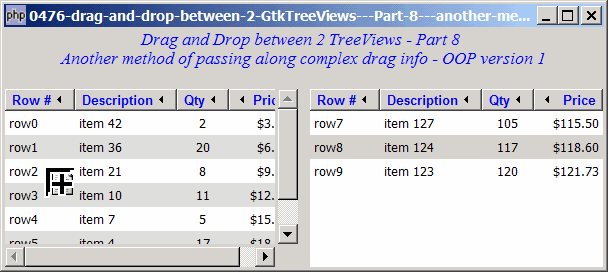
Solution
- We uses exactly the same approach as outlined in How to drag and drop between 2 GtkTreeViews - Part 7 - another method of passing along complex drag info?
- The only difference is that we encapsulate the drag information as one of the protected members of the class
App.
Sample Code
Important Note: This only works for PHP-GTK2 compliled with gtk+ v2.10 and above. If you are using an older version, for linux, you may follow the step-by-step instructions to recompile php-gtk2 with gtk+ v2.10. For windows, please refer to How to install php gtk2 on windows? You may also want to take a look here to see some of the new exciting PHP-GTK2 Functionalities.
| 1 2 3 4 5 6 7 8 9 10 11 12 13 14 15 16 17 18 19 20 21 22 23 24 25 26 27 28 29 30 31 32 33 34 35 36 37 38 39 40 41 42 43 44 45 46 47 48 49 50 51 52 53 54 55 56 57 58 59 60 61 62 63 64 65 66 67 68 69 70 71 72 73 74 75 76 77 78 79 80 81 82 83 84 85 86 87 88 89 90 91 92 93 94 95 96 97 98 99 100 101 102 103 104 105 106 109 110 111 112 113 114 115 116 117 118 119 120 121 122 123 124 125 126 127 128 129 130 131 132 133 134 135 136 137 138 139 140 141 142 143 144 148 149 150 151 152 153 154 155 156 157 158 159 160 161 162 163 164 165 166 175 176 177 178 179 180 181 185 187 189 190 191 193 194 195 196 198 199 200 201 207 208 210 211 213 214 215 216 217 221 222 225 226 229 230 231 232 233 234 236 237 238 239 240 | <?php $app = new App(); $app->main(); class App { protected $drag_data; // note 1 public function __construct() { global $argv; $window = new GtkWindow(); $window->set_title($argv[0]); $window->set_size_request(600, 240); $window->connect_simple('destroy', array('Gtk','main_quit')); $window->add($vbox = new GtkVBox()); $this->window = $window; // display title $title = new GtkLabel(" ". "Drag and Drop between 2 TreeViews - Part 8\n". "Another method of passing along complex drag info - OOP version 1"); $title->modify_font(new PangoFontDescription("Times New Roman Italic 10")); $title->modify_fg(Gtk::STATE_NORMAL, GdkColor::parse("#0000ff")); $title->set_size_request(-1, 40); $vbox->pack_start($title, 0, 0); $vbox->pack_start(new GtkLabel(''), 0, 0); $vbox->pack_start($hbox = new GtkHBox()); // Set up treeview 1 $data1 = array( array('row0', 'item 42', 2, 3.1), array('row1', 'item 36', 20, 6.21), array('row2', 'item 21', 8, 9.36), array('row3', 'item 10', 11, 12.4), array('row4', 'item 7', 5, 15.5), array('row5', 'item 4', 17, 18.6), array('row6', 'item 3', 20, 21.73)); $view1 = $this->display_table ($hbox, $data1); // setup drag for left side $view1->drag_source_set(Gdk::BUTTON1_MASK, array( array( 'text/plain', 0, 0)), Gdk::ACTION_COPY|Gdk::ACTION_MOVE); $view1->connect('drag-data-get', array($this, 'on_drag')); // setup drop for left side $view1->drag_dest_set(Gtk::DEST_DEFAULT_ALL, array( array( 'text/plain', 0, 0)), Gdk::ACTION_COPY|Gdk::ACTION_MOVE); $hbox->pack_start(new GtkLabel(' '), 0, 0); // Set up treeview 2 $data2 = array( array('row7', 'item 127', 105, 115.5), array('row8', 'item 124', 117, 118.6), array('row9', 'item 123', 120, 121.73)); $view2 = $this->display_table ($hbox, $data2); // setup drop for right side $view2->drag_dest_set(Gtk::DEST_DEFAULT_ALL, array( array( 'text/plain', 0, 0)), Gdk::ACTION_COPY|Gdk::ACTION_MOVE); $view2->connect('drag-data-received', array($this, 'on_drop'), $view1); // setup drag for right side $view2->drag_source_set(Gdk::BUTTON1_MASK, array( array( 'text/plain', 0, 0)), Gdk::ACTION_COPY|Gdk::ACTION_MOVE); $view2->connect('drag-data-get', array($this, 'on_drag')); // this is delayed till here because we need the ID of $view2 $view1->connect('drag-data-received', array($this, 'on_drop'), $view2); } public function main() { $this->window->show_all(); Gtk::main(); } // display a 2D table in treeview function display_table($container, $data) { // Set up a scroll window $scrolled_win = new GtkScrolledWindow(); $scrolled_win->set_policy( Gtk::POLICY_AUTOMATIC, Gtk::POLICY_AUTOMATIC); $container->pack_start($scrolled_win); // Creates the list store if (defined("GObject::TYPE_STRING")) { $model = new GtkListStore(GObject::TYPE_STRING, GObject::TYPE_STRING, GObject::TYPE_LONG, GObject::TYPE_DOUBLE); } else { $model = new GtkListStore(Gtk::TYPE_STRING, Gtk::TYPE_STRING, Gtk::TYPE_LONG, Gtk::TYPE_DOUBLE); } $field_header = array('Row #', 'Description', 'Qty', 'Price'); $field_justification = array(0.0, 0.0, 0.5, 1.0); // Creates the view to display the list store $view = new GtkTreeView($model); $scrolled_win->add($view); // Creates the columns for ($col=0; $col<count($field_header); ++$col) { $cell_renderer = new GtkCellRendererText(); $cell_renderer->set_property("xalign", $field_justification[$col]); $column = new GtkTreeViewColumn($field_header[$col], $cell_renderer, 'text', $col); $column->set_alignment($field_justification[$col]); $column->set_sort_column_id($col); // set the header font and color $label = new GtkLabel($field_header[$col]); $label->modify_font(new PangoFontDescription("Arial Bold")); $label->modify_fg(Gtk::STATE_NORMAL, GdkColor::parse("#0000FF")); $column->set_widget($label); $label->show(); // setup self-defined function to display alternate row color $column->set_cell_data_func($cell_renderer, array($this, 'format_col'), $col); $view->append_column($column); } // pupulates the data for ($row=0; $row<count($data); ++$row) { $values = array(); for ($col=0; $col<count($data[$row]); ++$col) { $values[] = $data[$row][$col]; } $model->append($values); } // setup selection $selection = $view->get_selection(); $selection->connect('changed', array($this, 'on_selection')); return $view; } // format treeview columns function format_col($column, $cell, $model, $iter, $col_num) { $path = $model->get_path($iter); // get the current path $row_num = $path[0]; // get the row number if ($col_num==3) { $amt = $model->get_value($iter, 3); $cell->set_property('text', '$'.number_format($amt,2)); } $row_color = ($row_num%2==1) ? '#dddddd' : '#ffffff'; // sets the row color for odd and even rows $cell->set_property('cell-background', $row_color); // sets the background color } // the function that is called when user selects a row function on_selection($selection) { list($model, $iter) = $selection->get_selected(); if ($iter==null) return; $desc = $model->get_value($iter, 1); $qty = $model->get_value($iter, 2); $price = $model->get_value($iter, 3); print "You have selected $desc: $qty ($price)\n"; } function on_drag($widget, $context, $data, $info, $time) { $selection = $widget->get_selection(); list($model, $iter) = $selection->get_selected(); if ($iter==null) return; $id = $model->get_value($iter, 0); $desc = $model->get_value($iter, 1); $qty = $model->get_value($iter, 2); $price = $model->get_value($iter, 3); $this->drag_data = array($id, $desc, $qty, $price); // note 2 $data->set_text('drag_data'); // note 3 } function on_drop($widget, $context, $x, $y, $data, $info, $time, $src_view) { // remove from src first $src_selection = $src_view->get_selection(); list($src_model, $src_iter) = $src_selection->get_selected(); if ($src_iter==null) { return; } $src_model->remove($src_iter); $drag_var = $data->data; // note 4 echo "drag_var = $drag_var\n"; $data2 = $this->$drag_var; // note 5 print_r($data2); $model = $widget->get_model(); $drop_info = $widget->get_dest_row_at_pos($x, $y); if ($drop_info) { list($path, $position) = $drop_info; if ($position == Gtk::TREE_VIEW_DROP_BEFORE || $position == Gtk::TREE_VIEW_DROP_INTO_OR_BEFORE) { $model->insert($path[0], $data2) ; } else { $model->insert($path[0]+1, $data2) ; } } else { $model->append($data2); } } } ?> |
Output
As shown above.
Explanation
We make use of the code from How to drag and drop between 2 GtkTreeViews - Part 7 - another method of passing along complex drag info?
What's new here:
- Set up a protected member to store the drag info.
- Store the drag info.
- Store the name of the member in the drag information
$data. - Retrieve the name of the member.
- Retrieve the data.
Related Links
- How to drag and drop between 2 GtkTreeViews - Part 1 - left to right?
- How to drag and drop between 2 GtkTreeViews - Part 2 - in both directions?
- How to drag and drop between 2 GtkTreeViews - Part 3 - left to right with insert?
- How to drag and drop between 2 GtkTreeViews - Part 4 - in both directions with insert?
- How to drag and drop between 2 GtkTreeViews - Part 5 - left to right with hints of insert location?
- How to drag and drop between 2 GtkTreeViews - Part 6 - in both directions with hints of insert location?
- How to drag and drop between 2 GtkTreeViews - Part 7 - another method of passing along complex drag info?
- How to drag and drop between 2 GtkTreeViews - Part 9 - another method of passing along complex drag info - OOP ver 2?
Read more...