Problem
If you have tried How to use drag and drop to shift rows in a GtkTreeView - Part 2 - using set_reorderable?, you will notice that the advantage of using PHP-GTK's built-in set_reorderable(true) is that PHP-GTK2 will give you a visual clue as to which row the dragged row will be inserted into.
However, set_reorderable(true) does not work across two treeviews. As such, when you set up drag and drop between two treeviews, you need to manually set up the drag and drop.
Dysmas de Lassus from France asked me whether it's possible to display similar "visual clue" of where the dragged row will be inserted when you set up the drag and drop manuallly across two treeviews as shown below:
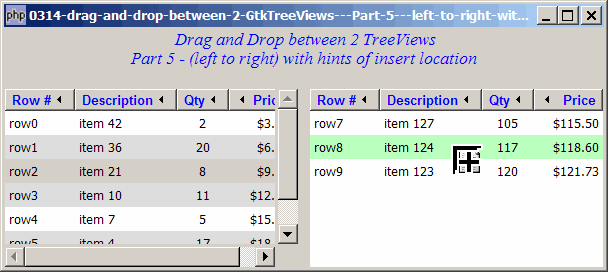
Solution
As first I thought it's not possible too. However, after some trials and errors, I was surprised to see it working!
- First turn on GtkWidget::drag_dest_set_track_motion(true) (available in gtk+ v2.10 and above).
- We make use of the signal drag-motion (GtkWidget) to allow us to track the mouse position during dragging.
- Then we use the method GtkTreeView::get_dest_row_at_pos(x, y) to transform the mouse position to the row path. (Please refer to How to drag and drop between 2 GtkTreeViews - Part 3 - left to right with insert? for more explanations on this method.)
- Finally we highlight the row of the insert location through the custom cell-display function (set through GtkCelllayout::set_cell_data_func())
Important Note: This only works for PHP-GTK2 compliled with gtk+ v2.10 and above. If you are using an older version, for linux, you may follow the step-by-step instructions to recompile php-gtk2 with gtk+ v2.10. For windows, please refer to How to install php gtk2 on windows? You may also want to take a look here to see some of the new exciting PHP-GTK2 Functionalities.
Sample Code
Important Note: This only works for PHP-GTK2 compliled with gtk+ v2.10 and above. If you are using an older version, for linux, you may follow the step-by-step instructions to recompile php-gtk2 with gtk+ v2.10. For windows, please refer to How to install php gtk2 on windows? You may also want to take a look here to see some of the new exciting PHP-GTK2 Functionalities.
| 1 2 3 4 5 6 7 8 9 10 11 12 13 14 15 16 17 18 22 23 24 25 26 27 28 29 30 31 32 33 34 35 36 40 41 42 43 44 46 47 48 49 50 51 52 53 54 55 56 57 58 59 60 61 62 63 64 65 66 67 68 69 70 71 72 73 74 75 76 77 78 79 80 81 82 83 84 85 86 87 88 89 90 91 92 93 94 95 96 97 98 99 100 101 102 103 104 105 106 107 108 109 110 111 112 113 114 115 116 117 118 119 120 121 122 123 124 125 126 127 128 130 132 134 136 137 144 145 146 147 148 149 150 151 152 153 154 155 156 165 166 167 168 169 170 171 172 174 175 176 177 179 181 182 183 184 185 186 187 189 191 192 193 194 195 199 200 203 204 207 208 209 210 211 213 214 215 216 217 225 227 229 230 231 232 233 237 238 242 243 244 248 249 250 251 255 256 257 258 259 | <?php $window = new GtkWindow(); $window->set_title($argv[0]); $window->set_size_request(600, 240); $window->connect_simple('destroy', array('Gtk','main_quit')); $window->add($vbox = new GtkVBox()); // display title $title = new GtkLabel(" Drag and Drop between 2 TreeViews\n". "Part 5 - (left to right) with hints of insert location"); $title->modify_font(new PangoFontDescription("Times New Roman Italic 10")); $title->modify_fg(Gtk::STATE_NORMAL, GdkColor::parse("#0000ff")); $title->set_size_request(-1, 40); $vbox->pack_start($title, 0, 0); $vbox->pack_start(new GtkLabel(''), 0, 0); $vbox->pack_start($hbox = new GtkHBox()); // Set up treeview1 $data1 = array( array('row0', 'item 42', 2, 3.1), array('row1', 'item 36', 20, 6.21), array('row2', 'item 21', 8, 9.36), array('row3', 'item 10', 11, 12.4), array('row4', 'item 7', 5, 15.5), array('row5', 'item 4', 17, 18.6), array('row6', 'item 3', 20, 21.73)); $view1 = display_table ($hbox, $data1, 1); $view1->drag_source_set(Gdk::BUTTON1_MASK, array( array( 'text/plain', 0, 0)), Gdk::ACTION_COPY|Gdk::ACTION_MOVE); $view1->connect('drag-data-get', 'on_drag'); $hbox->pack_start(new GtkLabel(' '), 0, 0); // Set up treeview2 $data2 = array( array('row7', 'item 127', 105, 115.5), array('row8', 'item 124', 117, 118.6), array('row9', 'item 123', 120, 121.73)); $view2 = display_table ($hbox, $data2, 2); $view2->drag_dest_set(Gtk::DEST_DEFAULT_ALL, array( array( 'text/plain', 0, 0)), Gdk::ACTION_COPY|Gdk::ACTION_MOVE); $view2->connect('drag-data-received', 'on_drop', $view1); $view2->drag_dest_set_track_motion(true); // note 1 $view2->connect('drag-motion', 'on_drag_motion', $view1); // note 2 $window->show_all(); Gtk::main(); function display_table($container, $data, $treeview_num) { // Set up a scroll window $scrolled_win = new GtkScrolledWindow(); $scrolled_win->set_policy( Gtk::POLICY_AUTOMATIC, Gtk::POLICY_AUTOMATIC); $container->pack_start($scrolled_win); // Creates the list store if (defined("GObject::TYPE_STRING")) { $model = new GtkListStore(GObject::TYPE_STRING, GObject::TYPE_STRING, GObject::TYPE_LONG, GObject::TYPE_DOUBLE); } else { $model = new GtkListStore(Gtk::TYPE_STRING, Gtk::TYPE_STRING, Gtk::TYPE_LONG, Gtk::TYPE_DOUBLE); } $field_header = array('Row #', 'Description', 'Qty', 'Price'); $field_justification = array(0.0, 0.0, 0.5, 1.0); // Creates the view to display the list store $view = new GtkTreeView($model); $scrolled_win->add($view); // Creates the columns for ($col=0; $col<count($field_header); ++$col) { $cell_renderer = new GtkCellRendererText(); $cell_renderer->set_property("xalign", $field_justification[$col]); $column = new GtkTreeViewColumn($field_header[$col], $cell_renderer, 'text', $col); $column->set_alignment($field_justification[$col]); $column->set_sort_column_id($col); // set the header font and color $label = new GtkLabel($field_header[$col]); $label->modify_font(new PangoFontDescription("Arial Bold")); $label->modify_fg(Gtk::STATE_NORMAL, GdkColor::parse("#0000FF")); $column->set_widget($label); $label->show(); // setup self-defined function to display alternate row color $column->set_cell_data_func($cell_renderer, "format_col", $col, $treeview_num); $view->append_column($column); } // pupulates the data for ($row=0; $row<count($data); ++$row) { $values = array(); for ($col=0; $col<count($data[$row]); ++$col) { $values[] = $data[$row][$col]; } $model->append($values); } // setup selection $selection = $view->get_selection(); $selection->connect('changed', 'on_selection'); global $drag_onto_path; $drag_onto_path = -1; return $view; } // display alternate row color function format_col($column, $cell, $model, $iter, $col_num, $treeview_num) { $path = $model->get_path($iter); // get the current path $row_num = $path[0]; // get the row number if ($col_num==3) { $amt = $model->get_value($iter, 3); $cell->set_property('text', '$'.number_format($amt,2)); } $row_color = ($row_num%2==1) ? '#dddddd' : '#ffffff'; global $drag_onto_path; if ($treeview_num==2 && $drag_onto_path>=0) { if ($row_num == $drag_onto_path) $row_color = '#BAFFBF'; // note 5 } $cell->set_property('cell-background', $row_color); // note 6 } // process user selection function on_selection($selection) { list($model, $iter) = $selection->get_selected(); if ($iter==null) return; $desc = $model->get_value($iter, 1); $qty = $model->get_value($iter, 2); $price = $model->get_value($iter, 3); echo "You have selected $desc: $qty ($price)\n"; } function on_drag($widget, $context, $data, $info, $time) { $selection = $widget->get_selection(); list($model, $iter) = $selection->get_selected(); if ($iter==null) return; $id = $model->get_value($iter, 0); $desc = $model->get_value($iter, 1); $qty = $model->get_value($iter, 2); $price = $model->get_value($iter, 3); $data->set_text(serialize(array($id, $desc, $qty, $price))); } function on_drop($widget, $context, $x, $y, $data, $info, $time, $src_view) { // remove the item from src first $src_selection = $src_view->get_selection(); list($src_model, $src_iter) = $src_selection->get_selected(); if ($src_iter==null) return; $src_model->remove($src_iter); // append the dragged item to the destination view $data2 = unserialize($data->data); $model = $widget->get_model(); $drop_info = $widget->get_dest_row_at_pos($x, $y); if ($drop_info) { list($path, $position) = $drop_info; if ($position == Gtk::TREE_VIEW_DROP_BEFORE || $position == Gtk::TREE_VIEW_DROP_INTO_OR_BEFORE) { $model->insert($path[0], $data2) ; } else { $model->insert($path[0]+1, $data2) ; } } else { $model->append($data2); } global $drag_onto_path; $drag_onto_path = -1; } function on_drag_motion($widget, $context, $x, $y, $timestamp, $data) { $drop_info = $widget->get_dest_row_at_pos($x, $y); // note 3 global $drag_onto_path; global $view2; if ($drop_info) { list($path, $position) = $drop_info; if ($position == Gtk::TREE_VIEW_DROP_BEFORE || $position == Gtk::TREE_VIEW_DROP_INTO_OR_BEFORE) { $drag_onto_path = $path[0]; // note 4 $view2->set_drag_dest_row($path, Gtk::TREE_VIEW_DROP_BEFORE); } else { $drag_onto_path = $path[0]+1; // note 4 $view2->set_drag_dest_row($path, Gtk::TREE_VIEW_DROP_AFTER); } } else { $drag_onto_path = -1; } } ?> |
Output
As shown above.
Explanation
We make use of the code from How to drag and drop between 2 GtkTreeViews - Part 3 - left to right with insert?
What's new here:
- Turn on set track motion.
- Register the signal 'drag-motion' on treeview2.
- Transform the mouse position to treeview path.
- Keep track of the treeview path.
- Highlight the insert location as light green.
- Set the background color.
Related Links
- How to drag and drop between 2 GtkTreeViews - Part 1 - left to right?
- How to drag and drop between 2 GtkTreeViews - Part 2 - in both directions?
- How to drag and drop between 2 GtkTreeViews - Part 3 - left to right with insert?
- How to drag and drop between 2 GtkTreeViews - Part 4 - in both directions with insert?
- How to drag and drop between 2 GtkTreeViews - Part 6 - in both directions with hints of insert location?
- How to drag and drop between 2 GtkTreeViews - Part 7 - another method of passing along complex drag info?
Read more...