Problem
We've seen how to display a progress bar in a treeview in How to display progress bar in GtkTreeView using GtkCellRendererProgress?
Note that the progress bar in that example is a static one.
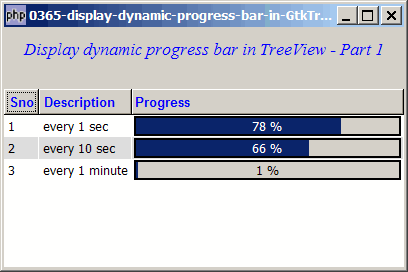
Suppose you would like to have a dynamic progress bar in a treeview as shown below. In this example, the progress bar will get updated once every second.
Solution
- Please refer to the article How to display progress bar in GtkTreeView using GtkCellRendererProgress? that shows you the basics of setting up a progress bar in a GtkTreeView.
- To have a dynamic progress bar, all you need is to set the property 'value' of the progress bar with GObject::set_property().
Sample Code
| 1 2 3 4 5 6 7 8 9 10 11 12 13 14 15 16 17 18 19 20 21 22 23 24 25 26 27 28 29 30 31 32 33 34 35 36 37 38 39 40 41 42 43 44 45 46 47 48 49 50 51 52 53 54 55 56 57 58 61 62 63 64 65 66 67 68 69 70 71 72 73 74 75 76 77 78 79 80 81 82 83 84 85 86 87 88 89 90 91 94 95 96 98 99 100 101 102 103 104 107 115 116 117 118 119 120 121 123 124 125 127 128 129 131 133 134 135 136 137 139 141 142 143 144 146 147 148 149 158 | <?php $window = new GtkWindow(); $window->set_size_request(400, 240); $window->connect_simple('destroy', array('Gtk','main_quit')); $window->add($vbox = new GtkVBox()); // display title $title = new GtkLabel("Display dynamic progress bar in TreeView - Part 1"); $title->modify_font(new PangoFontDescription("Times New Roman Italic 10")); $title->modify_fg(Gtk::STATE_NORMAL, GdkColor::parse("#0000ff")); $title->set_size_request(-1, 40); $vbox->pack_start($title, 0, 0); $vbox->pack_start(new GtkLabel(), 0, 0); // the 2D table $data = array( array('1', 'every 1 sec', 0), array('2', 'every 10 sec', 0), array('3', 'every 1 minute', 0), ); display_table ($vbox, $data); $window->show_all(); Gtk::timeout_add(1000, 'update_progress', $view, $model); // note 1 Gtk::main(); function display_table($vbox, $data) { global $view, $model; // Set up a scroll window $scrolled_win = new GtkScrolledWindow(); $scrolled_win->set_policy( Gtk::POLICY_AUTOMATIC, Gtk::POLICY_AUTOMATIC); $vbox->pack_start($scrolled_win); // Creates the list store if (defined("GObject::TYPE_STRING")) { $model = new GtkListStore(GObject::TYPE_STRING, GObject::TYPE_STRING, GObject::TYPE_DOUBLE); } else { $model = new GtkListStore(Gtk::TYPE_STRING, Gtk::TYPE_STRING, Gtk::TYPE_DOUBLE); } $field_header = array('Sno', 'Description', 'Progress'); $field_justification = array(0.0, 0.0, 0.0); // Creates the view to display the list store $view = new GtkTreeView($model); $scrolled_win->add($view); // Creates the columns for ($col=0; $col<count($field_header); ++$col) { if ($col==2) { $cell_renderer = new GtkCellRendererProgress(); $column = new GtkTreeViewColumn($field_header[$col], $cell_renderer, 'value', $col); } else { $cell_renderer = new GtkCellRendererText(); $cell_renderer->set_property("xalign", $field_justification[$col]); $column = new GtkTreeViewColumn($field_header[$col], $cell_renderer, 'text', $col); $column->set_alignment($field_justification[$col]); $column->set_sort_column_id($col); } // set the header font and color $label = new GtkLabel($field_header[$col]); $label->modify_font(new PangoFontDescription("Arial Bold")); $label->modify_fg(Gtk::STATE_NORMAL, GdkColor::parse("#0000FF")); $column->set_widget($label); $label->show(); // setup self-defined function to display alternate row color $column->set_cell_data_func($cell_renderer, "format_col", $col); $view->append_column($column); } // pupulates the data for ($row=0; $row<count($data); ++$row) { $values = array(); for ($col=0; $col<count($data[$row]); ++$col) { $values[] = $data[$row][$col]; } $model->append($values); } // setup selection global $start_time; $start_time = time(); } function format_col($column, $cell, $model, $iter, $col_num) { $path = $model->get_path($iter); $row_num = $path[0]; if ($col_num==2) { $percent = $model->get_value($iter, 2); // note 5 $cell->set_property('value', $percent); // note 6 } $row_color = ($row_num%2==1) ? '#dddddd' : '#ffffff'; $cell->set_property('cell-background', $row_color); } function update_progress() { global $view, $model; $iter = $model->get_iter(0); global $start_time; $elapsed_seconds = time() - $start_time; // note 2 $val = $elapsed_seconds % 60; $percent = $val / 60 * 100; // note 3 $model->set($iter, 2, $percent); // note 4 $iter = $model->get_iter(array(1)); $v = floor($elapsed_seconds / 10); $val = $v % 6; $percent = $val / 6 * 100; // note 3 $model->set($iter, 2, $percent); // note 4 $iter = $model->get_iter(array(2)); $val = floor($elapsed_seconds / 60); $percent = $val % 60; // note 3 $model->set($iter, 2, $percent); // note 4 return true; } ?> |
Output
As shown above.
Explanation
This example makes use of the code in How to display progress bar in GtkTreeView using GtkCellRendererProgress?
What's new here:
- Update the progress bar once every second.
- Calculate the elapsed time.
- Calculate the percentage for the corresponding row.
- Store the value of the percentage in the model.
- Retrieve the value of the percentage.
- Update the progress bar.
Note
Note that by default, the progress bar are displayed as percentages. In the next article, I'll show you how to display the progress bar as actual elapsed time in seconds (for row 0 and 1) and minutes (for row 2).
Read more...