Problem
We have displayed a 2D array in a table in Part 1
$data = array(
array('', 'header1', 'header2', 'header3'),
array('row0', 1, 2, 3),
array('row1', 4, 5, 6));
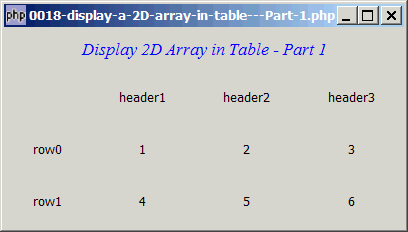
and also added borders to the table in Part 2
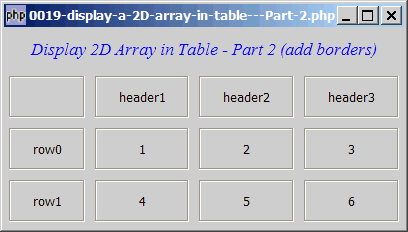
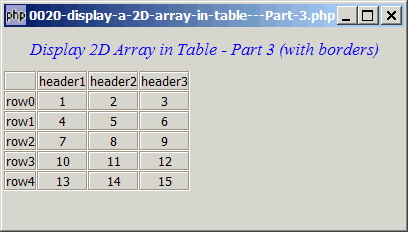
Now we would like to display the table in a more professional manner as shown below: (i.e. the cells more tightly packed together)
Solution
- The borders are drawn exactly the same way as what we have described in Part 2.
- To make the cells more tightly packed together, use the following arguments when calling the GtkTable::attach() method:
$table->attach($frame, $col, $col+1, $row, $row+1,
			Gtk::FILL, Gtk::SHRINK, 0, 0);
Sample Code
| 1 2 3 4 5 6 7 8 9 10 11 12 13 14 15 16 17 18 19 20 21 22 23 24 25 26 27 28 29 31 32 34 35 36 37 38 39 40 41 42 43 44 | <?php $window = new GtkWindow(); $window->set_size_request(400, 200); $window->connect_simple('destroy', array('Gtk','main_quit')); $vbox = new GtkVBox(); $window->add($vbox); // display title $title = new GtkLabel('Display 2D Array in Table - Part 3 (with borders)'); $title->modify_font(new PangoFontDescription("Times New Roman Italic 10")); $title->modify_fg(Gtk::STATE_NORMAL, GdkColor::parse("#0000ff")); $title->set_size_request(-1, 40); $vbox->pack_start($title, 0, 0); $table = new GtkTable(); $vbox->pack_start($table, 0, 0); // note 1 $data = array( array('', 'header1', 'header2', 'header3'), array('row0', 1, 2, 3), array('row1', 4, 5, 6), array('row2', 7, 8, 9), array('row3', 10, 11, 12), array('row4', 13, 14, 15)); display_table ($table, $data); function display_table($table, $a) { for ($row=0; $row<count($a); ++$row) { for ($col=0; $col<count($a[$row]); ++$col) { $frame = new GtkFrame(); $frame->add(new GtkLabel($a[$row][$col])); $table->attach($frame, $col, $col+1, $row, $row+1, Gtk::FILL, Gtk::SHRINK, 0, 0); // note 2 } } } $window->show_all(); Gtk::main(); ?> |
Output
As shown above.Explanation
Please refer to:
- Part 1 which explains how to display a 2D array in a table.
- Part 2 which explains how to add borders to table.
What's new here in Part 3:
$vbox->pack_start($table, 0, 0)make sure that the table doesn't get "auto-expanded" by PHP-GTK.- Note the use of the two arguments
Gtk::FILL, Gtk::SHRINKwhen calling the GtkTable::attach() method.
Combining the two above, we now have a tightly-packed table with borders!
Read more...