Problem
You have set up a pulldown menu using GtkComboBox as outlined in How to setup and process GtkComboBox? By default the options are displayed as a linear list.
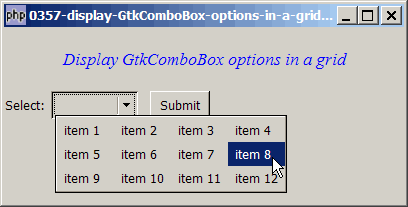
Suppose instead of a linear list, you would like the options of the combobox to be displayed in a grid as shown below:
Solution
- The options can be displayed in a grid by using GtkComboBox::set_wrap_width(n), where
nis the number of columns for the grid.
Sample Code
| 1 2 3 4 5 6 7 8 9 10 11 12 13 14 15 16 17 18 19 20 21 22 23 24 25 26 27 28 29 30 31 32 33 34 35 36 37 38 39 40 41 42 43 44 45 46 47 48 49 52 53 54 55 56 57 58 59 60 61 62 63 64 65 | <?php $window = new GtkWindow(); $window->connect_simple('destroy', array( 'Gtk', 'main_quit')); $window->set_size_request(400, 175); $window->add($vbox = new GtkVBox()); // display title $title = new GtkLabel("Display GtkComboBox options in a grid"); $title->modify_font(new PangoFontDescription("Times New Roman Italic 10")); $title->modify_fg(Gtk::STATE_NORMAL, GdkColor::parse("#0000ff")); $title->set_size_request(-1, 60); $vbox->pack_start($title, 0, 0); // the selection $list = array('item 1', 'item 2', 'item 3', 'item 4', 'item 5', 'item 6', 'item 7', 'item 8', 'item 9', 'item 10', 'item 11', 'item 12'); $vbox->pack_start($hbox=new GtkHBox(), 0, 0); $hbox->pack_start(new GtkLabel('Select: '), 0, 0); // Create a combobox $combobox = new GtkComboBox(); // Create a model if (defined("GObject::TYPE_STRING")) { $model = new GtkListStore(GObject::TYPE_STRING); } else { $model = new GtkListStore(Gtk::TYPE_STRING); } // Set up the combobox $combobox->set_model($model); $cellRenderer = new GtkCellRendererText(); $combobox->pack_start($cellRenderer); $combobox->set_attributes($cellRenderer, 'text', 0); $combobox->set_wrap_width(4); // note 1 // Stuff the choices in the model foreach($list as $choice) { $model->append(array($choice)); } // Set up a hbox to contain the combobox as well as the Submit button $hbox->pack_start($combobox, 0, 0); $hbox->pack_start(new GtkLabel(' '), 0, 0); $hbox->pack_start($button = new GtkButton('Submit'), 0, 0); $button->set_size_request(60, 24); // Set up the event handler to respond to button click $button->connect('clicked', "on_button", $combobox); // The callback function that is called when user clicks the submit button function on_button($button, $combobox) { $model = $combobox->get_model(); $selection = $model->get_value($combobox->get_active_iter(), 0); echo "You have selected: $selection!\n"; } $window->show_all(); Gtk::main(); ?> |
Output
As shown above.Explanation
We make use of the code from How to setup and process GtkComboBox? to set up the combobox.
What's new here:
- In this example, we set the number of columns to be 4.
Read more...