Problem
This example serves to show that we can dynamically change the contents of a GtkWindow by selectively removing the unwanted widgets and replacing with new widgets.
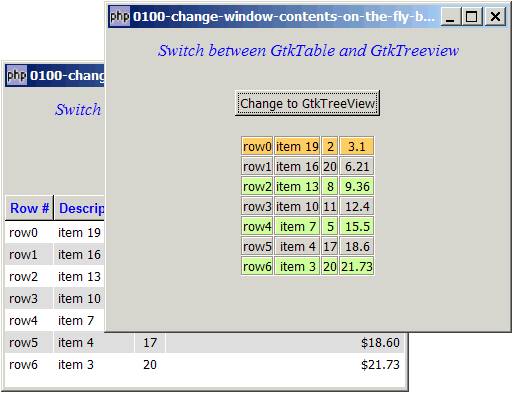
The sample code below will first display a 2D array using GtkTable. At the click of a button, the same data will be displayed in a GtkTreeView. Click the button again, it will change back to using GtkTable.
Solution
- Use GtkContainer::get_children() to get the list of widgets contained in a container e.g. GtkVBox or GtkHBox.
- Use GtkContainer::remove() to remove a widget from a container.
Sample Code
| 1 2 3 4 5 6 7 8 9 10 11 12 13 14 15 16 17 18 19 20 21 22 23 24 25 26 27 28 29 30 31 32 33 34 35 36 37 38 39 40 41 42 43 44 46 47 49 50 51 52 53 54 55 56 57 58 59 60 61 62 63 64 65 66 67 68 69 70 71 72 73 74 75 76 77 78 79 80 81 82 83 84 85 86 87 88 89 90 91 92 93 94 95 96 97 98 99 100 101 102 103 104 105 106 107 108 109 110 111 112 113 114 115 116 117 118 119 120 121 122 123 124 125 126 127 128 129 130 131 132 133 134 135 136 137 138 139 140 141 143 144 145 146 147 150 151 154 155 156 157 159 160 161 163 164 165 166 167 168 169 170 | <?php $window = new GtkWindow(); $window->set_size_request(400, 300); $window->connect_simple('destroy', array('Gtk','main_quit')); $window->add($vbox = new GtkVBox()); // display title $title = new GtkLabel("Switch between GtkTable and GtkTreeview"); $title->modify_font(new PangoFontDescription("Times New Roman Italic 10")); $title->modify_fg(Gtk::STATE_NORMAL, GdkColor::parse("#0000ff")); $title->set_size_request(-1, 40); $vbox->pack_start($title, 0, 0); $vbox->pack_start(new GtkLabel(), 0, 0); $button = new GtkButton('Change to GtkTreeView'); // note 2 $button->connect('clicked', 'on_button'); // note 2 $hbox = new GtkHBox(); $hbox->pack_start(new GtkLabel('')); $hbox->pack_start($button, 0, 0); $hbox->pack_start(new GtkLabel('')); $vbox->pack_start($hbox, 0, 0); $vbox->pack_start(new GtkLabel(), 0, 0); // the 2D table $data = array( array('row0', 'item 19', 2, 3.1), array('row1', 'item 16', 20, 6.21), array('row2', 'item 13', 8, 9.36), array('row3', 'item 10', 11, 12.4), array('row4', 'item 7', 5, 15.5), array('row5', 'item 4', 17, 18.6), array('row6', 'item 3', 20, 21.73)); display_table_using_gtktable ($vbox, $data); // note 1 $window->show_all(); Gtk::main(); function display_table_using_gtktable($vbox, $a) { $vbox->pack_start($hbox = new GtkHBox()); $hbox->pack_start(new GtkHBox()); $hbox->pack_start($table = new GtkTable(), 0, 0); $hbox->pack_start(new GtkHBox()); for ($row=0; $row<count($a); ++$row) { for ($col=0; $col<count($a[$row]); ++$col) { $frame = new GtkFrame(); // note 1 $eventbox = new GtkEventBox(); // note 2 $frame->add($eventbox); // note 3 $eventbox->add(new GtkLabel($a[$row][$col])); // note 4 if ($row==0) { // note 5 $eventbox->modify_bg(Gtk::STATE_NORMAL, GdkColor::parse("#FFCC66")); } elseif ($row%2==0) { // note 6 $eventbox->modify_bg(Gtk::STATE_NORMAL, GdkColor::parse("#CCFF99")); } $table->attach($frame, $col, $col+1, $row, $row+1, Gtk::FILL, Gtk::SHRINK, 0, 0); } } } function display_table_using_gtktreeview($vbox, $data) { // Set up a scroll window $scrolled_win = new GtkScrolledWindow(); $scrolled_win->set_policy( Gtk::POLICY_AUTOMATIC, Gtk::POLICY_AUTOMATIC); $vbox->pack_start($scrolled_win); // Creates the list store if (defined("GObject::TYPE_STRING")) { $model = new GtkListStore(GObject::TYPE_STRING, GObject::TYPE_STRING, GObject::TYPE_LONG, GObject::TYPE_DOUBLE); } else { $model = new GtkListStore(Gtk::TYPE_STRING, Gtk::TYPE_STRING, Gtk::TYPE_LONG, Gtk::TYPE_DOUBLE); } $field_header = array('Row #', 'Description', 'Qty', 'Price'); $field_justification = array(0.0, 0.0, 0.5, 1.0); // Creates the view to display the list store $view = new GtkTreeView($model); $scrolled_win->add($view); // Creates the columns for ($col=0; $col<count($field_header); ++$col) { $cell_renderer = new GtkCellRendererText(); $cell_renderer->set_property("xalign", $field_justification[$col]); $column = new GtkTreeViewColumn($field_header[$col], $cell_renderer, 'text', $col); $column->set_alignment($field_justification[$col]); $column->set_sort_column_id($col); // set the header font and color $label = new GtkLabel($field_header[$col]); $label->modify_font(new PangoFontDescription("Arial Bold")); $label->modify_fg(Gtk::STATE_NORMAL, GdkColor::parse("#0000FF")); $column->set_widget($label); $label->show(); // setup self-defined function to display alternate row color $column->set_cell_data_func($cell_renderer, "format_col", $col); $view->append_column($column); } // pupulates the data for ($row=0; $row<count($data); ++$row) { $values = array(); for ($col=0; $col<count($data[$row]); ++$col) { $values[] = $data[$row][$col]; } $model->append($values); } // setup selection $selection = $view->get_selection(); $selection->connect('changed', 'on_selection'); } // display alternate row color function format_col($column, $cell, $model, $iter, $col_num) { $path = $model->get_path($iter); $row_num = $path[0]; if ($col_num==3) { $amt = $model->get_value($iter, 3); $cell->set_property('text', '$'.number_format($amt,2)); } $row_color = ($row_num%2==1) ? '#dddddd' : '#ffffff'; $cell->set_property('cell-background', $row_color); } // process user selection function on_selection($selection) { list($model, $iter) = $selection->get_selected(); $desc = $model->get_value($iter, 1); $qty = $model->get_value($iter, 2); $price = $model->get_value($iter, 3); print "You have selected $desc: $qty ($price)\n"; } function on_button($button) { $button_label = $button->child->get_text(); // get button label global $vbox; $vbox_widgets = array(); foreach($vbox->get_children() as $widget) { // note 3 $vbox_widgets[] = $widget; } $last_widget = end($vbox_widgets); // note 4 $vbox->remove($last_widget); // note 4 global $data; if (preg_match("/GtkTreeView/", $button_label)) { display_table_using_gtktreeview ($vbox, $data); // note 5 $button->child->set_text('Change to GtkTable'); } else { display_table_using_gtktable ($vbox, $data); // note 5 $button->child->set_text('Change to GtkTreeView'); } global $window; $window->show_all(); // note 6 } ?> |
Output
As shown above.Explanation
We make use of the code in How to display a 2D array in table - Part 5? to display a 2D array using GtkTable, and the code in How to display a 2D array in GtkTreeView - Part 5 - get user selection? to display a 2D array using GtkTreeView.
What's new here:
- First display the 2D array in GtkTable.
- Set up the button.
- Get all the widgets inside
$vbox. - Both GtkTable and GtkTreeView happen to be the last widget inside $vbox. Let's get its ID and remove it!
- Display the 2D array again using the new format.
- Refresh the window contents.
Read more...