Problem
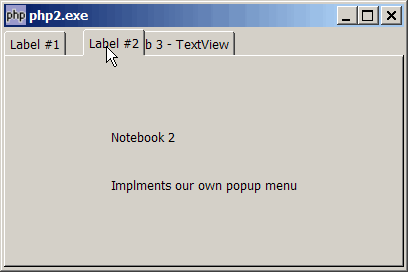
Suppose you have set up a GtkNotebook, and you would like to allow users to be able to reorder the tabs (by clicking and dragging the tab) as shown below:
Solution
- To enable reordering of tabs, use the method GtkNotebook::set_tab_reorderable ($widget, true);
- To know when a reordering takes place, use the signal 'page-reordered' (GtkNotebook)
Important Note: This only works for PHP-GTK2 compliled with gtk+ v2.10 and above. If you are using an older version, for linux, you may follow the step-by-step instructions to recompile php-gtk2 with gtk+ v2.10. For windows, please refer to How to install php gtk2 on windows? You may also want to take a look here to see some of the new exciting PHP-GTK2 Functionalities.
Sample Code
| 1 2 3 4 5 6 7 8 10 11 18 19 20 21 22 23 24 25 26 27 28 30 32 34 35 36 37 38 39 40 41 42 43 44 45 46 47 49 50 51 54 55 57 58 60 61 62 63 64 65 66 67 68 69 70 71 72 73 74 75 76 77 78 79 80 81 82 83 84 85 87 90 91 92 93 94 97 99 100 101 102 103 105 106 107 109 110 111 112 113 114 115 116 117 118 119 120 121 122 123 124 125 126 127 128 129 130 131 133 134 136 137 138 140 142 143 144 145 146 147 148 149 152 153 155 156 158 159 160 162 164 166 167 168 169 170 171 172 173 174 175 176 177 | <?php $window = new GtkWindow(); $window->set_size_request(400, 240); $window->connect_simple('destroy', array('Gtk','main_quit')); $window->add($vbox = new GtkVBox()); // setup notebook $notebook = new GtkNotebook(); $notebook->connect('switch-page', 'on_switch'); $notebook->connect('page-reordered', 'on_page_reordered'); // note 2 $vbox->pack_start($notebook); // add two tabs of GtkLabel add_new_tab($notebook, new GtkLabel('Notebook 1'), 'Label #1'); add_new_tab($notebook, new GtkLabel("Notebook 2\n\n Implments our own popup menu"), 'Label #2'); // add a third tab of GtkTextView $buffer = new GtkTextBuffer(); $view = new GtkTextView(); $view->set_buffer($buffer); $view->set_wrap_mode(Gtk::WRAP_WORD); add_new_tab($notebook, $view, 'Tab 3 - TextView'); $window->show_all(); Gtk::main(); // add new tab function add_new_tab($notebook, $widget, $tab_label) { $eventbox = new GtkEventBox(); $label = new GtkLabel($tab_label); $eventbox->add($label); $label->show(); $eventbox->connect('button-press-event', 'on_tab', $tab_label); $notebook->append_page($widget, $eventbox); $notebook->set_tab_reorderable($widget, true); // note 1 $menu_label = new GtkLabel($tab_label); $menu_label->set_alignment(0,0); $notebook->set_menu_label($widget, $menu_label); global $tab_widget; static $page=0; $tab_widget[$page] = $widget; ++$page; } // function that is called when user click on tab function on_tab($widget, $event, $tab_label) { global $tab_clicked; if ($event->button==1) { echo "tab clicked = $tab_label\n"; $tab_clicked = $tab_label; return false; } if ($event->button==3) { popup_menu(); return true; } return false; } function on_switch($notebook) { $switched_from = $notebook->get_current_page(); if ($switched_from==-1) return; global $tab_widget; $tab_label = $notebook->get_tab_label($tab_widget[$switched_from]); $tab_label_text = $tab_label->child->get_text(); echo "You have switched from: $tab_label_text\n"; } function popup_menu() { global $menu, $notebook; //define the popup menu $num_pages = $notebook->get_n_pages(); $menu_definition = array(); for ($i=0; $i<$num_pages; ++$i) { $widget = $notebook->get_nth_page($i); $tab_label = $notebook->get_tab_label($widget); $tab_label_text = $tab_label->child->get_text(); $menu_definition[] = $tab_label_text; } $menu = show_popup_menu($menu_definition); } // show popup menu function show_popup_menu($menu_definition) { $menu = new GtkMenu(); foreach($menu_definition as $menuitem_definition) { if ($menuitem_definition=='<hr>') { $menu->append(new GtkSeparatorMenuItem()); } else { $menu_item = new GtkMenuItem($menuitem_definition); $menu->append($menu_item); $menu_item->connect('activate', 'on_popup_menu_select'); } } $menu->show_all(); $menu->popup(); } // process popup menu item selection function on_popup_menu_select($menu_item) { global $notebook; $item = $menu_item->child->get_label(); $num_pages = $notebook->get_n_pages(); for ($i=0; $i<$num_pages; ++$i) { $widget = $notebook->get_nth_page($i); $tab_label = $notebook->get_tab_label($widget); $tab_label_text = $tab_label->child->get_text(); if ($tab_label_text==$item) { $notebook->set_current_page($i); echo "New tab selected: $tab_label_text (page $i)\n"; break; } } } function on_page_reordered($notebook, $widget, $newtabnum) { global $tab_widget; global $tab_clicked; $num_pages = $notebook->get_n_pages(); for ($i=0; $i<$num_pages; ++$i) { $widget = $notebook->get_nth_page($i); $tab_label = $notebook->get_tab_label($widget); $tab_label_text = $tab_label->child->get_text(); if ($tab_label_text==$tab_clicked) { swap($tab_widget[$i], $tab_widget[$newtabnum]); // note 3 break; } } } function swap(&$a, &$b) { $tmp = $b; $b = $a; $a = $tmp; } ?> |
Output
As shown above.Explanation
We make use of the code from How to display a popup menu for GtkNotebook tab - Part 3?
What's new here:
- Enable reordering of tabs.
- Inform us when there's a reordering of tabs.
- Update the array
$tab_widgetwhich contains the pointers to the widgets associatred with each tab.
Read more...