Problem
I've written an example on getting the color values from GtkColorButton / GtkColorSelection in the article How to get color values from gtkcolorbutton?
Veronica from Argentina wrote to me with a better method of obtaining the color value from GtkColorButton as shown below:
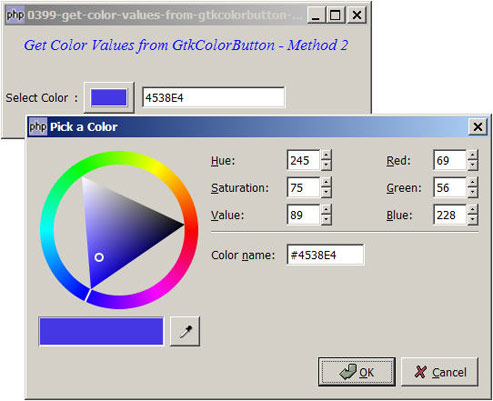
Solution
- Create a standard GtkColorButton.
- Use the signal color-set to know when the user has selected a color.
- Get the selected color with GtkColorButton::get_color().
- Note that the value returned is a GdkColor.
- With a good understanding of XColor, Veronica shared with us the "magic formula" to convert the GdkColor to the familiar RGB color (in decimal) or hexadecimal.
Sample Code
| 1 2 3 4 5 6 7 8 9 10 11 12 13 14 15 16 17 19 20 21 22 24 26 27 28 29 31 32 33 34 35 36 37 38 39 40 41 42 43 47 48 49 51 52 53 54 55 57 58 59 63 64 65 | <?php $window = new GtkWindow(); $window->set_title($argv[0]); $window->set_size_request(400, 120); $window->connect_simple('destroy', array('Gtk','main_quit')); $window->add($vbox = new GtkVBox()); // display title $title = new GtkLabel("Get Color Values from GtkColorButton - Method 2"); $title->modify_font(new PangoFontDescription("Times New Roman Italic 10")); $title->modify_fg(Gtk::STATE_NORMAL, GdkColor::parse("#0000ff")); $title->set_size_request(-1, 40); $vbox->pack_start($title, 0); $vbox->pack_start(new GtkLabel(), 0); $hbox = new GtkHBox(); $vbox->pack_start($hbox, 0, 0); $hbox->pack_start(new GtkLabel('Select Color'), 0); $hbox->pack_start(new GtkLabel(' : '), 0); $color_button = new GtkColorButton(); // note 1 $hbox->pack_start($color_button, 0); $hbox->pack_start(new GtkLabel(' '), 0); $selected_color = new GtkEntry(); $hbox->pack_start($selected_color, 0); $color_button->connect('color-set', 'on_color_set'); // note 1 $window->show_all(); Gtk::main(); function on_color_set($color_button) { print "on_color_set!\n"; $color = $color_button->get_color(); // note 3 print_r($color); $gdk_red = $color->red; // note 4 $gdk_green = $color->green; // note 4 $gdk_blue = $color->blue; // note 4 $red = round($gdk_red * 255 / 65535); // note 5 $green= round($gdk_green * 255 / 65535); // note 5 $blue = round($gdk_blue * 255 / 65535); // note 5 $red_hex = dechex($red); // note 6 $green_hdex= dechex($green); // note 6 $blue_hdex = dechex($blue); // note 6 $color_hex = strtoupper($red_hex.$green_hdex.$blue_hdex); // note 6 global $selected_color; $selected_color->set_text($color_hex); // note 7 } ?> |
Output
As shown above.
Explanation
- Create the GtkColorSelection.
- Register the signal
color-set - Retrieve the selected color. Note that this is in GdkColor.
- Retrieve the respective red, green and blue of the GdkColor. Note that these values range from 0-65535.
- Use Veronica's "magic formula" to convert the GdkColor to the standard RGB color we're familiar with (in decimal).
- Convert the RGB color to hexadecimal.
- Display the hexadecimal color value in the GtkEntry.
Read more...