Problem
You have set up a pulldown menu using GtkComboBox as outlined in How to setup and process GtkComboBox?
Suppose you would like the first item of the combobox to be selected when the application is first started as shown below:
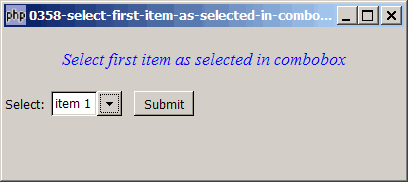
Solution
- To select the first item of the combobox, use GtkComboBox::set_active()
Sample Code
| 1 2 3 4 5 6 7 8 9 10 11 12 13 14 15 16 17 18 19 20 21 22 23 24 25 26 27 28 29 30 31 32 33 34 35 36 37 38 39 40 41 42 43 44 45 46 49 50 51 52 53 54 55 56 57 58 59 60 61 62 63 | <?php $window = new GtkWindow(); $window->connect_simple('destroy', array( 'Gtk', 'main_quit')); $window->set_size_request(400,150); $window->add($vbox = new GtkVBox()); // display title $title = new GtkLabel("Select first item as selected in combobox"); $title->modify_font(new PangoFontDescription("Times New Roman Italic 10")); $title->modify_fg(Gtk::STATE_NORMAL, GdkColor::parse("#0000ff")); $title->set_size_request(-1, 60); $vbox->pack_start($title, 0, 0); // the selection $list = array('item 1', 'item 2', 'item 3', 'item 4'); $vbox->pack_start($hbox=new GtkHBox(), 0, 0); $hbox->pack_start(new GtkLabel('Select: '), 0, 0); // Create a combobox $combobox = new GtkComboBox(); // Create a model if (defined("GObject::TYPE_STRING")) { $model = new GtkListStore(GObject::TYPE_STRING); } else { $model = new GtkListStore(Gtk::TYPE_STRING); } // Set up the combobox $combobox->set_model($model); $cellRenderer = new GtkCellRendererText(); $combobox->pack_start($cellRenderer); $combobox->set_attributes($cellRenderer, 'text', 0); // Stuff the choices in the model foreach($list as $choice) { $model->append(array($choice)); } // Set up a hbox to contain the combobox as well as the Submit button $hbox->pack_start($combobox, 0, 0); $hbox->pack_start(new GtkLabel(' '), 0, 0); $hbox->pack_start($button = new GtkButton('Submit'), 0, 0); $button->set_size_request(60, 24); // Set up the event handler to respond to button click $button->connect('clicked', "on_button", $combobox); // The callback function that is called when user clicks the submit button function on_button($button, $combobox) { $model = $combobox->get_model(); $selection = $model->get_value($combobox->get_active_iter(), 0); echo "You have selected: $selection!\n"; } $combobox->set_active(0); // note 1 $window->show_all(); Gtk::main(); ?> |
Output
As shown above.Explanation
- Select the first item.
Read more...