Problem
You would like to change the font or font size of a GtkTextView as shown below:
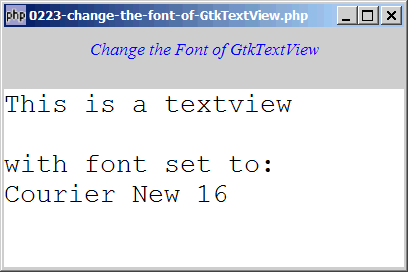
Solution
Just use GtkWidget::modify_font() on the GtkTreeView.
Sample Code
| 1 2 3 4 5 6 7 8 9 10 11 12 13 14 15 16 17 18 19 20 25 26 27 28 29 30 31 32 33 34 | <?php $window = new GtkWindow(); $window->set_size_request(400, 240); $window->connect_simple('destroy', array('Gtk','main_quit')); $window->add($vbox = new GtkVBox()); // display title $title = new GtkLabel("Change the Font of GtkTextView"); $title->modify_font(new PangoFontDescription("Times New Roman Italic 10")); $title->modify_fg(Gtk::STATE_NORMAL, GdkColor::parse("#0000ff")); $title->set_size_request(-1, 40); $vbox->pack_start($title, 0, 0); $vbox->pack_start(new GtkLabel(), 0, 0); // Create a new buffer and a new view to show the buffer. $buffer = new GtkTextBuffer(); $view = new GtkTextView(); $view->set_buffer($buffer); $view->modify_font(new PangoFontDescription("Courier New 16")); // note 1 $view->set_wrap_mode(Gtk::WRAP_WORD); $scrolled_win = new GtkScrolledWindow(); $scrolled_win->set_policy( Gtk::POLICY_AUTOMATIC, Gtk::POLICY_AUTOMATIC); $vbox->pack_start($scrolled_win); $scrolled_win->add($view); $window->show_all(); Gtk::main(); ?> |
Output
As shown above.
Explanation
- Set the font on the textview.
Read more...